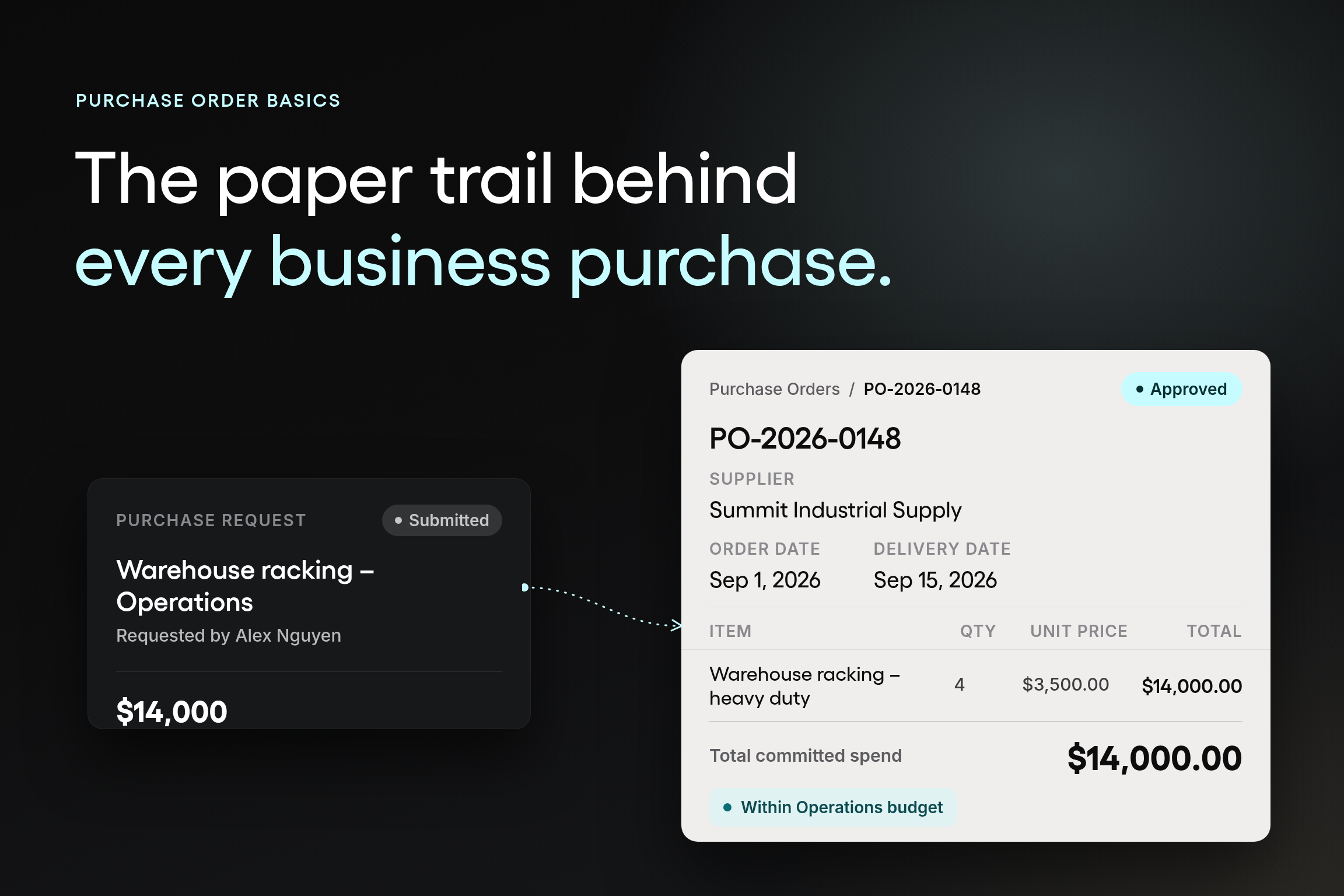



A department head approves a $14,000 equipment purchase in a Slack message. The vendor ships the order two weeks later, working from a phone call and a follow-up email. When the invoice arrives, accounts payable has no record of what was approved, at what price, or on what terms, just an amount to reconcile against a budget that may or may not have room for it.
That gap between a spoken or written "yes" and a documented commitment is where purchase order problems start. Without a formal purchase order, a business is relying on memory, email threads, and goodwill to confirm what was actually ordered. That works until a price changes, a delivery falls short, or two people approve the same purchase without knowing it.
A purchase order closes that gap. It's the document that turns an approved purchase into a specific, agreed, and traceable commitment between a buyer and a supplier, before any money changes hands.
This guide covers what a purchase order includes, how the process works from request to payment, the different types of purchase orders your organization is likely to use, and where manual purchase order creation starts to break down as purchasing volume grows. Whether you're writing your first purchasing policy or explaining to a new hire why the process exists, the goal is the same: fewer surprises between what's approved and what's actually paid for.
What is a purchase order?
A purchase order is a formal document a buyer sends to a seller to request specific goods or services at an agreed price, quantity, and delivery date. Once the seller accepts it, the purchase order becomes a legally binding agreement that both sides can rely on to confirm exactly what was ordered.
In practice, "PO" is shorthand procurement teams use daily, and most people in finance and operations understand the abbreviation without an explanation. A purchase order isn't just paperwork. It's the record that both a buyer and a seller point to when a delivery arrives short, a price on an invoice looks wrong, or a department needs to confirm what was actually authorized.
What is the purpose of a purchase order?
A purchase order exists to eliminate ambiguity before a purchase occurs. It gives both sides a single record of what's being bought, how much it costs, and when it should arrive, so neither party relies on a verbal agreement or a partial email thread.
For the organization issuing it, a purchase order does several things at once:
- Authorizes the purchase: so the supplier knows the order has real approval behind it, not just a request from one employee.
- Documents the essential details: item descriptions, quantities, unit prices, applicable taxes, and the specific delivery date.
- Supports financial control: by giving finance a record of committed spend before the invoice arrives.
- Supports inventory management: since receiving teams know what to expect and when, rather than reacting to deliveries as they show up.
- Prevents duplicate orders and mismatched invoices: since there's one authoritative record of what was ordered and at what price.
- Strengthens supplier relationships: by giving both sides a shared reference point for price, quantity, and delivery terms.
What types of problems does a purchase order prevent?
The most common ones are purchases made without a budget check, suppliers shipping the wrong quantity or price because the order was communicated informally, and invoices that don't match what anyone remembers approving. A clear purchase order process heads off all three before they become someone's problem at month-end close, and it keeps a supply chain moving without the budget surprises that come from spend nobody saw coming.
This is also where e-procurement earns its keep. Once purchase orders exist as a consistent digital record instead of a one-off document, a procurement department can start answering questions it usually can't answer from a spreadsheet: which suppliers get the most repeat business, how consistently a category follows its approval rules, and where the purchasing process is quietly slower than it needs to be.
What does a purchase order look like?
A typical purchase order is a single-page document, whether it's built by hand from a spreadsheet template or created automatically in purchase order software. It lists the buyer's and seller's contact details, a unique PO number, the items or services being ordered, agreed unit prices, delivery instructions, and payment terms, usually formatted as a header with company information followed by a line-item table.
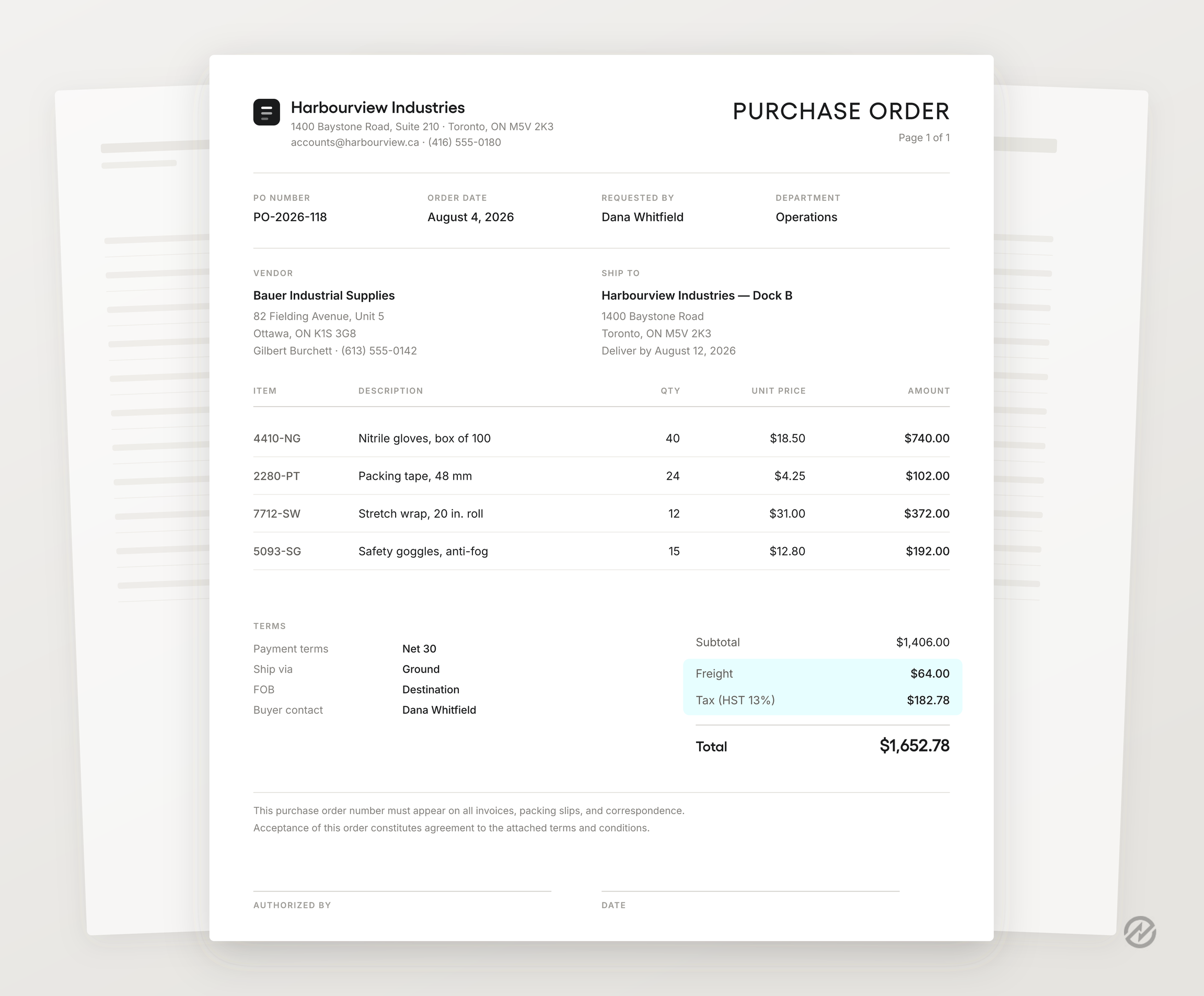
The exact layout varies by company and industry, but the goal is the same: a document specific enough that a supplier can fulfill it exactly as written, and clear enough that anyone in finance can reconcile it against the invoice later without asking someone what was actually ordered.
What's included in a purchase order?
A purchase order only serves as a control if it consistently includes the same core information, regardless of who creates it. Seven elements make up a typical purchase order:
- Buyer and seller information. Names, addresses, and contact details for both the purchasing organization and the supplier.
- PO number. A unique identifier used to track the order and reference it on the invoice, the receiving record, and any related correspondence.
- Order details. Descriptions, quantities, and unit prices for each item or service, plus any applicable taxes and associated costs.
- Delivery terms. The specific delivery date, delivery address, and any handling instructions the supplier needs to follow.
- Payment terms. The agreed payment schedule, due dates, and any early-payment discounts or late penalties.
- Shipping instructions. Preferred carrier, shipping method, and any shipping fees or special delivery requirements.
- Terms and conditions. Warranties, return policy, liability, and how disputes get resolved if something goes wrong.
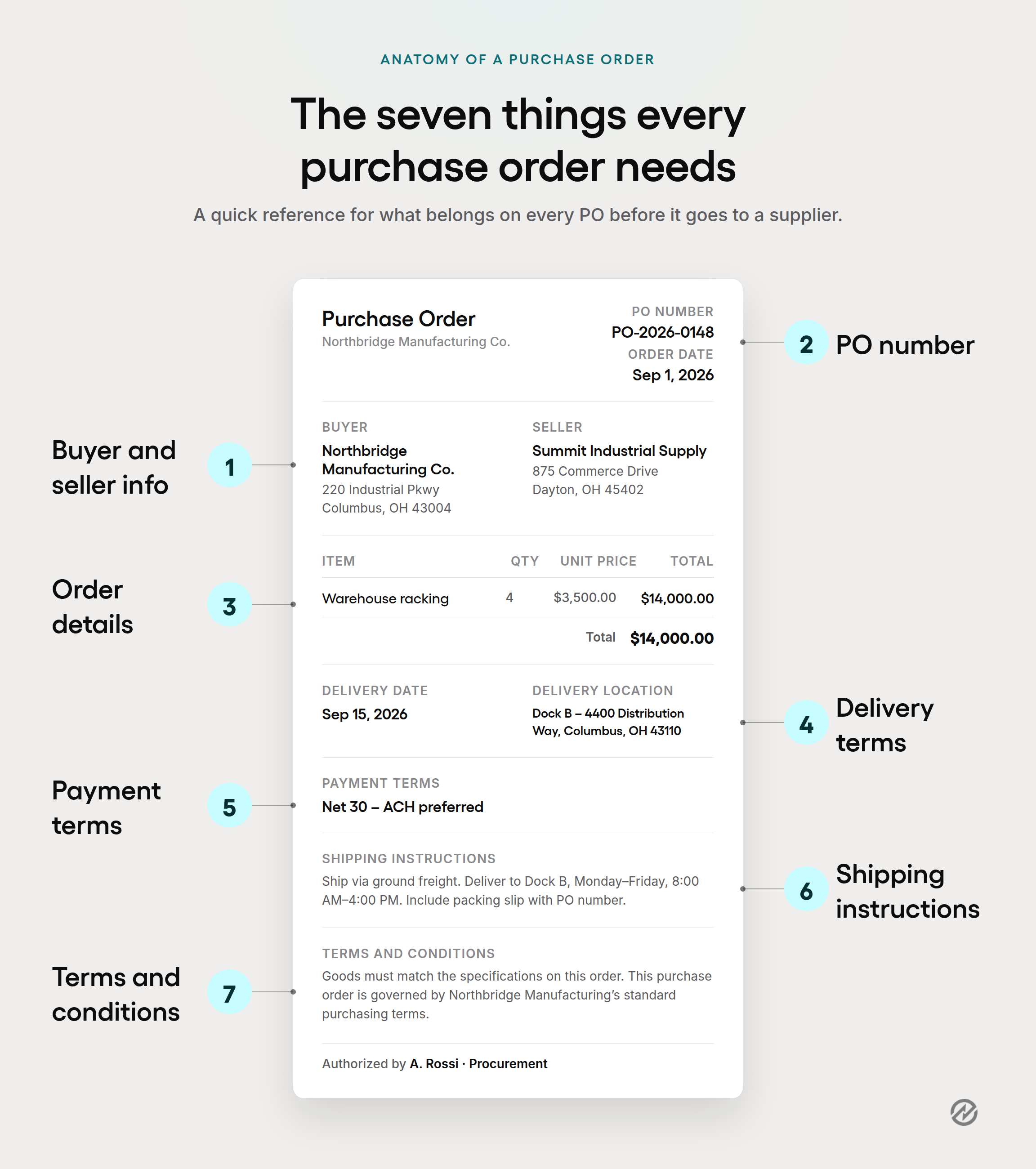
Missing or inconsistent information in any of these seven areas is one of the more common purchase order mistakes procurement teams run into, and it's usually the reason a delivery arrives wrong or an invoice gets stuck in exception handling.
What are the different types of purchase orders?
Most organizations use some combination of four purchase order types, and using the wrong one for the situation is a common source of duplicate orders and pricing confusion.
A standing purchase order is another term some teams use interchangeably with a blanket purchase order, since both cover recurring purchases from the same supplier under one agreement. Getting the type right at the purchase order creation step prevents recurring purchases from becoming a brand-new PO each time and keeps one-time purchases from getting buried in an open blanket order where nobody notices the total climbing.
How does the purchase order process work?
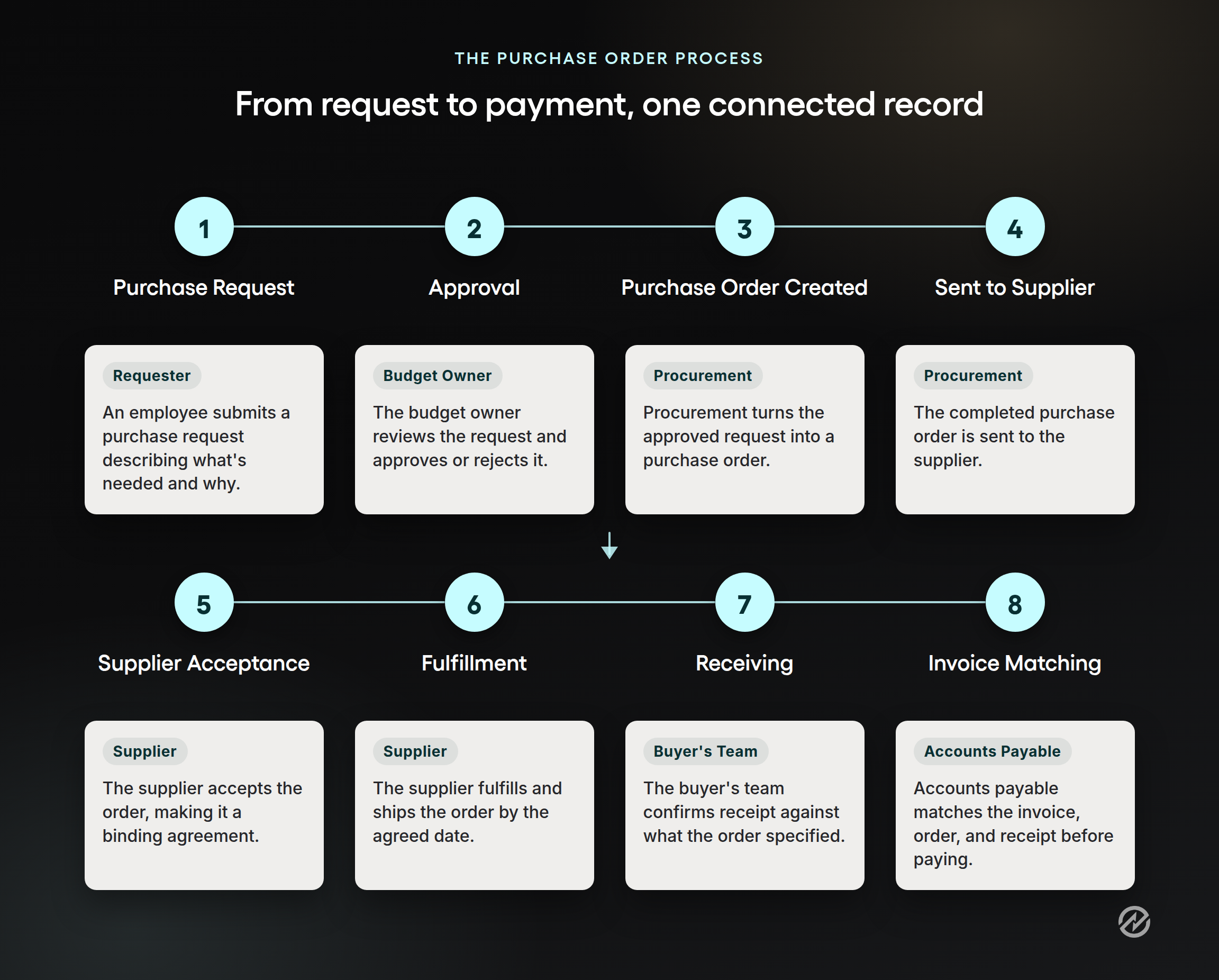
The purchase order process follows a consistent sequence, whether it happens through email and spreadsheets or through purchase order software:
- An employee identifies a need and submits a purchase request, sometimes called a purchase requisition, which is a formal document describing what they need to buy and why.
- The purchasing department or budget owner reviews the request against available budget and approves or rejects it.
- Once approved, the purchasing team creates the purchase order, using the approved requisition to fill in order details, pricing, and delivery terms.
- The purchase order is sent to the supplier.
- The supplier accepts the order, which makes it a binding agreement, or flags a change if pricing or availability has shifted.
- The supplier fulfills and ships the order according to the agreed delivery date.
- The buyer's team confirms receipt, checking what arrived against what the purchase order specified.
- Accounts payable compares the invoice against the purchase order and the receiving record, a step often called three-way matching, before releasing payment.
The purchase order workflow, meaning who has to approve what and in what order, is usually the part that breaks down first as an organization grows. A five-person team can get by with one approver for every purchase. A 200-person organization with several departments and multiple locations needs rules: a purchase under a set amount might only need a manager's sign-off, while a larger one routes to both the department head and finance before the purchase order goes out.
Writing down that routing, rather than relying on whoever happens to be free that day, keeps the process from depending on one person's memory.
When is a purchase order required?
Most organizations set a dollar threshold, a category rule, or both. A common approach is to require a purchase order for any purchase above a set amount, from a new supplier, or that will recur.
Below that threshold, some teams allow a simpler purchase request without a full PO. The exact threshold matters less than having a policy that's written down and applied consistently across departments and locations, since inconsistent enforcement is what leads to maverick spend in the first place.
Is a purchase order a contract?
Yes, once the supplier accepts it. A purchase order becomes a legally binding contract the moment the seller agrees to its terms, whether that acceptance is a signature, a confirmation email, or fulfilling the order as written. Before acceptance, it's an offer. After acceptance, both parties are expected to honor the specified price, quantity, and delivery terms.
This is worth being precise about internally, since it affects how disputes get resolved. If a delivery doesn't match what was ordered, or a supplier tries to bill a different price than what's on the purchase order, the accepted PO is usually the reference document both sides fall back on as the formal contractual agreement.
What's the difference between a purchase order, a purchase requisition, and an invoice?
These three documents address different aspects of the same commercial transaction, and mixing them up is a common source of confusion for anyone new to procurement.
A purchase requisition is an internal document. An employee submits a request for permission to buy something, and it never leaves the organization. A purchase order is external. It's the document sent to the supplier once the requisition is approved, and it's what turns an internal decision into a formal commitment with a third party.
A purchase order and an invoice sit on opposite ends of the same purchase transaction. The purchase order comes first: the buyer creates it to say what they intend to buy. The invoice comes after delivery: the supplier issues it to request payment for what was actually delivered. Comparing the two, along with the receiving record, is exactly what invoice matching is designed to catch before a payment goes out for the wrong amount.
A closer look at purchase orders vs. purchase requisitions covers this distinction in more depth, including when a requisition step is actually necessary for a small business versus a larger, multi-department team.
How do purchase orders support financial control?
A purchase order is one of the few procurement documents finance actually wants to see before money moves, not after. Every issued PO represents committed spend: money the organization has agreed to pay, even though no invoice has been issued yet. Without that visibility, a department can appear to be within budget right up until several outstanding purchase orders are issued as invoices in the same week.
Purchase orders also make record-keeping simpler for procurement and finance alike. A clear PO history shows finance what a department typically spends with which suppliers, making budget planning and supplier negotiations more grounded in real numbers rather than guesswork.
Before Tradogram, we were reconciling purchase orders and invoices manually across spreadsheets. Now everything is structured, approved, and synced with our accounting system.
Julian D'Oyley, Director of Finance, Reed Global
That shift, from reconciling after the fact to seeing commitments as they happen, is the practical difference a documented purchase order process makes for a finance team.
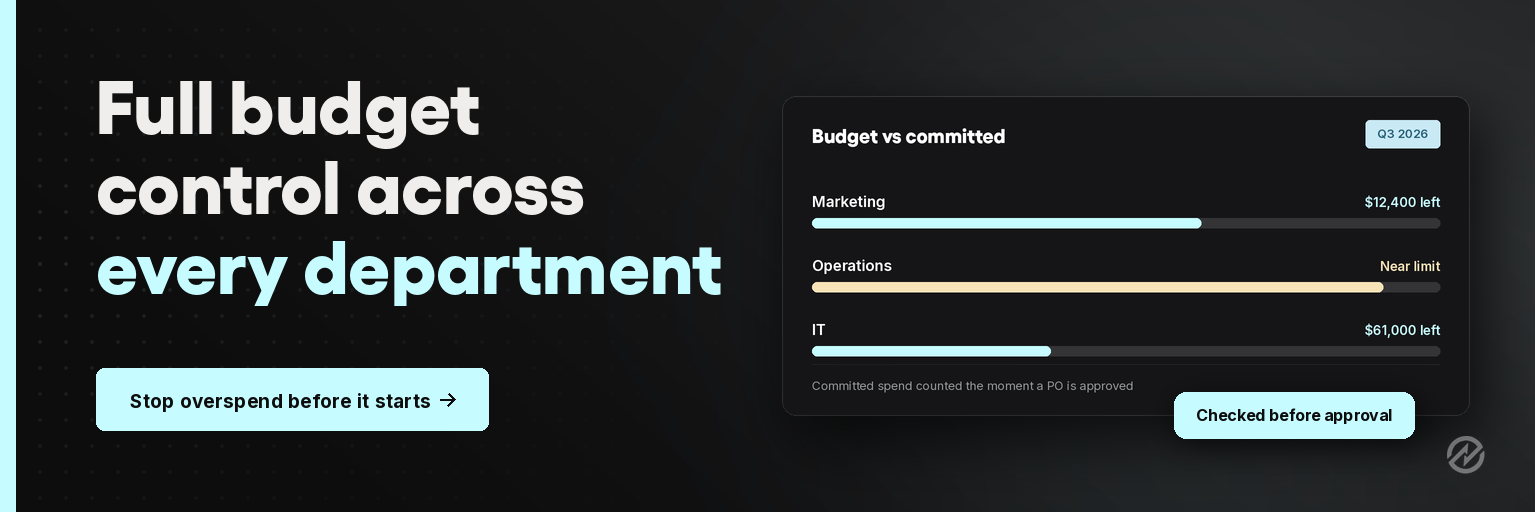
See how procurement spend management software gives teams more visibility and control over budgets before money is spent.
Manual purchase orders vs. software-managed purchase orders
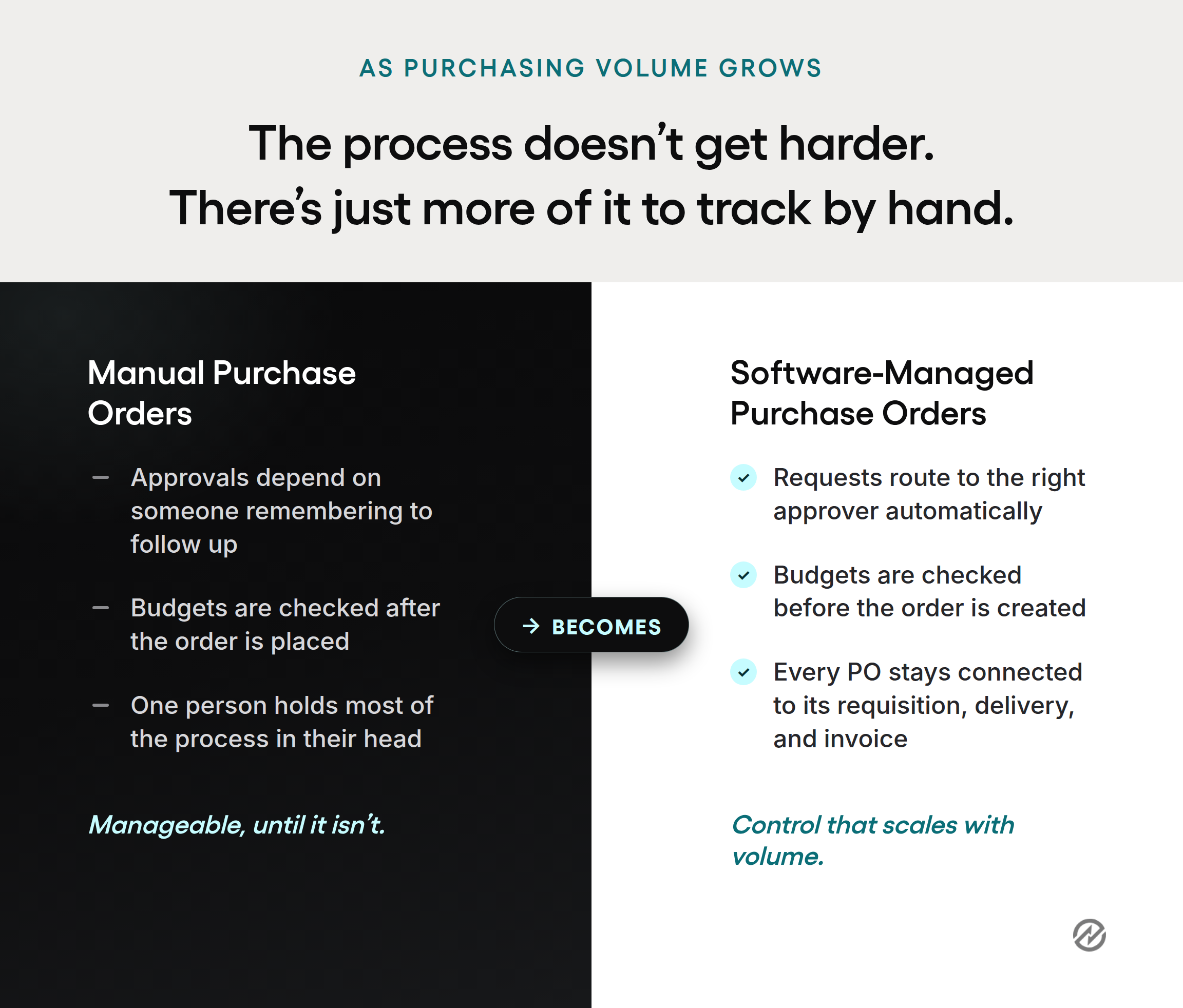
Every organization starts somewhere close to a spreadsheet and email. A purchasing team builds a PO template, tracks issued orders in a shared file, and follows up on approvals by asking around. That works when purchasing volume is low, and a small number of people manage most of the buying, including many small businesses just formalizing their first purchasing process.
It gets harder as the organization adds departments, multiple locations, suppliers, and approvers. Manual PO processes depend on someone remembering to check the budget, someone else remembering to follow up on an approval, and everyone trusting that the spreadsheet is current. Duplicate orders, missed approvals, and purchase orders created after the invoice has already arrived are the predictable result of that setup, not a sign that anyone on the team is doing something wrong.
Digital purchase order systems change what has to happen manually. Requests route to the right approver automatically, based on rules your team sets around amount, department, project, or supplier. Budgets are checked before a purchase order is created, not discovered afterward. And every purchase order, from request through delivery and invoice, stays connected in a single record instead of scattered across email, a spreadsheet, and an accounting system, which also makes supplier management and relationships easier to keep organized as the vendor list grows.
Download a purchase order process template
Building a purchase order process from scratch is slower than it needs to be. If your team is still working from an inconsistent template, or a purchase order someone built in a spreadsheet years ago, a structured starting point makes it easier to standardize what every PO includes before you're troubleshooting a mismatch with a supplier.
Download the Complete Guide to Planning the Perfect Purchase Order Process for a practical walkthrough of what belongs in a purchase order, how to route it for approval, and where teams typically get stuck moving from a manual process to a documented one.
Common mistakes to avoid with purchase orders
Most purchase order problems trace back to a handful of recurring mistakes, and they get more expensive as purchasing volume grows.
Incomplete or inaccurate order details. A missing unit price, an unclear delivery date, or an incorrect item description creates room for the supplier to interpret the order differently than you intended, and that gap usually surfaces as a delivery or invoice dispute.
Purchase orders created after the fact. When a purchase order is written to match an invoice that has already arrived, it ceases to function as a control and becomes mere paperwork. The value of a PO comes from creating it before the commitment, not documenting it afterward.
Inconsistent process across departments. When one department follows the purchase order process closely and another treats it as optional, finance loses a reliable picture of committed spend, and employees get mixed signals about what's actually required.
No connection between the purchase order, receiving, and the invoice. Without that link, accounts payable is left comparing documents by hand, which is where errors and late payments tend to start.
Treating the purchase order as a formality rather than a control. A PO created after verbal approval, just to satisfy an audit trail, doesn't do the job it's meant to do. The purchase order only prevents problems if it's created and checked against budget before the buyer commits to anything with the supplier.
Still processing purchase orders manually? It's time to switch.
Every mistake in the list above has the same root cause: a purchase order process built for the size of the company you used to be, not the one you're running today.
Retyping the same supplier details onto every new PO. Chasing approvers by email because there's no other way to know who's supposed to sign off. Finding out a purchase was already committed before anyone checked the budget. None of that means your team is doing something wrong. It means the process has quietly run out of room to grow with you.
Tradogram doesn't ask you to change how your organization operates before you get started. You define your approval rules, spend thresholds, and required documentation once, and then they apply automatically every time a purchase order is created.
- Requests route to the right approver without anyone forwarding an email.
- Purchase orders pull directly from approved request data, so nobody's retyping supplier details or dollar amounts by hand.
- Finance sees what's been committed before the invoice shows up, not after.
- Every purchase order, approval, and invoice stays connected, so an audit doesn't mean piecing records back together from three different places.
If any of the mistakes above sound familiar, the fix usually isn't more training or a stricter policy. It's a process that enforces itself.
Book a Tradogram demo to see how it fits the approval structure you already have.