


Someone in finance asks a simple question: Did we already order the replacement laptops, and what did we agree to pay?
Answering it should take 30 seconds. Instead, it means a trip to the shared drive, where three files sit with some version of the name PO_template_FINAL. The most recent one has the right supplier but last quarter's pricing. The approval lives in an email thread that has since been archived. And the invoice that arrived this morning is for $13,400, while the file says $12,000.
None of that is anyone's fault. A purchase order template is a good tool, and it's how most organizations start. It gives every order the same set of fields, creates a record that you and your supplier can both point to, and costs nothing to implement. For a small team buying from a handful of suppliers, it does the job it was designed for.
The catch is that it only does one job. A template documents a purchase. It doesn't route the request to the right approver, check the budget before money is committed, confirm that the order arrived, or connect the order to the invoice that lands in finance’s inbox three weeks later. When one person handles all of that in their head, the gap never shows. Add a second location, a third approver, or a finance team that needs to close the month on time, and that gap starts to widen.
Purchase order software is a system that manages the full order lifecycle rather than the document alone: the requisition, the approval routing, the order itself, the receiving record, and the invoice match. The distinction from a template is not that it produces better-looking purchase orders. It's that the order is a single record with a status, visible to everyone who needs it, rather than a file describing a decision made elsewhere.
So the question isn't whether purchase order templates are good or bad. It's whether yours is still able to carry the weight you've put on it.
This article answers that. It covers where a purchase order template still earns its place, the specific signals that indicate a process has outgrown it, why purchase order volume is the wrong metric to watch, and what changes when you move to purchase order management software.
What a purchase order template does well
A template earns its place by doing one narrow thing well: it makes every purchase look the same on paper.
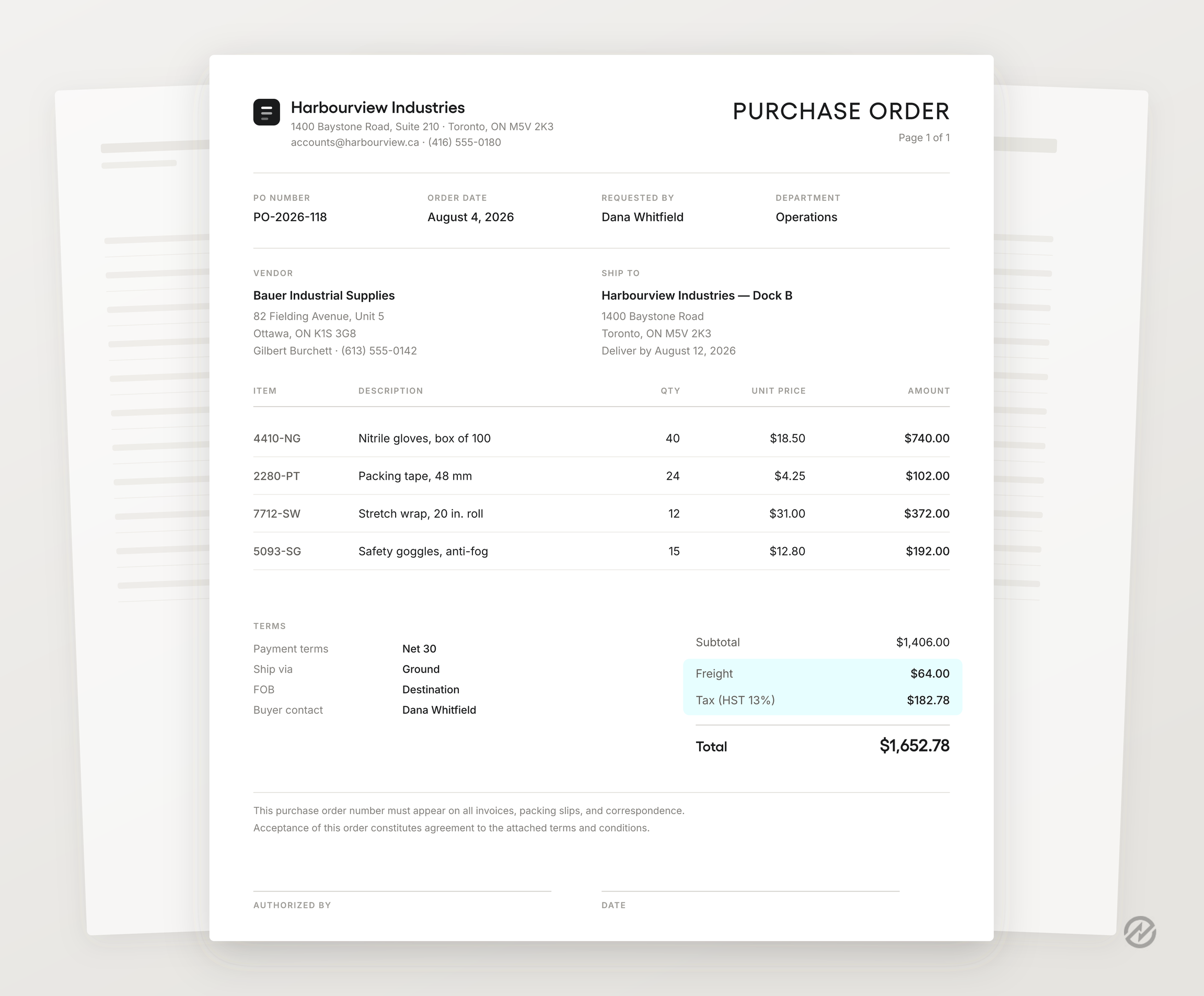
That matters more than it sounds. When the supplier name, quantities, unit prices, delivery address, and payment terms sit in the same spot on every order, your supplier can process it without a follow-up call, and accounts payable has something concrete to check the invoice against. Consistency is the whole point of the document, and a good template delivers it for free.
There's also real legal weight behind the form. Once a supplier accepts a purchase order, it generally becomes a binding agreement covering price, quantity, and terms, which is a meaningful step up from an email that says "yes, go ahead." The specifics depend on the terms you attach and where you operate, so it's worth having a lawyer review your standard terms once rather than assuming the template covers you. (For what those terms usually include, see our guide to purchase order terms and conditions.)
The underrated benefit, though, isn't the file. It's the pause. Filling out a purchase order forces someone to name the supplier, price the line items, and put a number on the total before the money moves. Plenty of organizations get most of their spend discipline from that small moment of friction alone, without any system to back it up.
The cost of entry is also zero. No implementation, no training, no IT project, no procurement staff required. For a team that buys from six suppliers with one person approving everything, a purchase order template plus a numbering convention is a reasonable process, not a shortcut.
Worth checking: open your current template and confirm it has separate fields for freight and tax rather than a single typed total. When those amounts are buried in a single number, accounts payable can't reconcile the invoice without calling someone, and that one missing field causes more delay than any other formatting choice on the page.
When a purchase order template is still the right choice
Plenty of smaller organizations should keep their PO template and allocate the budget elsewhere. Here's what that situation usually looks like.
- One or two approvers, and everyone knows who they are. No routing decisions, no thresholds to interpret, no confusion about whose sign-off counts.
- A single location. One receiving door, one person who knows what showed up.
- A short supplier list. Vendor details live in a contact file that's actually up to date because there are only a dozen entries to maintain.
- One clear owner of the template. Someone controls the master file, issues the PO number, and would notice if a version drifted.
- Little or no inventory to track. What you buy gets used, not stocked, counted, reconciled, and forgotten about.
- Spend that finance already sees. Purchases fall into a small number of categories that appear in the monthly review without anyone reconstructing them.
If all of those describe your organization, a purchase order form in Excel or Google Sheets, saved as a PDF and emailed to the supplier, is a legitimate process. You'll get consistent documents, a workable audit trail, and a record both the buyer and seller can point to if a transaction goes sideways.
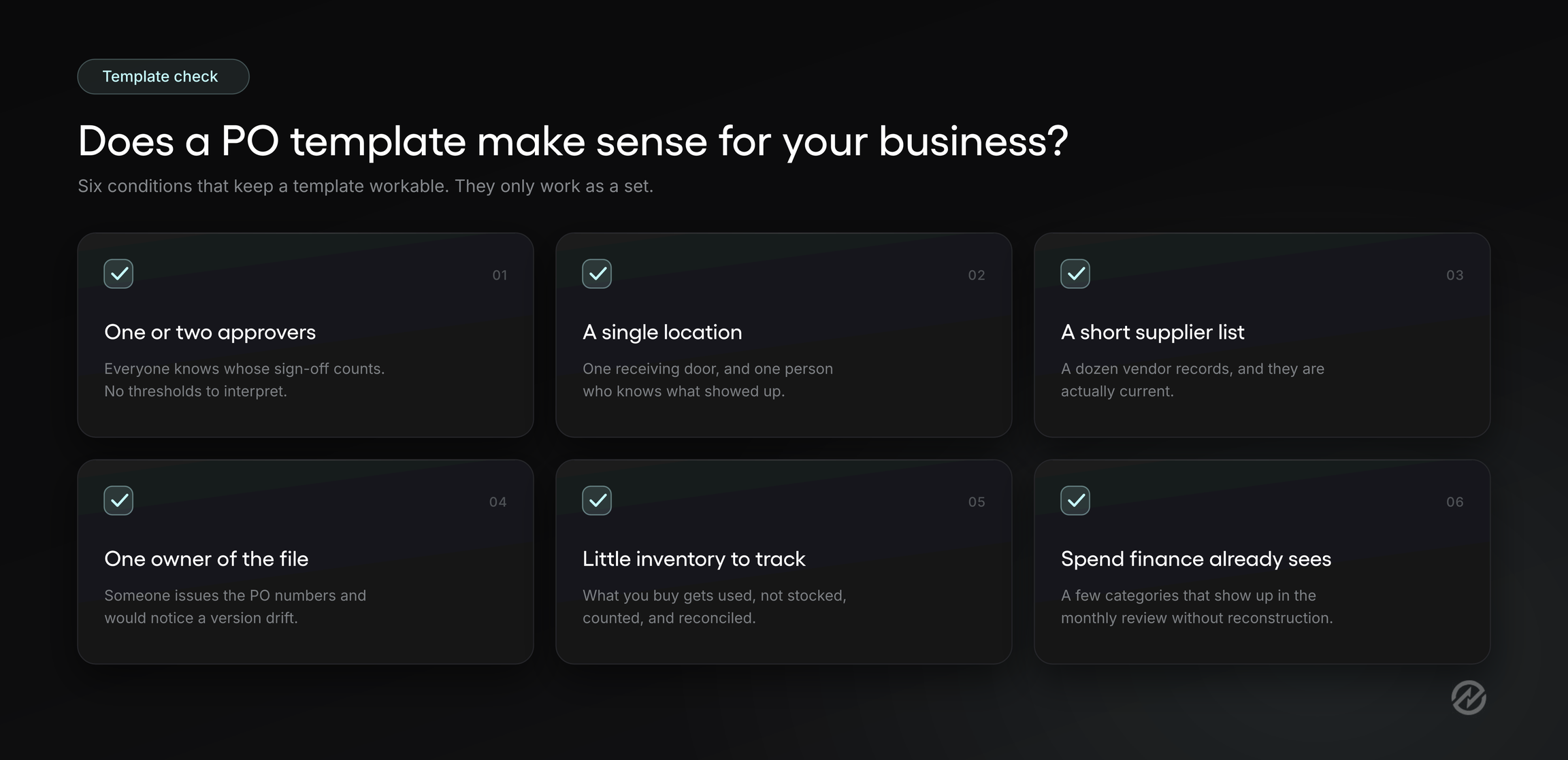
The list matters as a cluster, though, not as a scorecard. These conditions support each other. A single location keeps receiving simple, which keeps invoice matching simple, which keeps one person's memory sufficient. Pull out any one of them and the others start carrying more weight than they were meant to.
Which points at the real test underneath all six. A purchase order template works as long as one person can hold the entire purchasing process in their head. Not the documents, the process: what's been requested, who approved it, what's still coming, and what's already been paid for. The template is the filing system for a process that lives in someone's memory. That arrangement is efficient right up until the memory has to be shared.
Worth checking: try to name the one person who owns your template today. If two names come to mind, or if the honest answer is "whoever needs a PO makes one," the memory has already been split across more than one head, and the next section will feel familiar.
The moment a template stops being the source of truth
Follow that laptop order from the beginning, and you can see exactly where the template is present and where it isn't.
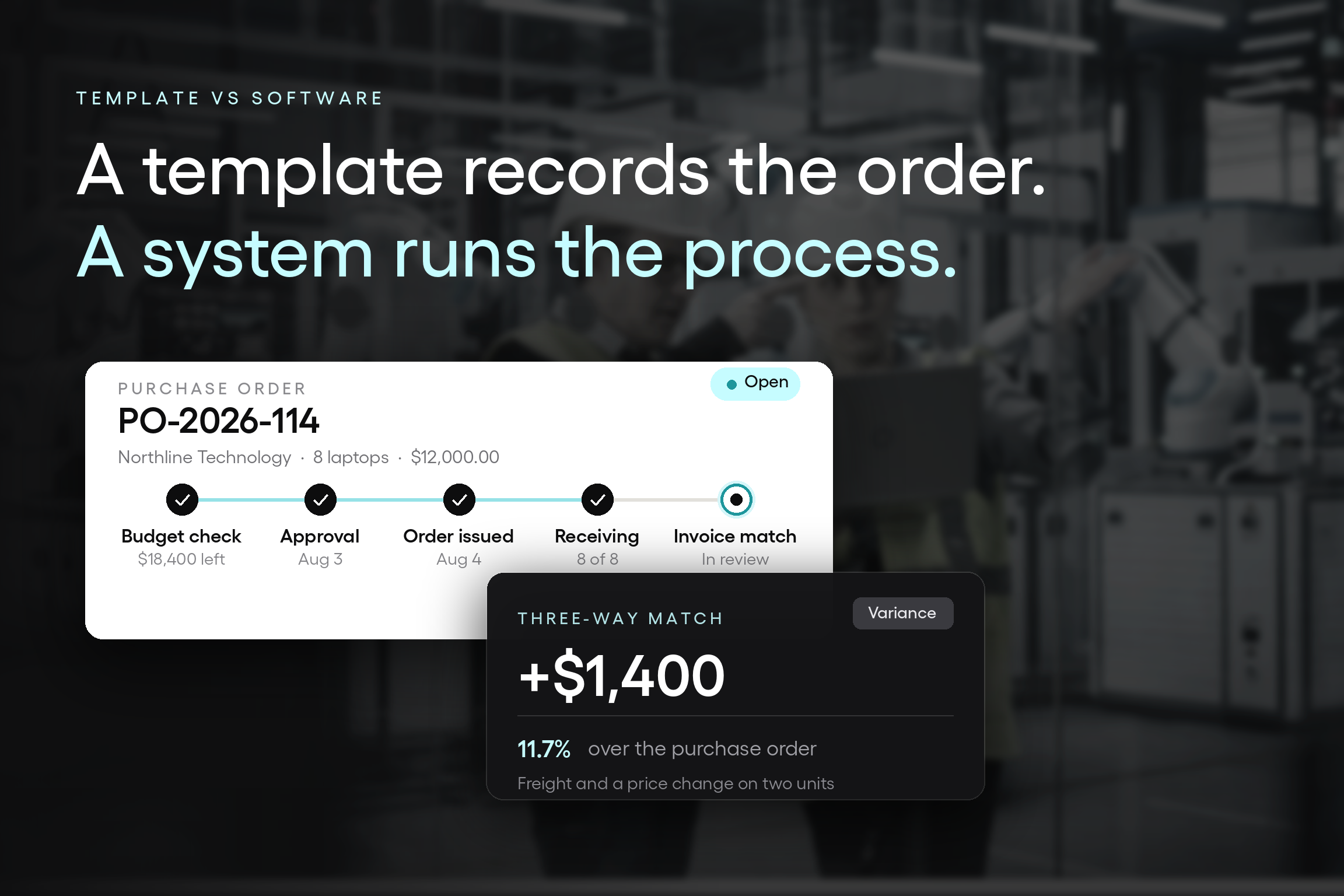
An office manager needs eight replacement laptops. She checks with the IT lead about the model, gets a quote from the usual supplier, and sends her director an email: "About $12,000 for the eight, okay to proceed?" The director replies, "Yes, go ahead," from his phone between meetings. She opens the template, fills in the vendor details, line items, shipping information, and order date, assigns the next PO number, saves it as a PDF, and emails it to the supplier.
That's a clean process by most standards. Now look at what the document did and didn't do.
It wasn't there for the budget check. Nobody looked at what the IT hardware budget had left, or at the two other orders already approved this quarter that haven't been invoiced yet. The template has a total field, but it doesn't know what else is outstanding.
It wasn't there for the approval. The decision happened in an email thread. The template recorded the outcome afterward. If someone asks in nine months who authorized $12,000, the answer isn't in the PO; it's in an inbox.
It wasn't there when the laptops arrived. Six came in the first shipment. The other two shipped separately and landed the following week. The person at the receiving door signed the packing slip, and nobody updated anything, because there's nothing to update.
It wasn't there when the invoice came. The supplier billed $13,400: the agreed price plus freight and an unexpected price increase on the final two units. Accounts payable now has an invoice number, a PO number, a packing slip somewhere, and no single record connecting them. Someone spends 40 minutes reconstructing what was supposed to happen before the payment can be approved.
The template didn't fail here. It did the one thing it was built to do: write down what was ordered. But this purchase moved through five moments that mattered: the budget check, the approval, the order itself, the delivery, and the invoice review. The template only showed up for one of them.
A purchase order template records a decision it had no part in making. It's the receipt for a control that occurred elsewhere, if it happened at all. When the approval, the budget check, the receiving confirmation, and the invoice match all live outside the document, the document can't tell you whether any of them occurred. It can only tell you what someone intended to buy on a particular day.
All five moments worked because one person was present for each. She remembers the director said yes, she knows two laptops are still coming, and she can tell accounts payable what the freight charge is about.
Split those five moments across five people, and the template is suddenly the only thing they share, which means they're sharing about a fifth of what they need. Everything else gets rebuilt by email, one question at a time.
Worth checking: take your last three purchase orders and mark the point in each process where the template was actually opened. If it was opened after approval rather than before, the document describes your spend, not controls it.
Eight signals that your company has outgrown a purchase order template
These are observable. Each one is something you can confirm this week by looking at your own files and asking two or three people a direct question. You don't need all eight. Three is usually enough to say the process has moved past what a document can hold.
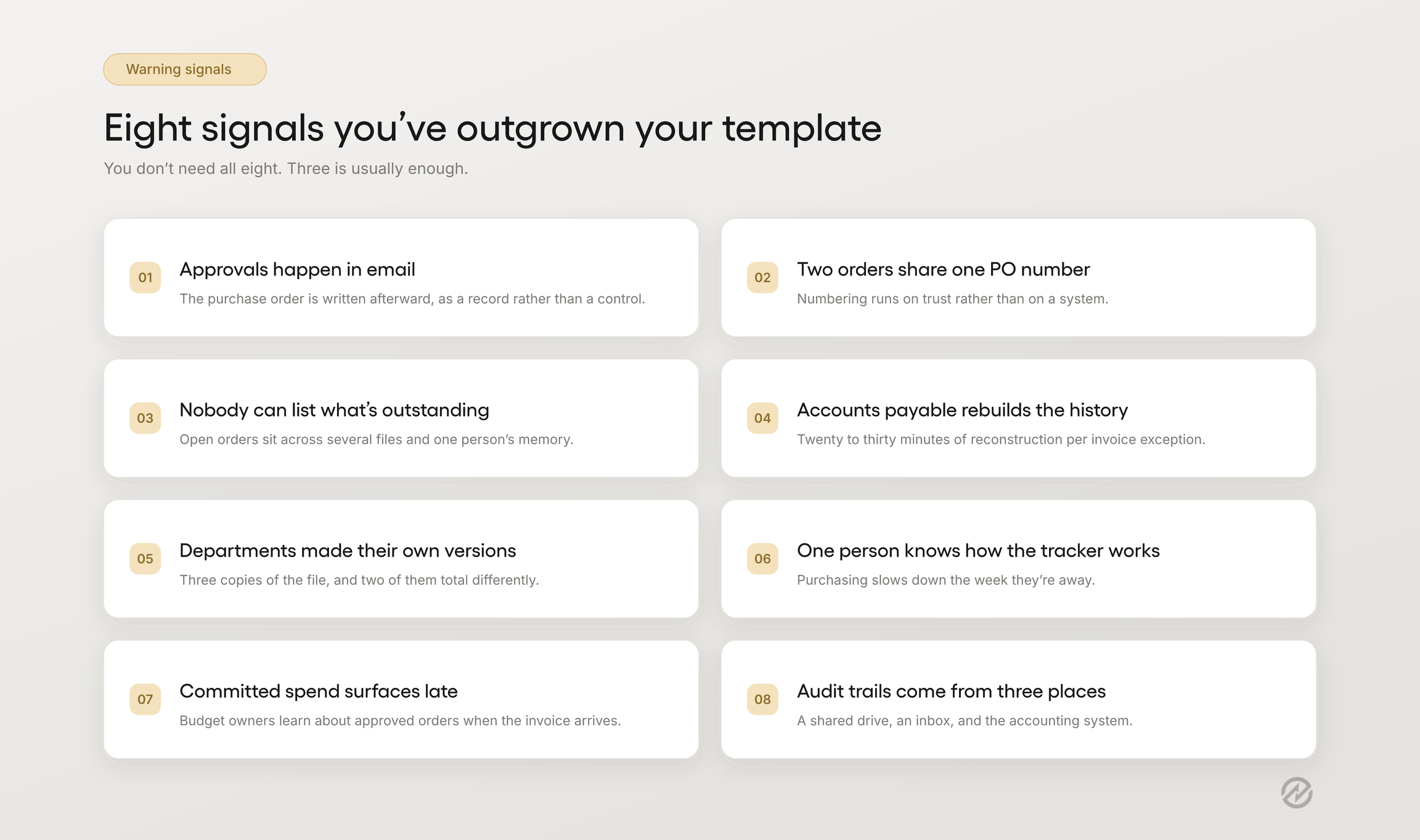
Approvals happen in email, and the purchase order is written afterward
What makes it a signal rather than a quirk is how it spreads. Once the first order is approved in a thread and later documented, that becomes the pattern everyone copies because it's faster. Within a few months, the purchase order form becomes a record-keeping step at the end of the process rather than a control at the front.
Two people have issued the same purchase order number
The PO number is the key that ties the order to the packing slip to the invoice. When it's assigned manually, duplicates are only a matter of time, and they don't announce themselves. You find out when a supplier references PO-2026-114 and two different orders come back. Near-misses count here too: if anyone has ever had to ask "what number are we up to?" before creating an order, the numbering is running on trust rather than on a system.
Nobody can answer what's been ordered but not yet received
Ask someone to list every open order, what it cost, and when it's due. If the answer requires opening multiple files and asking a colleague, you don't have a way to track orders. You have a folder of documents, each describing a single transaction, with no shared status. Some small businesses often run this way for years without harm, right up until a delivery goes missing or a project stalls waiting on something to arrive.
Accounts payable rebuilds the order history before approving an invoice
An invoice arrives referencing a purchase order number. To approve payment, someone has to locate the purchase order, find any existing proof of delivery, and confirm the price still matches. That's 20 or 30 minutes of detective work per exception, and it holds up as long as one person keeps doing it. The risk is what happens on a busy week. When there isn't time to rebuild the history, invoices get approved because the purchase order number looks right, which is not the same as checking.
Departments have quietly made their own versions of the file
Someone in operations needed a field for a project code. Someone in facilities wanted different cancellation terms. Neither asked, because both changes were reasonable. Now, three versions of the template exist; the totals are calculated differently in two of them, and suppliers are receiving documents that don't match each other. Version drift is one of the clearest signs a shared file has more users than an owner.
One person is the only one who knows how the tracker works
Every manual purchasing process eventually has a keeper: the person who built the spreadsheet, maintains the vendor list, knows which supplier requires a separate shipping address, and can tell you what's outstanding without looking. That knowledge is genuinely valuable, and it's also a single point of failure. When they're sick or on vacation, purchasing slows down. When they leave, the data stays, but the process doesn't.
A budget owner learns about committed spend when the invoice arrives
A department can look like it's within budget and still have overspent, because the approved orders that haven't been invoiced yet aren't in the number anyone's looking at. Budget owners find out about them weeks later, in a month-end review, when the money is already gone. If your budget conversations regularly include the phrase "I didn't know that was coming," committed spend is invisible in your current setup.
Audit preparation means assembling a trail from three places
When an auditor asks for the approval, the order, the receiving confirmation, and the invoice for a specific purchase, the answer should take a few minutes. If it takes a day and involves a shared drive, an inbox, and the accounting system, the connection between those records exists only in the effort of whoever's assembling it.
Count how many of the eight describe your organization. One or two are worth fixing directly: tighten the numbering convention, add a field, agree on a single master file. Three or more usually means the fixes are stacking up faster than they can be completed, and the constraint isn't the template's design.
Now read the list again and notice what isn't on it. None of the eight signals is about how many purchase orders you create. They're about how many people touch one, and how much of the process happens outside the document. Which means the usual advice, the kind that tells you to upgrade once you cross some monthly order count, is measuring the wrong thing entirely.
Why purchase order volume is the wrong number to watch
Search for advice on this, and you'll typically find a threshold. Fifty purchase orders a month. A hundred. Some number that supposedly marks the line between needing a template versus needing a system.
The number is easy to publish and act on, which is the main reason it exists. It's also pretty close to useless, because two organizations creating the same volume can be in completely different situations.
Consider a distributor placing 200 orders a month. One buyer creates all of them, working from an approved supplier list with negotiated pricing already in place. Her manager reviews anything above $5,000, which is maybe six orders a week. Everything ships to one warehouse where the same two people receive it. The work is repetitive, and a template handles it because the process is a single lane with one person driving.
Now consider a nonprofit placing 40 orders. Program staff in four departments request purchases. A department head approves within budget; the finance director approves amounts above $2,500; and anything charged to a restricted grant requires a second sign-off from the program director who owns that project code. Some purchases are services with no delivery to confirm: a consultant's engagement, a facilities contract, an annual software renewal. Materials go to three sites. At 40 orders a month, this organization is already struggling, and no template will fix that.
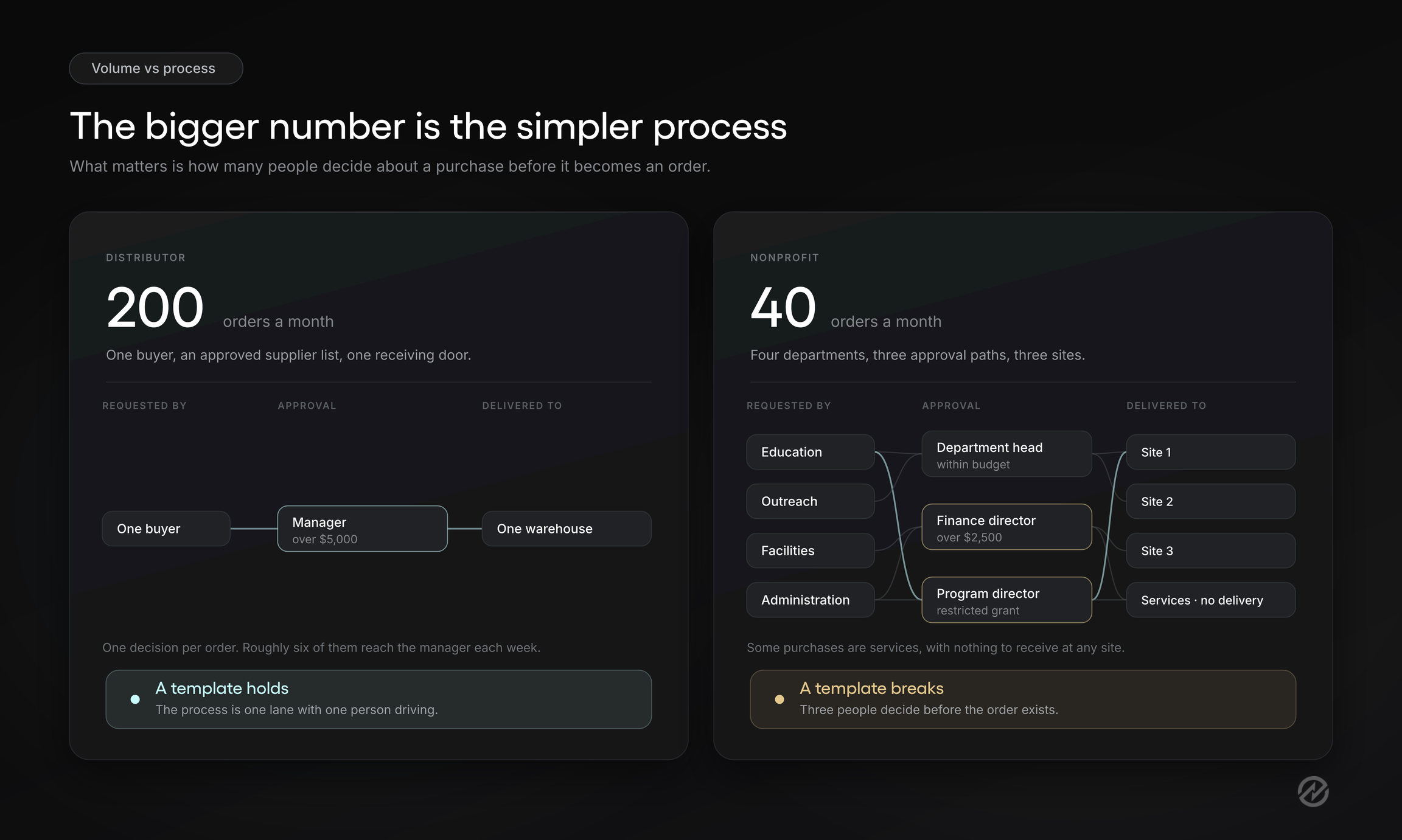
The distributor has more transactions. The nonprofit has a more complex process. Only one of those breaks a template on its own.
What separates them is how many people have to make a decision about a purchase before it becomes an order. At the distributor, that's one person, and she has the supplier list and the agreed pricing in front of her when she makes it. At the nonprofit, it's three or four people, each answering a different question: whether the program needs it, whether the budget covers it, whether the grant allows it. They're working from different information, and none of them can see what the others concluded.
None of this makes volume irrelevant. High volume magnifies whatever's already true. If the process is sound, more orders mean more work. If the process depends on informal knowledge, more orders mean more gaps. Volume is an amplifier, not a trigger.
Two Tradogram customers make the point from opposite directions. The National Security Institute, an education and training organization with around 200 employees, was processing 50 to 100 purchase orders per month. Fetchr, a delivery company with more than 3,500 employees, was processing roughly 50 a month in the branch that adopted first.
Wildly different organizations, near-identical volume, and both were held up by the same thing: approvals waiting on physical signatures and documents nobody could find quickly. Fetchr's regional head of procurement, Yasir Rizvi, described locating an original requisition or a specific purchase order for quick reference as taking far longer than it should. Neither organization had a volume problem. Both had a connection problem.
Worth checking: pick one purchase from last month that required more than one approval and write down every judgment someone made about it: whether it was needed, whether the budget allowed it, whether the supplier was the right choice, whether the price was reasonable, whether it arrived. Then mark which of those judgments left a record anyone else could find today.
What it actually costs to stay on a purchase order template too long
The cost of a manual purchase order process rarely appears as a line item, which is why it survives budget reviews so easily. It's spread across people who each absorb a small amount of it, and none of them are tracking their share.
Here's where it accumulates.
Rework at the invoice stage. Every mismatch between an invoice and an order becomes an investigation. A handful of exceptions a week is a meaningful share of one person's month. The work is invisible because it's distributed across days and nobody logs it as a category.
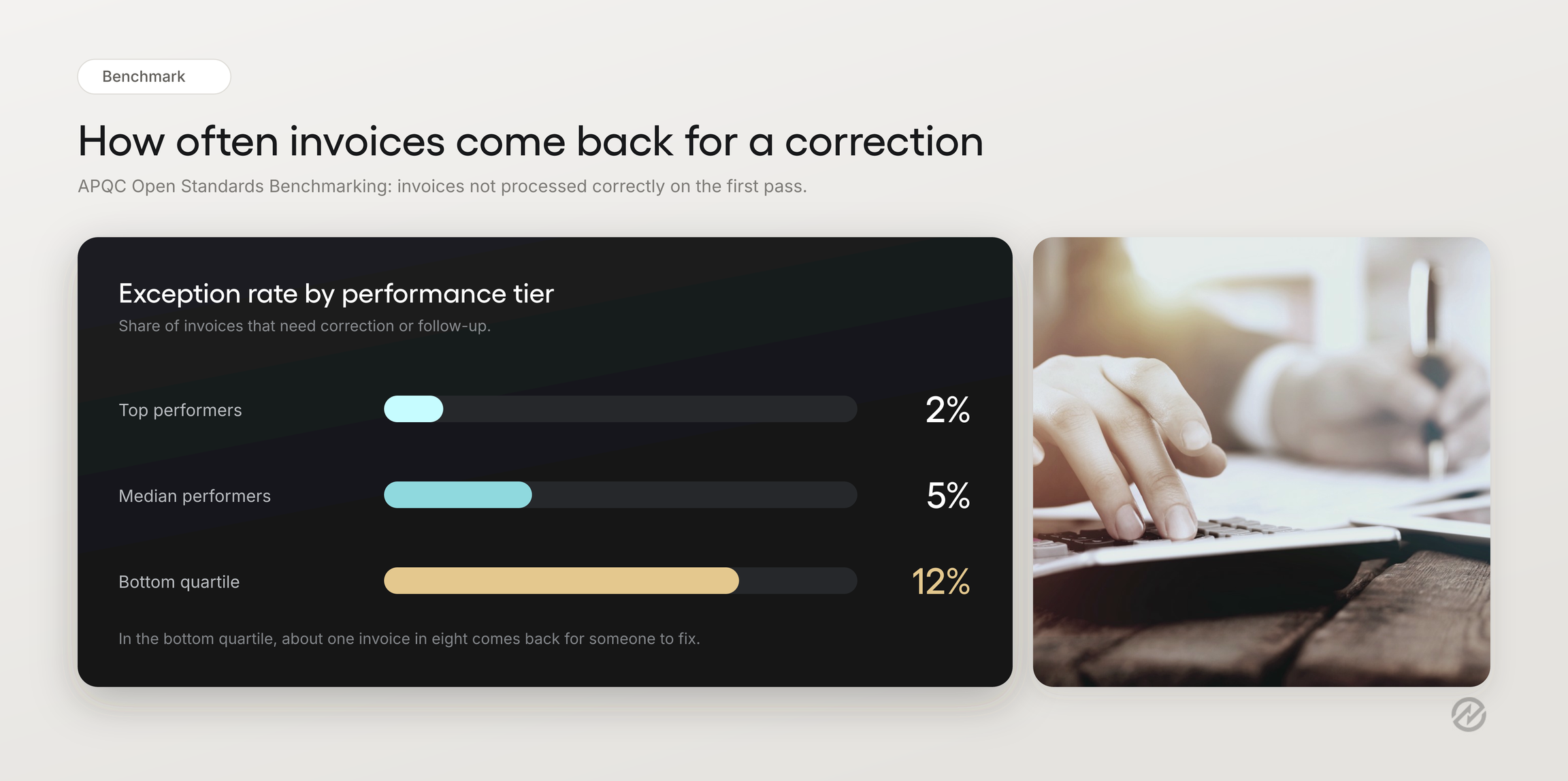
According to benchmarking data from the American Productivity and Quality Center (APQC), top-performing organizations process 98% of invoices correctly the first time, leaving an exception or error rate of just 2%. That falls to 95% for median performers, while bottom-quartile organizations achieve an 88% error-free rate, meaning roughly 12% of invoices require correction or additional attention.
Keep in mind that these error rates don’t distinguish between companies using purchasing software versus those using purchase order templates, but the errors these benchmarks capture (wrong amounts, duplicate payments, and corrections after the fact) are the same ones that show up when the order, the receipt, and the invoice live in three different places.
Duplicate and overpayment risk. When approval to pay rests on whether the PO number looks familiar, the controls that would catch a double-billed invoice or a quiet price increase aren't running.
Late payments and the supplier relationship. Invoices that stall in review get paid late. That can mean forfeited early-payment discounts, and over time, it changes how a supplier treats you: less flexibility on a rush order, less willingness to hold pricing.
Month-end reconstruction. If the accounting system is the first place a purchase becomes visible, close involves working backward from invoices to figure out what happened and which budget it belongs to.
Spend committed outside the budget anyone's watching. This is the highest cost and the hardest to see. A department can look on track and still have overspent, because approved orders that haven't been invoiced aren't in the number being reviewed.
Now the honest part. None of this means the manual process is costing you more than software would.
APQC benchmarking puts the cost of processing a single purchase order at about $14 at the efficient end and more than $54 at the inefficient end, with the spread largely attributed to how procurement work is structured and executed.
For many smaller organizations, that cost doesn’t justify investing in software, and a vendor telling you otherwise is guessing about your situation.
The useful question isn't what the manual process costs in the abstract. It's whether the cost is growing faster than your purchasing volume. A process that requires the same effort per order at 40 orders as at 20 is stable, and that is fine. But if the effort per order is climbing, because each order now touches more people and more reconciliation, the process gets more expensive every quarter you leave it alone.
Worth checking: ask whoever processes invoices to keep a tally for two weeks of every invoice that couldn't be approved without asking someone a question. Not the time spent, just the count. That number, compared against total invoices, is the closest thing to a direct measurement of what the gap between your documents is costing you, and it only takes a sticky note to collect.
The middle option: purchase orders in your accounting software
Before evaluating procurement software, check what you're already paying for. QuickBooks, Xero, Sage, and most mid-market accounting systems include some form of purchase order feature, and for a meaningful number of smaller organizations that's the right next step rather than a separate platform.
The case for it is strong where it applies. The purchase order and the bill live in the same system, so the order flows into accounts payable without re-entry. Your chart of accounts is already in place, which means purchases are coded correctly at the point of ordering rather than reconstructed later. Nobody learns a second login, and you're often activating something included in your plan rather than buying anything new.
To find out what yours does before you go shopping, ask four questions:
Can it route an approval by more than one rule? Most accounting systems handle a single threshold and a single approver. Ask what happens when the rule needs to vary by department, project, GL account, or supplier, and whether you can build that yourself.
Can it check a budget before the order goes out? Not a report someone runs at month-end. A warning at the time of approval, showing how the purchase affects the remaining balance. This is the single most useful question you'll ask.
Where does the process start? If the answer is "when someone creates a purchase order," then the requisition, justification, and supplier decision are still happening via email.
Can it record what actually arrived? Partial deliveries, receiving against a specific line item, and a note of who confirmed it. Without that record, three-way matching is really two-way matching plus a phone call.
The pattern in those four answers is the thing worth noticing. Accounting software is built to record transactions accurately. Procurement software is built to control decisions before they become transactions. Both are legitimate jobs, and an organization that needs the second one won't get it by configuring the first more deliberately.
Worth checking: book 20 minutes with whoever administers your accounting system and ask them to demonstrate the purchase order module with a real example. Many organizations discover they've had the feature for years and nobody turned it on. Others discover in that same 20 minutes exactly why it won't work for them, which is just as useful and considerably cheaper than a procurement software evaluation.
What purchase order software adds to the process
Go back to the five moments from earlier: the budget check, the approval, the order, the delivery, and the invoice review. A template shows up for one of them. Accounting software may show up for a couple more. What follows is what changes when a system is present for the rest.
Requisitions that route themselves and carry forward
The process starts before the order. An employee submits a purchase requisition, which is the internal document describing what's needed and why, and it never goes to a supplier. It routes for approval based on the rules the organization sets: the department it belongs to, the project or GL account it's charged to, the supplier, the item category, the person who created it, the amount, or a combination of these.
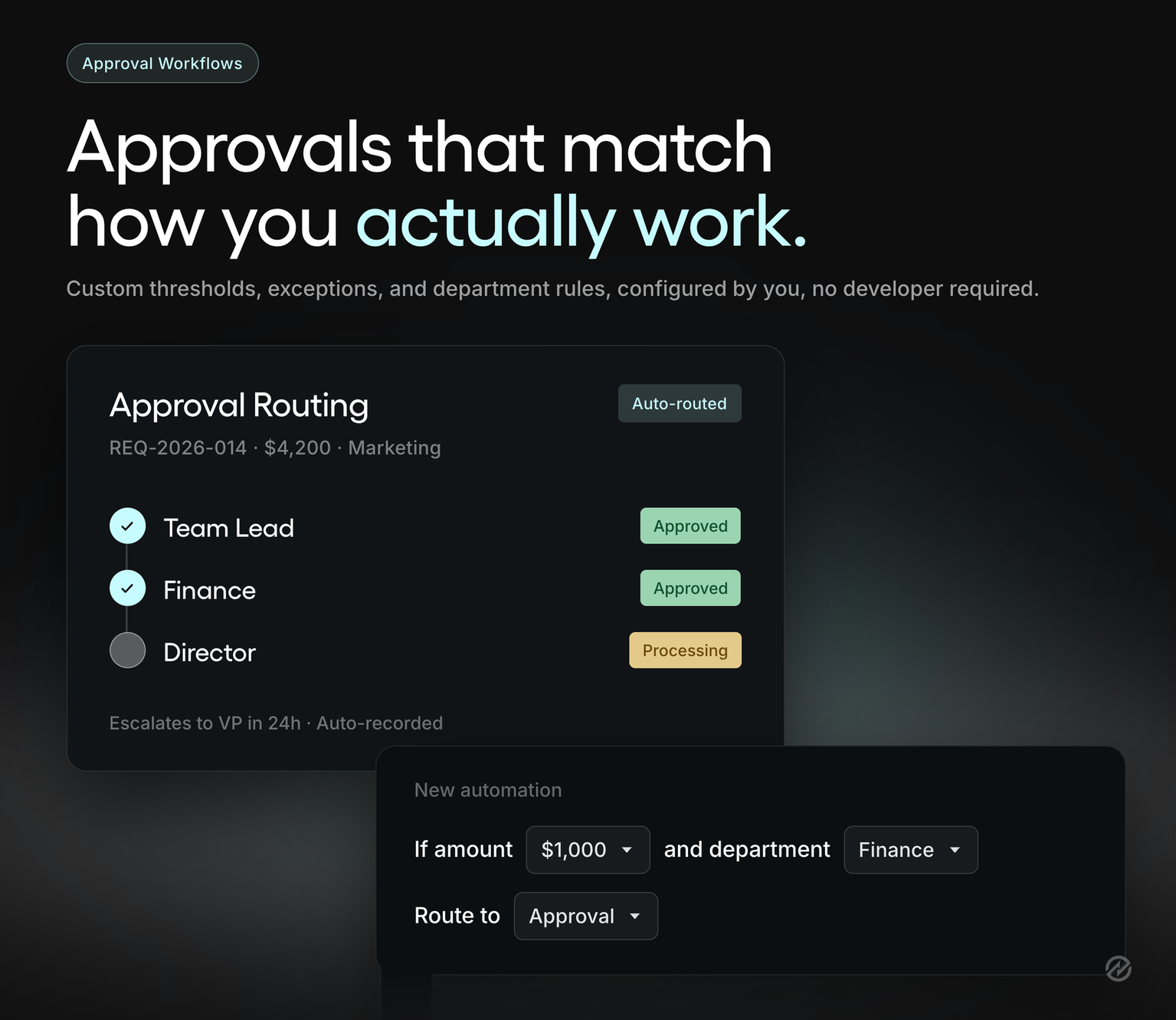
In Tradogram, those rules are configured by a branch administrator rather than through a support ticket, and they stack up to 10 levels that trigger in sequence. Each rule has a main approver and up to five alternates, so a manager's vacation doesn't stall the purchasing process.
Once the requisition is approved, it becomes a purchase order that carries the information already entered and reviewed. Nobody retypes the supplier, the line items, or the account coding. That single step removes a surprising share of duplicate entries in a manual process, and it's the reason approval and the order stop being two disconnected events.
Budget checks the approver sees before saying yes
This is where the template's silence is most costly, and it's worth being specific about how a system fills it.
Each budget in Tradogram has a "Cap the spending" setting. Left off, which is the default, a transaction that would exceed the budget still goes through, the overage appears in the budget's analytics, and the approver can see exactly how much the budget will be exceeded while they're reviewing the request. When turned on, the transaction is blocked, and the user gets an error explaining why.
The choice between those two is more interesting than either one alone. A hard cap is right for a fixed project budget or a restricted grant where overspending isn't an option. A visible warning is usually better for departmental operating budgets, where the real goal is that nobody approves anything without knowing how it affects the remaining balance. Either way, someone answers the budget question while the decision is still open, which is the part a template can't do.
Receiving that records what actually arrived
Deliveries are recorded against the original purchase order, line by line, so what was received is checked against what was ordered rather than against someone's memory. Partial deliveries stay tracked as outstanding until the order is fulfilled or formally closed, which means the six-laptops-now, two-later problem from earlier stops being invisible.
Discrepancies get logged where they're discovered. Damaged goods, short shipments, and supplier substitutions are recorded at the point of receipt with item-level notes, by the person who saw the pallet. That's a different quality of information than a note reconstructed three weeks later by someone in accounts payable who wasn't there.
Three-way matching with something real to match against
Three-way matching compares the invoice with the purchase order and the receiving record. The technique isn't new, and plenty of organizations claim to do it. What they usually mean is that someone compares an invoice to a purchase order and asks a colleague whether the goods showed up.
The third leg is what makes it work, and it only exists if receiving was recorded when it happened. With confirmed receipts feeding the match, a price difference, a quantity difference, or a delivery that never happened surfaces before payment is approved rather than after. That's the same $13,400 invoice from the opening, except the freight charge and the price increase on two units are visible as differences against a documented order, and someone decides what to do about them in a few minutes instead of rebuilding the history first.
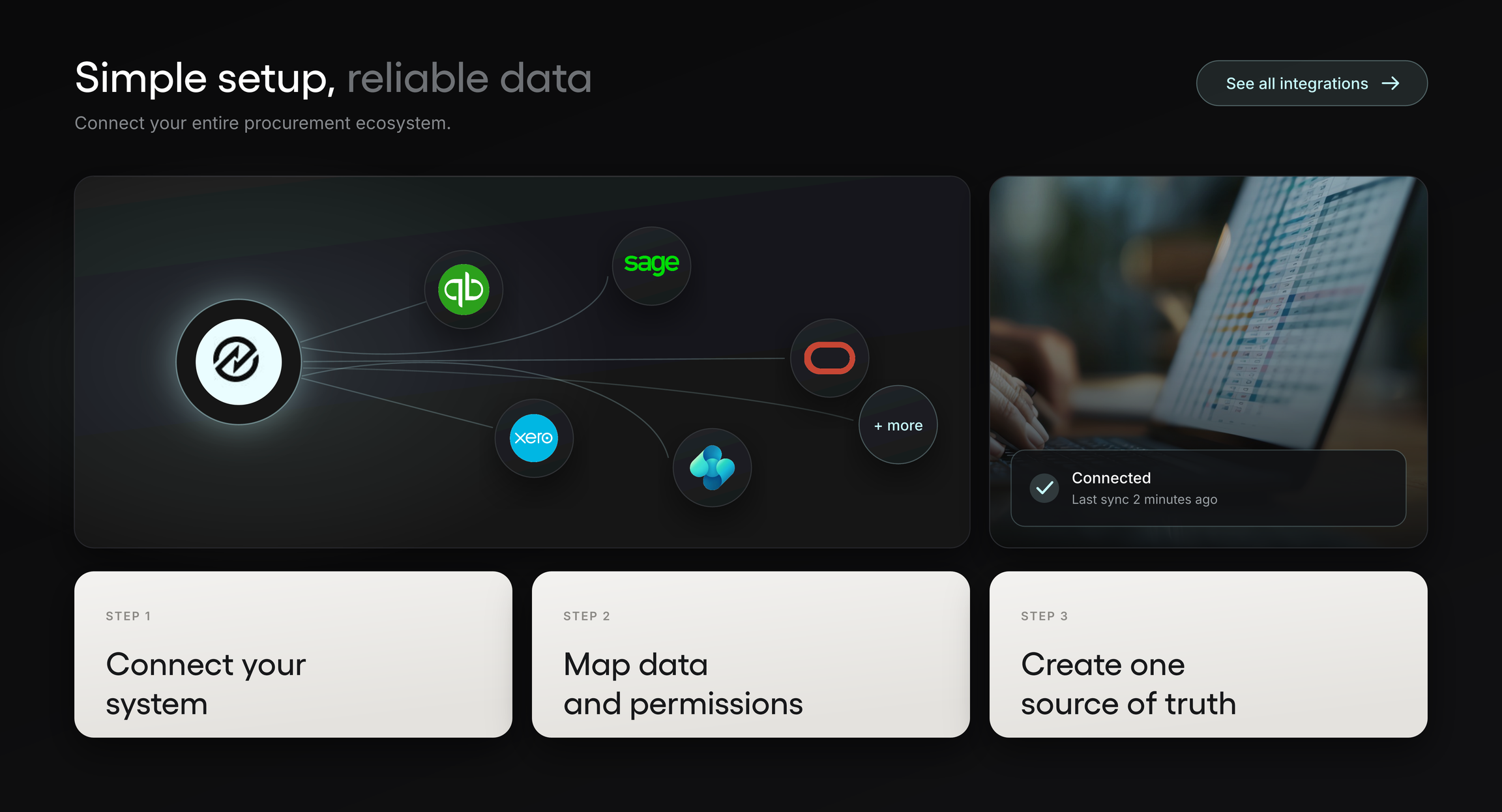
Matching also produces information the accounting system wants. Tradogram integrations connect to QuickBooks Online and QuickBooks Desktop, Xero, Sage, Oracle NetSuite, Microsoft Dynamics 365 Business Central, and more, using REST APIs and EDI for everything else.
Worth checking: whichever system you evaluate, ask the demo to show you a purchase that goes wrong. A partial delivery, an invoice that doesn't match, an approval that needs to skip a level. Any system looks good moving a clean order from request to payment. What you're buying is how it handles the ones that don't go cleanly.
What to look for when comparing purchase order software
Most vendor comparisons list features everyone has. These are the questions that actually separate systems, and they're worth asking whether or not Tradogram is on your list.
Can you configure approval rules yourself? Ask to see an administrator create a new rule during the demo, not a pre-built one. Then ask what happens when your CFO wants a threshold changed in month four. If the answer involves a support ticket or professional services hours, your approval policy is now on someone else's schedule.
How does the system record confirmation for purchases with no delivery? A consulting engagement, a maintenance contract, and an annual software renewal all require someone to confirm the work was completed before an invoice is approved.
What does the accounting integration actually sync, and what does it cost? Get specific: purchase orders, invoices, suppliers, chart of accounts, in which direction, and how often. Then ask whether the integration is included or priced separately, because many are add-ons, and a plan comparison that ignores that isn't a real comparison.
Can the system show committed spend? Approved orders that haven't been invoiced yet are the number your budget owners can't see today. Ask to see the report, not a description of it.
What do suppliers have to do? If your suppliers need to create accounts, learn a portal, and change how they invoice, that's a rollout cost you'll pay in follow-up emails. Ask what the minimum viable supplier experience looks like.
What happens in month seven? Who administers it, what support is included, and what it costs to add users as you grow. Per-user pricing that's comfortable at 10 users deserves a second look at 40.
One more thing worth knowing before you start looking. The fear behind most delayed decisions here isn't cost; it's that the transition will break purchasing while everyone learns a new system.
It's largely avoidable, and mostly through sequencing: agree on your approval thresholds before anyone configures anything, start with one department rather than the whole organization, and keep the template available as a fallback through the first cycle.
Worth checking: ask every vendor the same three questions in the same order, and write down the answers before the next demo. Demos are persuasive in the room and hard to compare afterward; the vendor who is clearest about limitations is usually the one to trust.
What to take away
The decision comes down to four things.
Your template isn't the problem, and neither is your team. A purchase order form does one job well. It records what was ordered. If the approval, the budget check, the receiving confirmation, and the invoice review are all happening somewhere else, that's not a failure of the document or the people using it. It's a job the document was never built to do.
Watch the connection points, not the volume. Two hundred orders per month with one buyer and one approver are manageable. Forty orders across four departments, three budget owners, and two funding sources is not. Count the people who must decide on a purchase before it becomes an order. That number tells you more than anything on your PO log.
Three signals is the line worth taking seriously. One or two of the eight can be fixed directly: tighten the numbering, add a field, agree on one master file. Three or more usually means the fixes are stacking up faster than they're holding, and the constraint isn't the template's design.
Know exactly what's missing. Your accounting system may already cover part of this, and 20 minutes with whoever administers it will tell you. Test three things: whether it can route an approval by more than one rule, warn you before a purchase breaks a budget, and record what actually arrived. Knowing which of those you're missing beats a general sense of how hard purchasing is.
And one thing that isn't a takeaway so much as permission: if the honest answer is that your template still fits, keep it. Spend the budget on something that's actually broken.
For everyone else, the shape of the improvement is fairly consistent. Requests are routed by rules rather than by memory. Approvers see the budget impact while the decision is still open. Deliveries get recorded by the person who received them. And the invoice arrives with something real to match against.
If that's the change you're after, book a demo and ask to see one messy purchase move through the system: a partial delivery, an invoice that doesn't match, an approval that needs to skip a level. That's the thirty minutes that will tell you whether Tradogram will improve your process.