

If you've searched for the best procure-to-pay software as you go into 2027, you've probably noticed a pattern. Most lists are written by vendors, and each vendor ranks itself first. Many lists put enterprise suites next to tools built for a 15-person office, and most leave out pricing. That makes it hard to tell which platforms fit a company your size or what they would cost to run.
Here's how we tried to make this list useful. We judged every platform on how well it fits organizations with 50 to 500 employees. We used the prices each vendor publishes on its own website, and we named the situations where Tradogram isn't the right choice.
Since 2014, Tradogram has helped organizations move purchasing out of email and spreadsheets without the weight of an enterprise rollout. That work shaped the four questions behind our picks:
- Does the platform cover the whole workflow, from request to payment?
- Will occasional requesters actually use it?
- Does it sync with the accounting or ERP system you run now, and the one you'll run in three years?
- How quickly can your first workflow go live?
Below you'll find our top procure-to-pay software picks with a "best for" label on each. After that comes a plain explanation of what P2P software covers, seven questions to bring to each demo, and fair entries for eight platforms with prices and the implementation times each vendor states. A side-by-side comparison table sums it all up.
Here's the short version first.
The short answer: The best procure-to-pay software for a mid-sized company covers requests, approvals, purchase orders, receiving, invoice matching, and payment in one system. It also syncs with your accounting or ERP system and is simple enough for occasional requesters. For teams of 50 to 500 employees, Tradogram, Procurify, Precoro, and ProcureDesk fit best. Zip and Coupa stretch into the enterprise, and Jaggaer and Ivalua suit larger, more complex organizations.
Key Takeaways
- Mid-sized companies should rank procure-to-pay software by fit, not feature breadth. Workflow coverage, adoption by occasional requesters, accounting or ERP fit, and time to a first live workflow predict success better for a 50- to 500-employee team than the length of a feature list.
- Corporate card and AP automation tools are not procure-to-pay software. Card and AP tools control the payment after a purchase is made, while P2P software controls the commitment before the order is placed, through requests, approvals, budgets, and purchase orders.
- The seat model can change the cost of P2P software more than the published price. Vendors count users differently, from tiers with 10 or 20 included users to unlimited free requesters, so counting requesters and approvers comes before comparing prices.
- Vendor implementation timelines often measure different milestones. A first live workflow and full go-live with receiving, budgets, and invoice matching are different finish lines, so buyers should ask which one a quoted timeline describes.
- An organization's most complex site determines the P2P tier it needs. Multi-entity accounting, project budgets, and receiving at remote locations are where lighter purchasing tools tend to break down.
The best P2P software for mid-sized companies at a glance
Eight platforms made our shortlist, and they fall into three groups. Four are built for the mid-market. Two stretch from the mid-market into the enterprise. The last two are enterprise source-to-pay suites, included because they show up on almost every list and you deserve to know where they fit.
| Platform | Group | Best for | Starting price (as published) |
|---|---|---|---|
| Tradogram | Built for mid-market | Mid-sized and multi-site teams that want full P2P without an enterprise rollout | $99/month (Essentials); full P2P on Premium, custom quote |
| Procurify | Built for mid-market | Teams with many occasional requesters who want modular add-ons | Custom quote |
| Precoro | Built for mid-market | Teams that want published, tiered pricing and fast onboarding | From $499/month, billed annually |
| ProcureDesk | Built for mid-market | QuickBooks and NetSuite finance teams at 100 to 1,000 employees | From $830/month for 10 users, billed annually |
| Zip | Mid-market to enterprise | Organizations whose requests need legal, IT, and security review | Custom quote |
| Coupa | Mid-market to enterprise | Larger organizations that want a broad spend management suite | Custom quote |
| Jaggaer | Enterprise source-to-pay | Large manufacturers and universities with direct-materials sourcing | Custom quote |
| Ivalua | Enterprise source-to-pay | Enterprises that want sourcing, contracts, and P2P on one data model | Custom quote |
Prices as of November 2026, taken from each vendor's own website. Prices change, and some exclude implementation fees or add-on modules. Check each vendor's pricing page before you budget.
How we evaluated
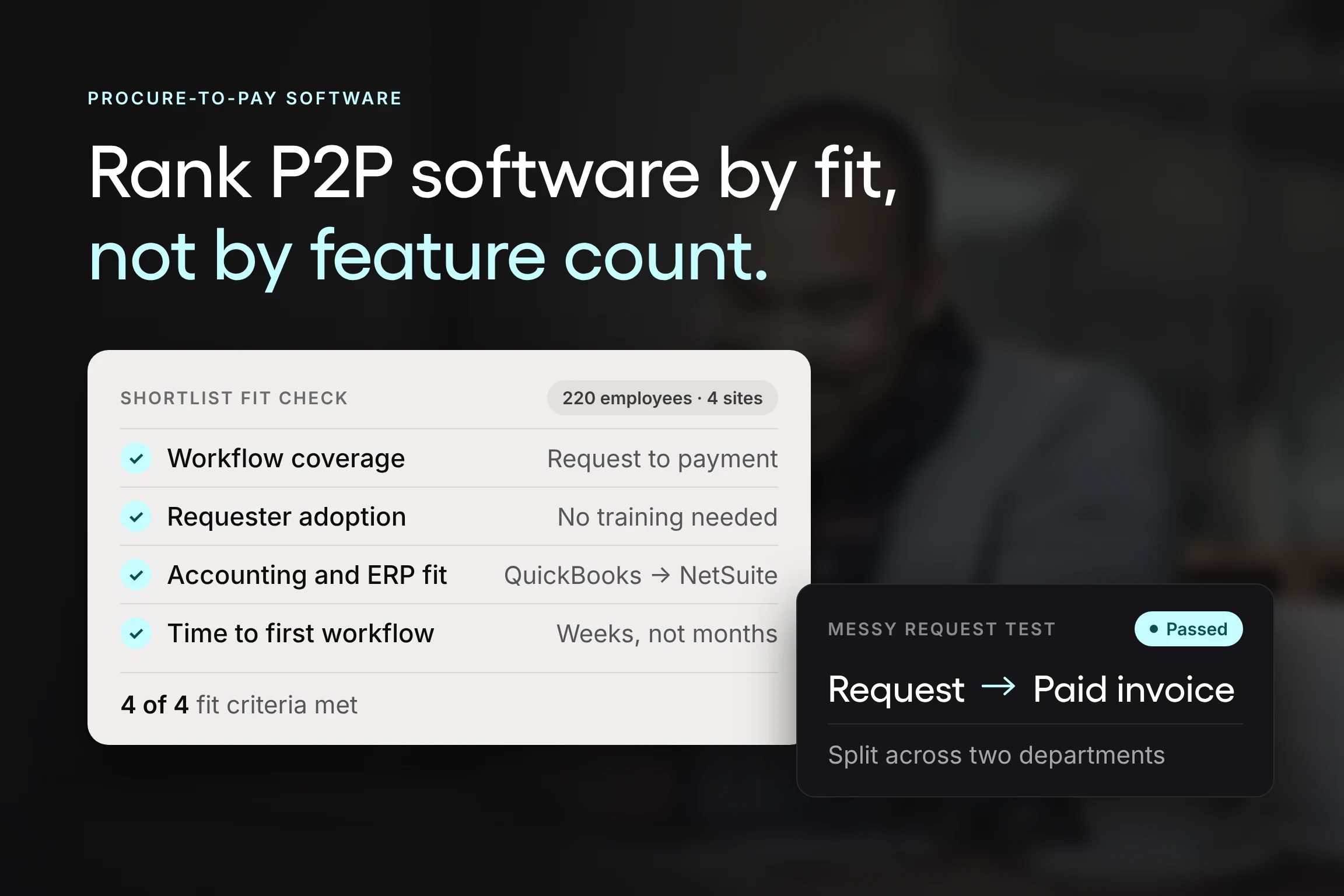
We scored each platform on four fit criteria for organizations with 50 to 500 employees:
- Workflow coverage: Does one system hold the request, approval, purchase order, receipt, invoice, and payment?
- Adoption: Can someone who submits two requests a month do it without training?
- Accounting and ERP fit: Does it sync with QuickBooks, Xero, Sage, NetSuite, or Business Central, and in which direction?
- Time to first workflow: How long until real requests run through the system?
Pricing comes from vendors' own pages. Implementation times are the vendors' own stated ranges, attributed to them. We didn't use ratings or prices quoted in other vendors' lists.
What procure-to-pay software does (and what it doesn't)
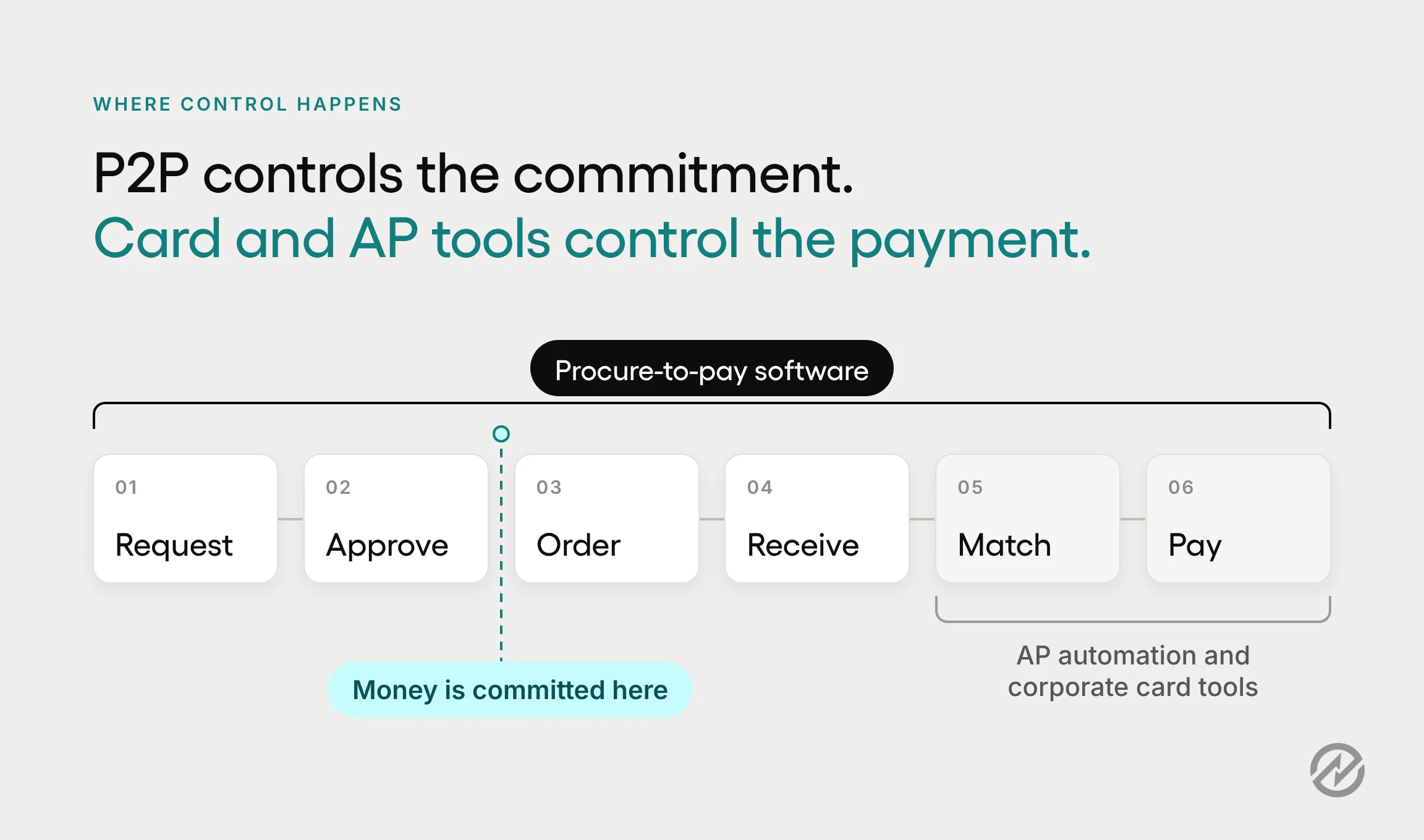
What is procure-to-pay software? Procure-to-pay (P2P) software manages company purchasing from the first request to the supplier payment. It holds requisitions, approvals, purchase orders, receiving, invoice matching, and payment in one system. Each step creates a record that the next step checks, so finance can see what was committed before the invoice arrives.
A P2P system runs six connected stages:
- Request: An employee describes what they need, from which supplier, and against which budget.
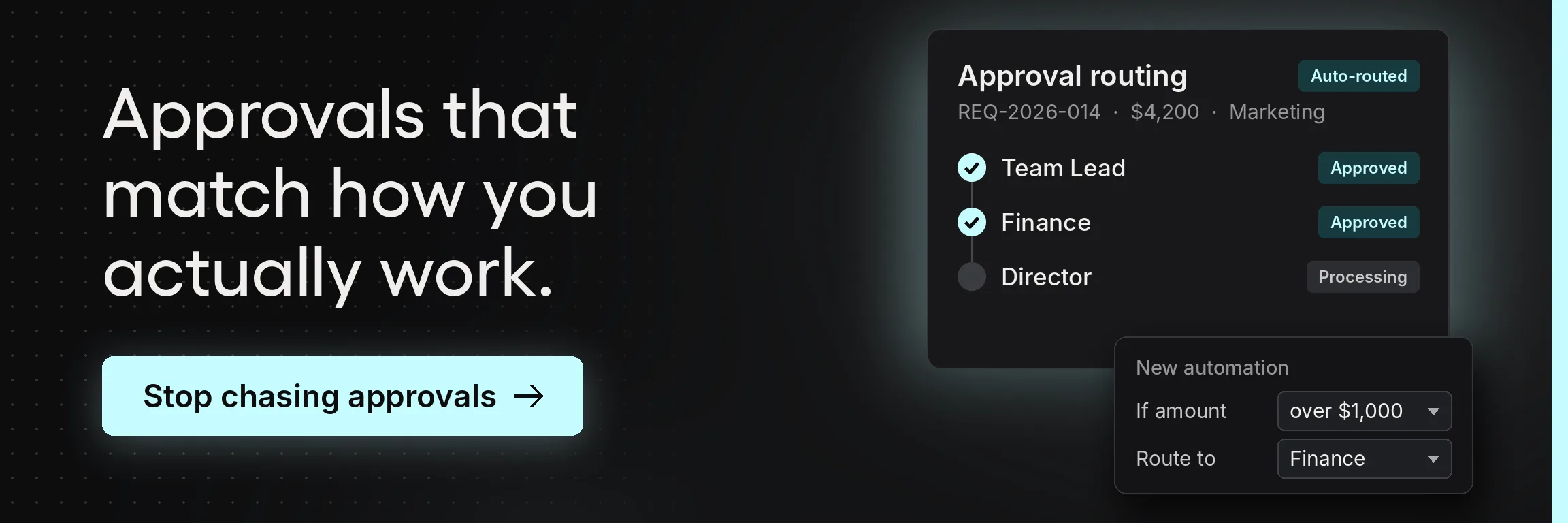
- Approve: The request routes by amount, department, project, or GL code.
- Order: The approved request becomes a purchase order.
- Receive: Someone records what arrived, including partial deliveries.
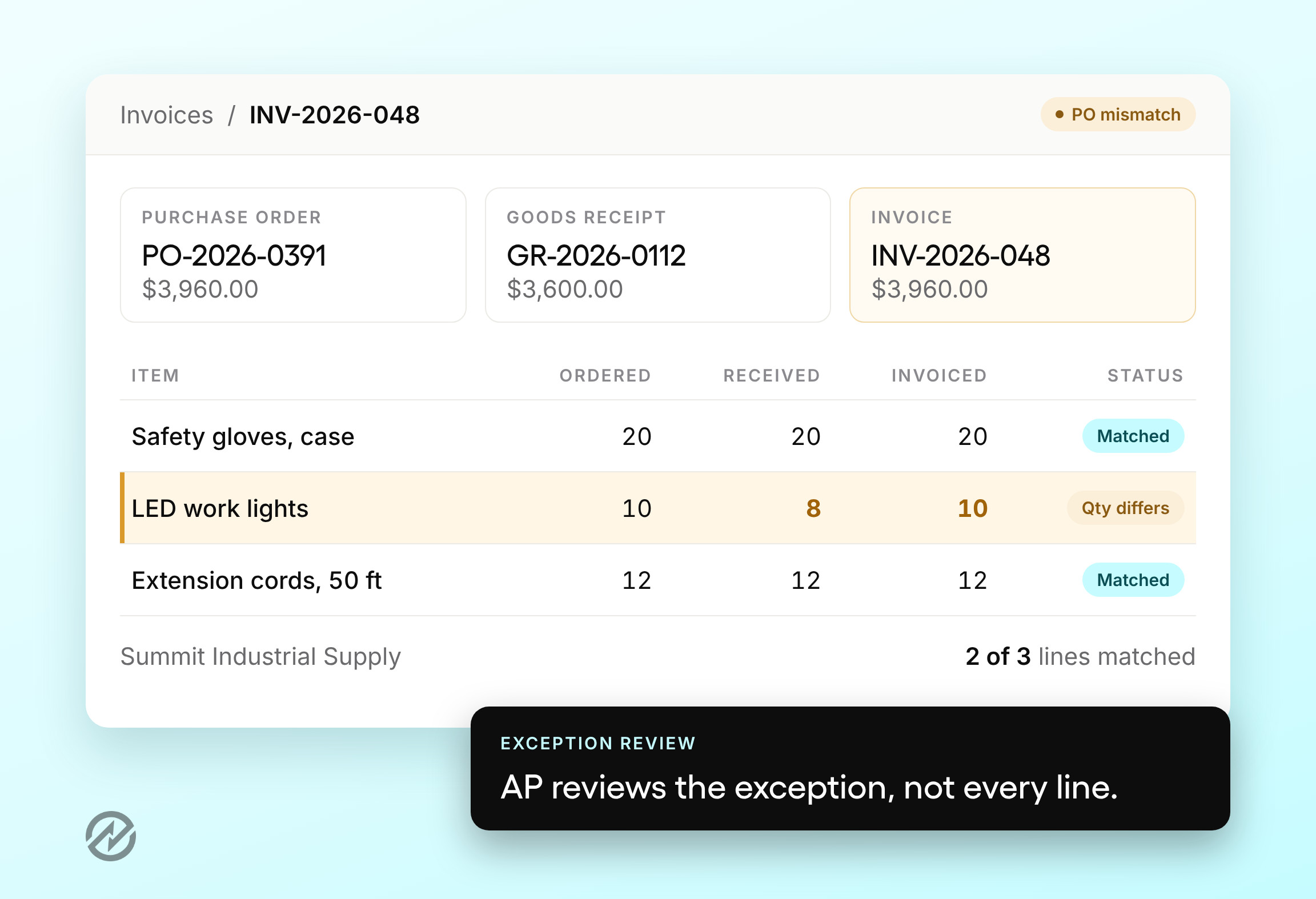
- Match: The invoice is checked against the purchase order and receipt (three-way matching).
- Pay: The verified invoice is paid or synced to accounting for payment.
Our procure-to-pay process guide covers each stage in depth. Here, the more useful point is what P2P software is not.
Why card and AP tools aren't P2P software
Corporate card, expense, and accounts payable (AP) automation tools control the payment after a purchase is made. P2P software controls the commitment before anyone places the order.
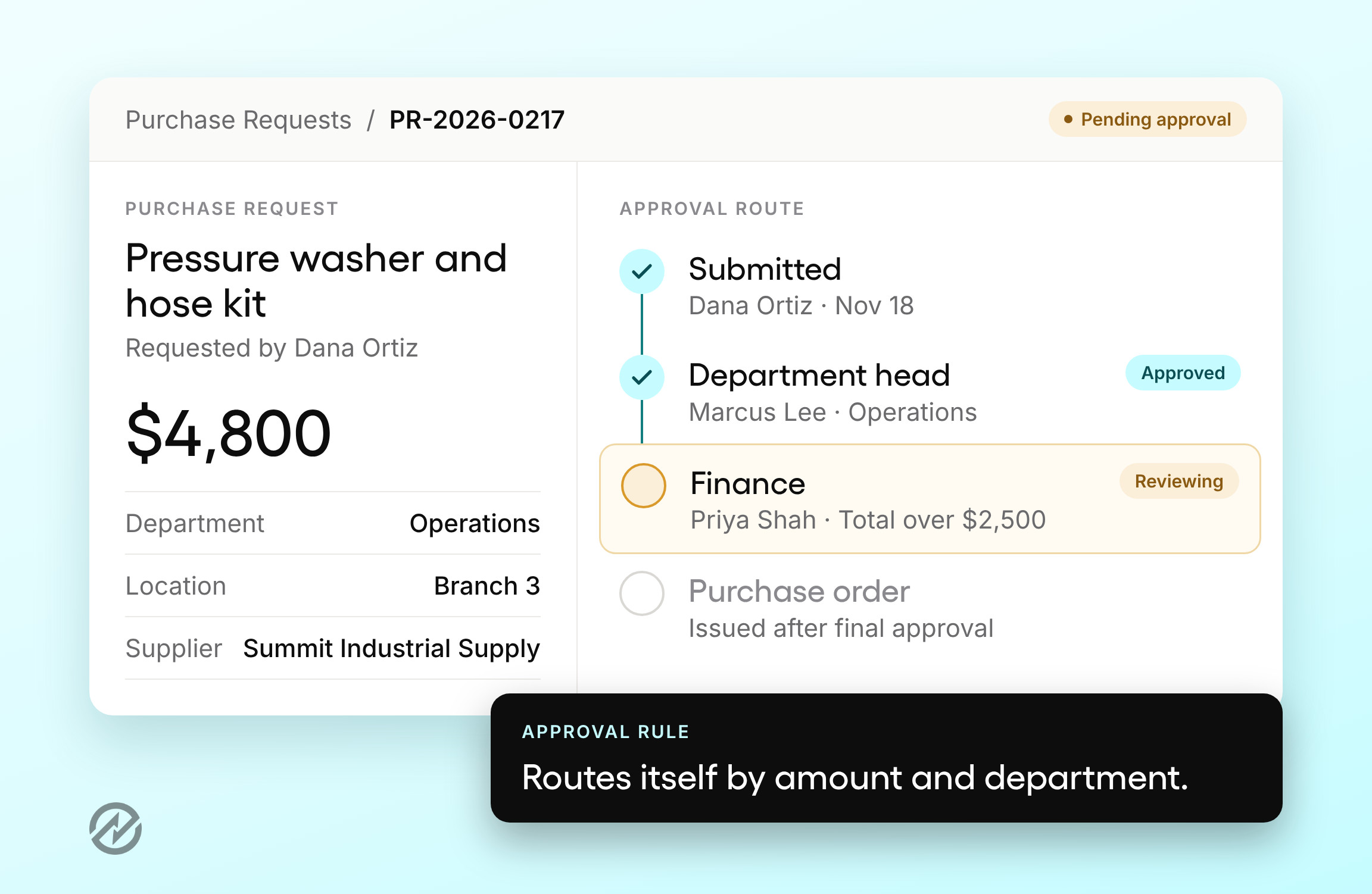
Picture a $4,800 equipment order. On a corporate card, the spend appears in a feed the next day. With AP automation, the invoice is captured and paid weeks later. Either way, the money is already spent. A P2P system would have sent the request to the budget owner first and issued a purchase order only after approval.
The confusion is understandable. G2's procure-to-pay category requires purchase orders, approvals, three-way matching, spend controls, and supplier management, yet it also lists card and expense platforms. If purchases happen before anyone approves them, a card or AP tool alone won't fix that.
P2P also sits inside a larger category. Source-to-pay (S2P) adds sourcing events, supplier selection, and contracts before a request exists. Most mid-sized teams start with P2P and add sourcing later.
So when does a company actually need this?
Why mid-sized teams outgrow starter tools, and why enterprise suites overshoot
Purchasing usually breaks when it spreads out. A second site, a new department with its own budget, or a project buying from a dozen suppliers adds approvers and places for a request to stall. The process that worked when one person saw every purchase stops working when no one does.
We'll follow one company through the rest of this article.
An illustrative example: A 220-person building services company runs four branches. Requests arrive by email and text. Each branch manager approves purchases differently, some by replying "ok" from a phone. Finance sees spend only when invoices land in QuickBooks Online, often weeks later. The company plans to move to NetSuite within 18 months.
This company has a purchasing process. It just lives in inboxes, spreadsheets, and the memory of the longest-serving controller. That kind of fragmented procurement system holds up until something forces the question: a failed audit, a budget surprise, a new branch, or a new procurement hire asking where the approval records are.
Your accounting system sees invoices, not commitments
The usual response is "our accounting system already does POs." Many do. What they rarely handle well is the work before the purchase order: collecting a complete request, routing it by amount and department, and checking it against what's already committed.
So approvals stay in email, and accounting records the result afterward. Our example controller learns that Branch 3 bought a $9,000 compressor when the bill arrives, with no record of who approved it.
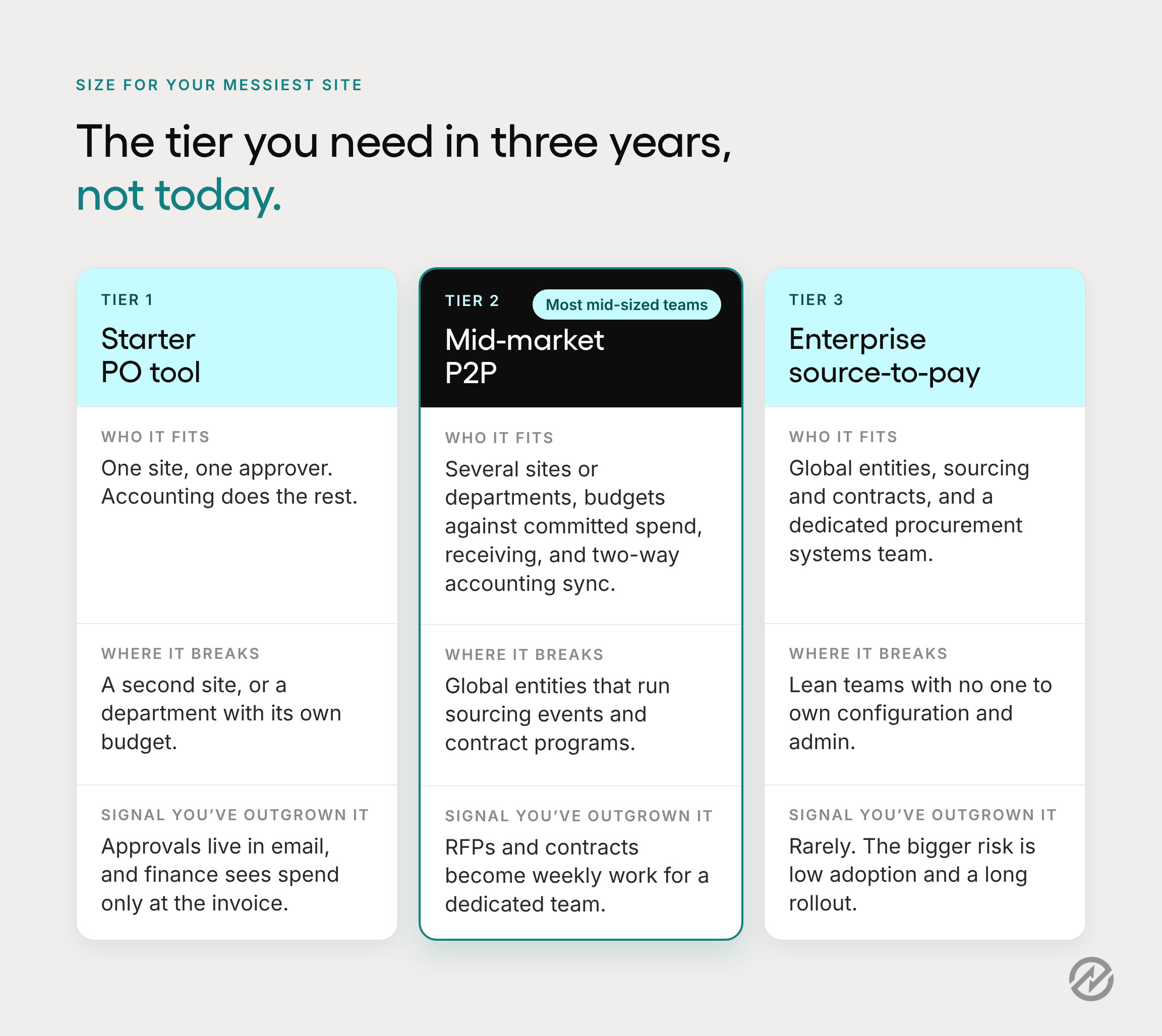
Your messiest site sets the tier you need
Teams often picture their simplest location when sizing up P2P software. The hardest one matters more. Lighter tools tend to break at multi-entity accounting, project or job budgets, and receiving at remote locations.
Our example company's head office could manage with a basic PO tool. Its branches can't, because each receives deliveries on job sites and needs its own budget.
Why an enterprise suite isn't automatically the safe choice
Enterprise suites solve control thoroughly, but they bring longer implementations, more configuration, and an admin role someone has to own. For a procurement team of one to three people, the bigger risk is low adoption and a long rollout.
The practical target sits between the two: full request-to-payment control, simple enough that a branch manager uses it from a phone.
With fewer than about 50 employees, start with our guide to procurement software for small business. Still mapping your current process? The free procure-to-pay handbook can help.
How to evaluate procure-to-pay software
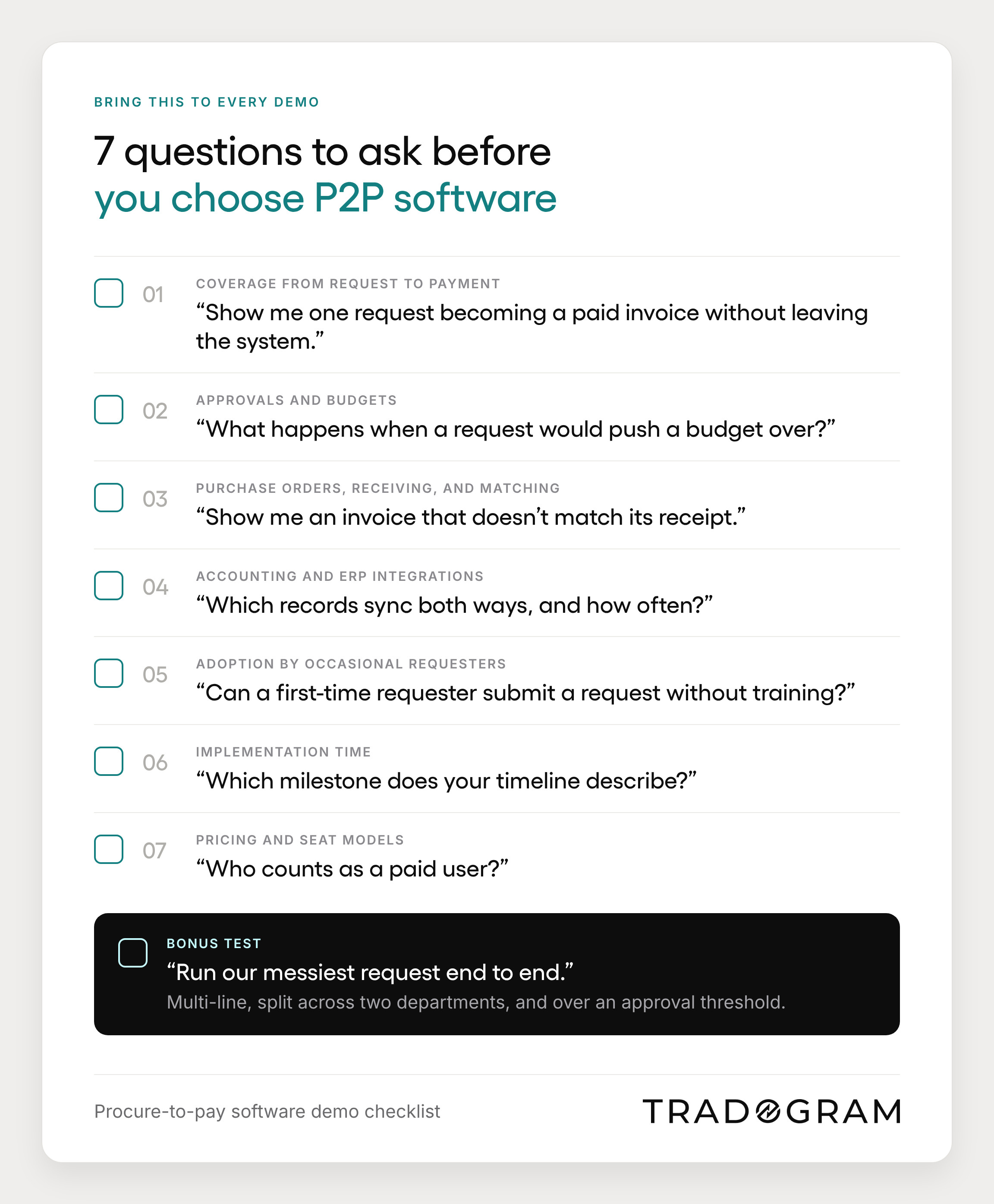
A good procure-to-pay system evaluation compares seven things. Each criterion below ends with one question to ask on the demo, so a feature tour becomes a test of how well the tool fits the way your organization buys.
1. Coverage from request to payment
Does one system hold every stage? Some P2P automation software is strong at purchase orders but sends you elsewhere for receiving. Others handle invoices well but treat requests as an afterthought. Every handoff between tools is a place where records stop matching.
Ask on the demo: "Show me one request becoming a paid invoice without leaving the system."
2. Approvals and budgets
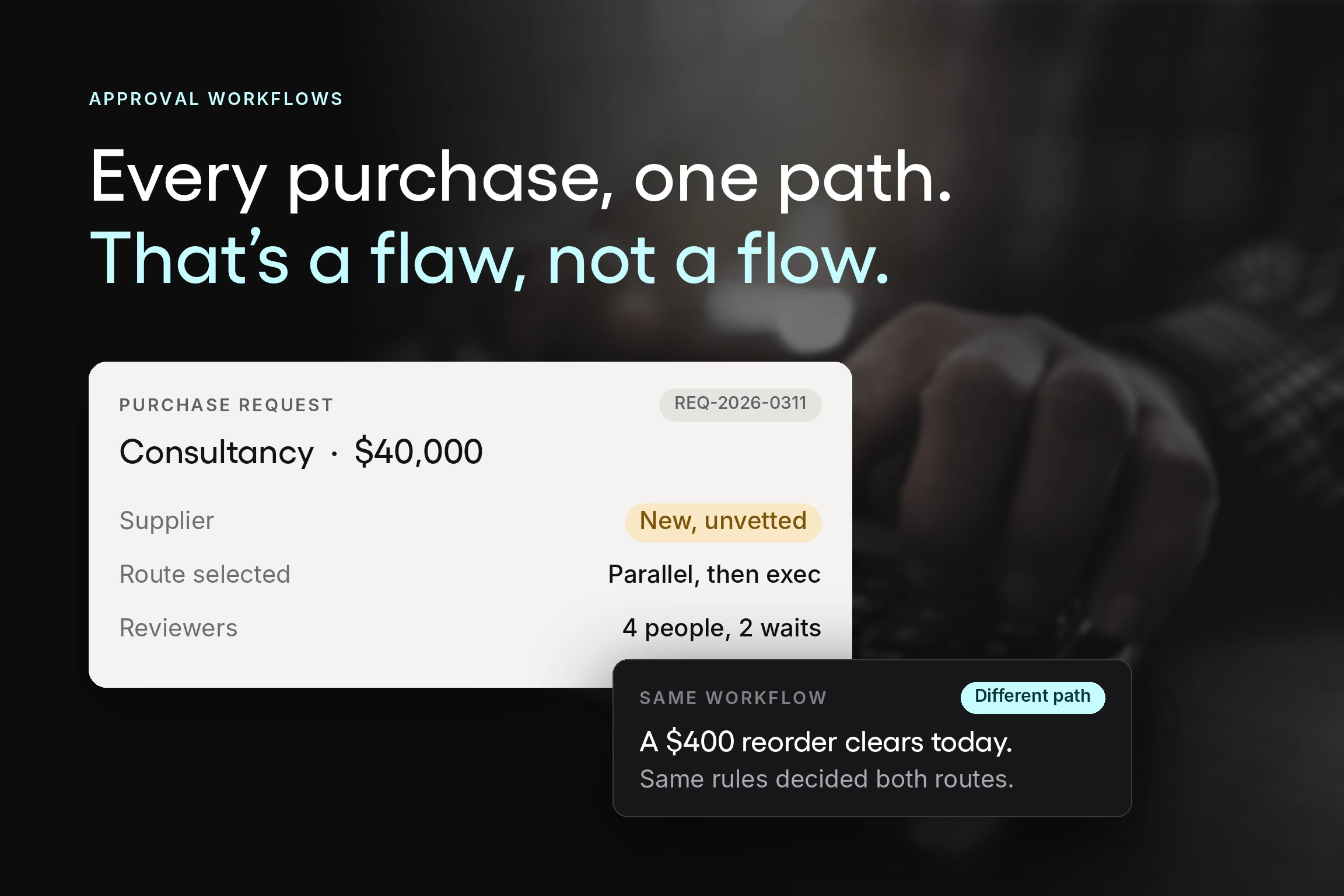
Approvals should route by rules you define: amount, department, location, GL code, or project. Stronger tools also check each request against committed spend, the purchase orders approved but not yet invoiced. That's the number a budget owner needs, and accounting won't show it until the bills arrive.
In our example company, a branch manager approves anything under $2,500, and larger requests also go to finance with the branch budget shown. Look for purchase approval software that handles this without custom code, and procurement spend management software that tracks commitments by cost center, department, or project.
Ask on the demo: "What happens when a request would push a budget over?"
3. Purchase orders, receiving, and invoice matching
Three-way matching compares the invoice with the purchase order and receiving record. It only works if receiving is easy enough that people record it, including partial deliveries to job sites. Check how purchase order management software handles change orders and how invoice matching software flags price or quantity differences. New to the check itself? Here's how 3-way matching in accounts payable works.
Ask on the demo: "Show me an invoice that doesn't match its receipt."
4. Accounting and ERP integrations
Integrations come as native connectors, API access, or file exports, and native is the easiest to run. Direction matters too. A one-way sync pushes bills into accounting. A two-way sync keeps suppliers, GL codes, and payment status aligned in both systems.
Plan for the system you'll run in three years. Our example company would face a second migration with a QuickBooks-only tool. Compare each vendor against your roadmap, whether that means a NetSuite procurement integration, a QuickBooks Online procurement integration, or a Xero procurement integration.
Ask on the demo: "Which records sync both ways, and how often?"
5. Adoption by occasional requesters
Most people in a P2P system are supervisors, teachers, site leads, and office managers who submit a few requests a month. If the request form feels like an accounting screen, they'll go back to email. Look for simple forms, mobile approvals, and email approvals for people who rarely log in.
Ask on the demo: "Can a first-time requester submit a request without training?"
6. Implementation time
Vendors measure implementation against different milestones. One may mean your first working workflow, usually requests and approvals. Another may mean full go-live with purchase orders, receiving, budgets, matching, and accounting sync.
Vendor-stated ranges show the spread. Tradogram says teams go live in weeks, not months. Precoro lists onboarding of two to eight weeks, and ProcureDesk says it deploys in two to four weeks. Whichever vendor you choose, the first workflow moves fastest when your supplier list, users, departments, and approval rules are clean before kickoff. Our checklist of nine things to prepare before onboarding covers each one.
Ask on the demo: "Which milestone does your timeline describe?"
7. Pricing and seat models
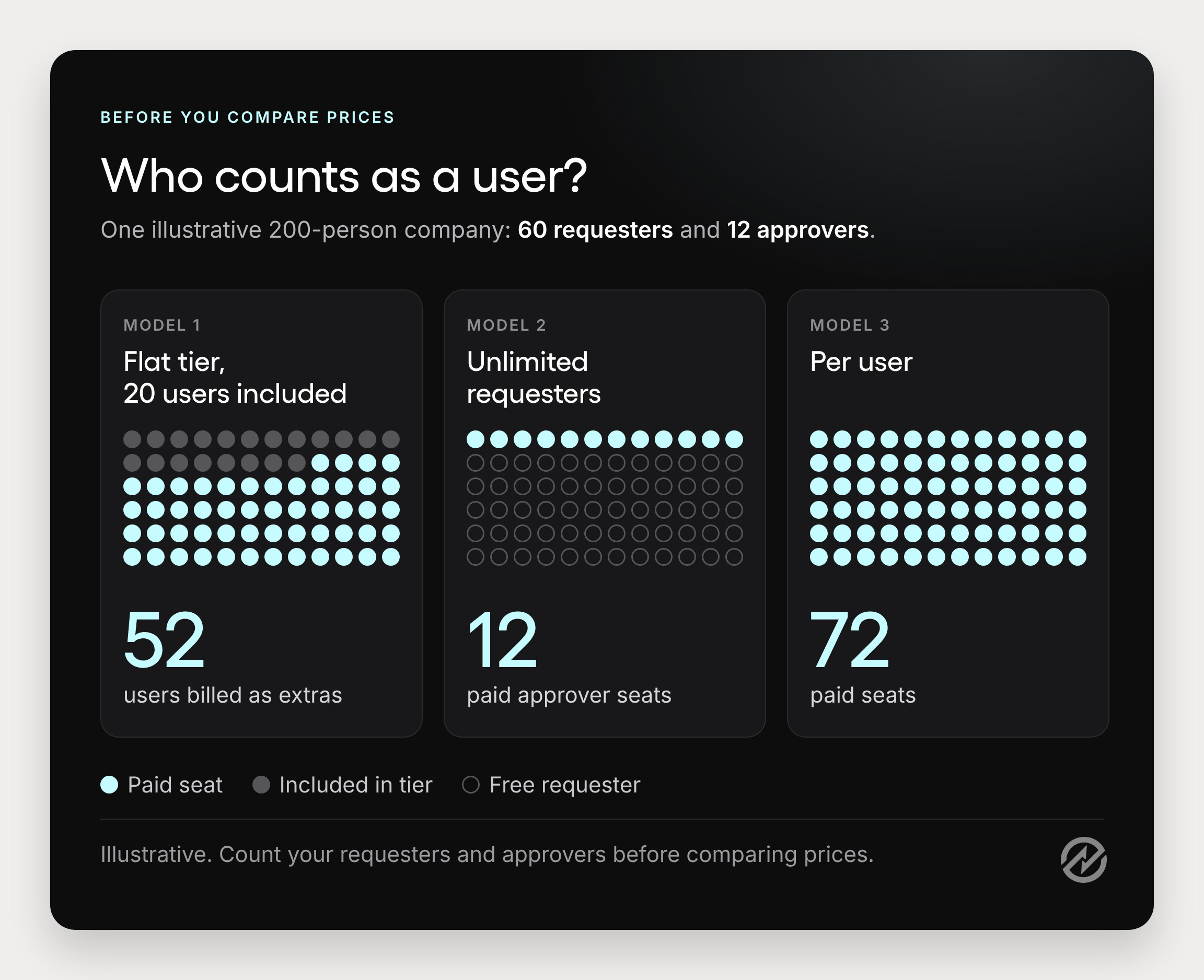
The seat model often matters more than the sticker price. Mid-market P2P tools price in four common ways:
- Flat tier with included users: A monthly price covers a set number of users, plus a fee per extra user.
- Unlimited requesters: People who only submit requests are free, and approvers or buyers are paid.
- Modular quote: A base platform plus priced add-ons for AP, contracts, or cards.
- Enterprise custom: Pricing negotiated per deal by modules, volume, and services.
Count requesters and approvers before comparing prices. A 200-person company might have 60 requesters and 12 approvers: 72 paid seats under one model, 12 under another. Then ask what sits outside the base price, since integrations, single sign-on (SSO), API access, and implementation fees are often extra.
Ask on the demo: "Who counts as a paid user?"
Run the messy request test
Demo polish and feature counts are poor predictors of fit. Instead, bring one real request that's multi-line, split across two departments, and over an approval threshold. Ask every vendor to run it end to end, receive half of it, and match an invoice that's slightly off.
The best procure-to-pay software platforms, compared
These procure-to-pay software vendors are listed in the same order as the quick-picks table, from built-for-mid-market to enterprise. Each entry follows the same template, and all prices and timelines come from the vendor's own website as of November 2026.
Tradogram
Best for: Mid-sized and multi-site teams that want full P2P without an enterprise rollout.
What it covers: Requisitions, approval routing by amount, department, GL code, or project, purchase orders, receiving, three-way matching, supplier payments, budgets tracked against committed spend, and reporting. Purchase orders can start from a requisition, an online cart (TradoCart), or a scanned quote. TradoScan uses AI to read invoices and quotes into structured data, and TradoPay handles supplier payments.
Pricing: Essentials is $99 per month, or $950.40 per year billed annually, and covers purchase orders, suppliers, invoices, TradoPay, and TradoScan. Requisitions, receiving, budget tracking, and custom approvals start on Premium (custom quote, 20+ users). Scale is a custom quote with unlimited users. Additional user fees apply, and integrations, SSO, API access, and PunchOut are add-ons. See Tradogram pricing.
Integrations: Native sync with QuickBooks Online, QuickBooks Desktop, Xero, NetSuite, Sage, and Microsoft Dynamics 365 Business Central, plus an API.
Implementation: Tradogram says teams go live in weeks, not months.
Tradeoffs: Full P2P requires Premium, and accounting integrations cost extra. Tradogram isn't built for AP-only needs, for organizations where one person makes every purchase, or for global enterprises with a dedicated procurement systems team.
Shortlist it if: You buy across sites, projects, or entities and want procure-to-pay software that brings control without an enterprise program. Smaller teams can start on Essentials and add the rest later.
Procurify
Best for: Teams with many occasional requesters who want modular add-ons.
What it covers: A Platform and Purchasing base, with Accounts Payable, Expense and Card, Contracts, and Guided Intake as add-on modules.
Pricing: Quote-only, depending on the modules you choose. Procurify's pricing page notes unlimited Basic users, the people who mainly submit requests.
Integrations: Connects with common mid-market accounting and ERP systems. Confirm your system and sync direction on the demo.
Implementation: Not published.
Tradeoffs: No published price makes early budgeting harder, and full request-to-payment coverage depends on which add-ons you buy.
Shortlist it if: Many of your staff request occasionally and you want them included without paying per seat.
Precoro
Best for: Teams that want published, tiered pricing and fast onboarding.
What it covers: Requests, approvals, purchase orders, receiving, budgets, and invoices. Core includes two- and three-way matching and invoice payments. AI invoice capture sits in the Automation plan.
Pricing: Core starts at $499 per month and Automation at $999 per month, both billed annually. Enterprise is a custom quote.
Integrations: QuickBooks Online and Xero on Core. ERP and custom integrations on Enterprise.
Implementation: Precoro lists onboarding of two to eight weeks.
Tradeoffs: Some automation and ERP integrations require higher tiers, so a team planning an ERP move should price the tier it will need later.
Shortlist it if: You want published prices before a sales call and run QuickBooks Online or Xero today.
ProcureDesk
Best for: QuickBooks and NetSuite finance teams at 100 to 1,000 employees.
What it covers: Purchase requests, approvals, purchase orders, receiving, AP automation, and budgets, positioned for finance-led teams.
Pricing: Startup is $830 per month for 10 users and Growth is $1,250 per month for 20 users, billed annually. Each extra user is $20 per month.
Integrations: QuickBooks, Sage Intacct, NetSuite, and Microsoft Dynamics 365 Business Central.
Implementation: ProcureDesk says it deploys in two to four weeks.
Tradeoffs: Included user counts are low for a company with many requesters, so seat costs climb as you add people.
Shortlist it if: You're a finance-led team on QuickBooks or NetSuite that wants published pricing and a short deployment.
Zip
Best for: Organizations whose requests need legal, IT, and security review.
What it covers: Intake-to-pay: request intake, multi-team approvals, purchase orders, invoices, and payments to suppliers in 140+ countries, with major ERP integrations.
Pricing and implementation: Not published.
Tradeoffs: Zip is built around complex intake and cross-functional review, which a 150-person company buying supplies, equipment, and services may not need.
Shortlist it if: Your biggest problem is getting software and vendor requests through legal, security, and IT.
Coupa
Best for: Larger organizations that want a broad spend management suite.
What it covers: P2P inside Coupa's Total Spend Management suite, including guided buying, invoicing, payments, fraud alerts (SpendGuard), sourcing, and contracts, with broad ERP coverage.
Pricing and implementation: Not published.
Tradeoffs: The suite's breadth brings rollout and admin weight that a one- to three-person procurement team will feel.
Shortlist it if: You're at the top of the mid-market, expect to need sourcing and contracts soon, and can staff a system owner.
Jaggaer
Best for: Large manufacturers and universities with direct-materials sourcing.
What it covers: Source-to-pay with depth in direct materials, sourcing, and supplier management, alongside P2P and enterprise ERP integrations.
Pricing and implementation: Not published.
Tradeoffs: Jaggaer positions itself for large, complex organizations in manufacturing, higher education, and healthcare. Most 50- to 500-employee teams will use a fraction of it.
Shortlist it if: Direct-materials sourcing is central to your business and you're closer to enterprise scale.
Ivalua
Best for: Enterprises that want sourcing, contracts, and P2P on one data model.
What it covers: Source-to-pay on a single platform, including supplier management, sourcing, contracts, procurement, and invoicing. Ivalua describes itself as going well beyond simple P2P.
Pricing and implementation: Not published.
Tradeoffs: Expect a longer evaluation and implementation than with mid-market tools.
Shortlist it if: You need sourcing, contracts, and supplier management on one platform at enterprise scale.
P2P software comparison table
The table below puts the eight platforms side by side on size fit, coverage, pricing, and implementation. Where a vendor doesn't publish a figure, we say so instead of guessing.
| Platform | Company size fit | P2P coverage | Published pricing | Implementation (vendor-stated) | Best for |
|---|---|---|---|---|---|
| Tradogram | 50 to 500 employees, multi-site and multi-entity | Request to payment (full P2P on Premium) | Essentials $99/month; Premium and Scale custom | Weeks, not months | Full P2P without an enterprise rollout |
| Procurify | Mid-market | Purchasing base, with AP, cards, and contracts as add-ons | Not published | Not published | Many occasional requesters |
| Precoro | Mid-market | Request to payment; AI invoice capture on Automation | From $499/month, billed annually | 2 to 8 weeks onboarding | Published, tiered pricing |
| ProcureDesk | 100 to 1,000 employees | Request to AP | From $830/month for 10 users, billed annually | 2 to 4 weeks | QuickBooks and NetSuite finance teams |
| Zip | Mid-market to enterprise | Intake to payment | Not published | Not published | Complex cross-team intake |
| Coupa | Upper mid-market to enterprise | P2P within a spend management suite | Not published | Not published | Broad spend management |
| Jaggaer | Enterprise | Source to pay | Not published | Not published | Direct-materials sourcing |
| Ivalua | Enterprise | Source to pay | Not published | Not published | Source-to-pay on one data model |
Sources: each vendor's own pricing and product pages, as of November 2026. Implementation times are each vendor's stated range and may describe different milestones. Prices may exclude implementation fees, add-on modules, and additional users.
P2P software for US, Canadian, and UK teams
Where you operate changes the vocabulary, the tax handling, and the accounting systems you connect. The core evaluation stays the same.
Terminology. Procure-to-pay is the common term in North America. In the UK and much of Europe, the same process is usually called purchase-to-pay, so purchase-to-pay software belongs to the same category.
Currency and tax. If you buy in more than one currency, check how the platform handles multi-currency purchase orders and payments. Ask how it records US sales tax, Canadian GST and HST, or UK VAT, and whether those amounts sync to accounting correctly. Also check which currency each vendor bills in. Tradogram's published plans, for example, are priced in US dollars.
Accounting systems. QuickBooks and NetSuite are common in the US, while QuickBooks, Sage, and Xero appear often in Canada and the UK. Confirm native support for the system each entity uses.
Build your shortlist, then test it
The right P2P platform for a mid-sized company covers request to payment at the complexity you'll have in three years, gets used by occasional requesters, and syncs with the accounting system you already run.
Pick your three and test them the same way. Bring one real request (the multi-line, two-department, over-threshold kind) and ask each vendor to run it end to end. Count your requesters and approvers before comparing prices, and ask which milestone each quoted timeline describes.
For our building services company, that test narrows the list fast. It needs branch budgets, receiving on job sites, and a sync that works with QuickBooks Online now and NetSuite later.
If Tradogram is on your list, we'll run your messy request through our procurement software during a live demo.