

It usually starts in a meeting. Someone from IT watches the purchasing team chase approvals through email and says, reasonably, "We already pay for Microsoft 365. I could build this in a few weeks."
They're probably right. In 2026, a capable IT generalist can stand up a request form and an approval flow quickly, and an AI coding tool can get a working prototype on screen in an afternoon. So the build vs buy procurement software question has changed. Whether you can build it is settled. What matters is what it costs to keep running after those few weeks, and who's on the hook when it breaks.
For most mid-market teams, buying procurement software costs less over three years than building it. A custom tool or Power Apps build can be cheap to launch, but the larger cost arrives later: developer time to maintain approvals, accounting sync, permissions, and audit trails. Building makes sense when you have a dedicated developer and a truly unique process.
This guide prices four build paths (custom code, an ERP extension, Power Apps, and an AI-built tool) against buying, with every assumption visible. It also gives you an honest test for when building is the better call. If you're newer to the category, start with what procurement software does, then come back with your build estimate in hand.
Key Takeaways
- Building a procurement tool is cheap to start in 2026, but owning it for three years usually costs more than buying. Maintenance, accounting sync, permissions, and audit trails keep consuming developer time long after launch.
- A fair build vs buy comparison sets three years of build costs against three years of subscription costs. Comparing a build's hours-to-launch with a vendor's multi-year license makes building look far cheaper than it is.
- AI coding tools shrink the first version of a build, not the work of owning it. Change testing, integration upkeep, access control, and audit records still need a person who understands the code.
- Most "unique" purchasing requirements are approval thresholds, routing rules, and document formats. In configurable procurement software, those are settings an administrator changes without a developer.
- Building procurement software makes sense only under specific conditions. The clearest one is a developer who will own the tool for years, alongside a process that is a real competitive advantage.
What does "building" procurement software actually mean for a mid-market team?
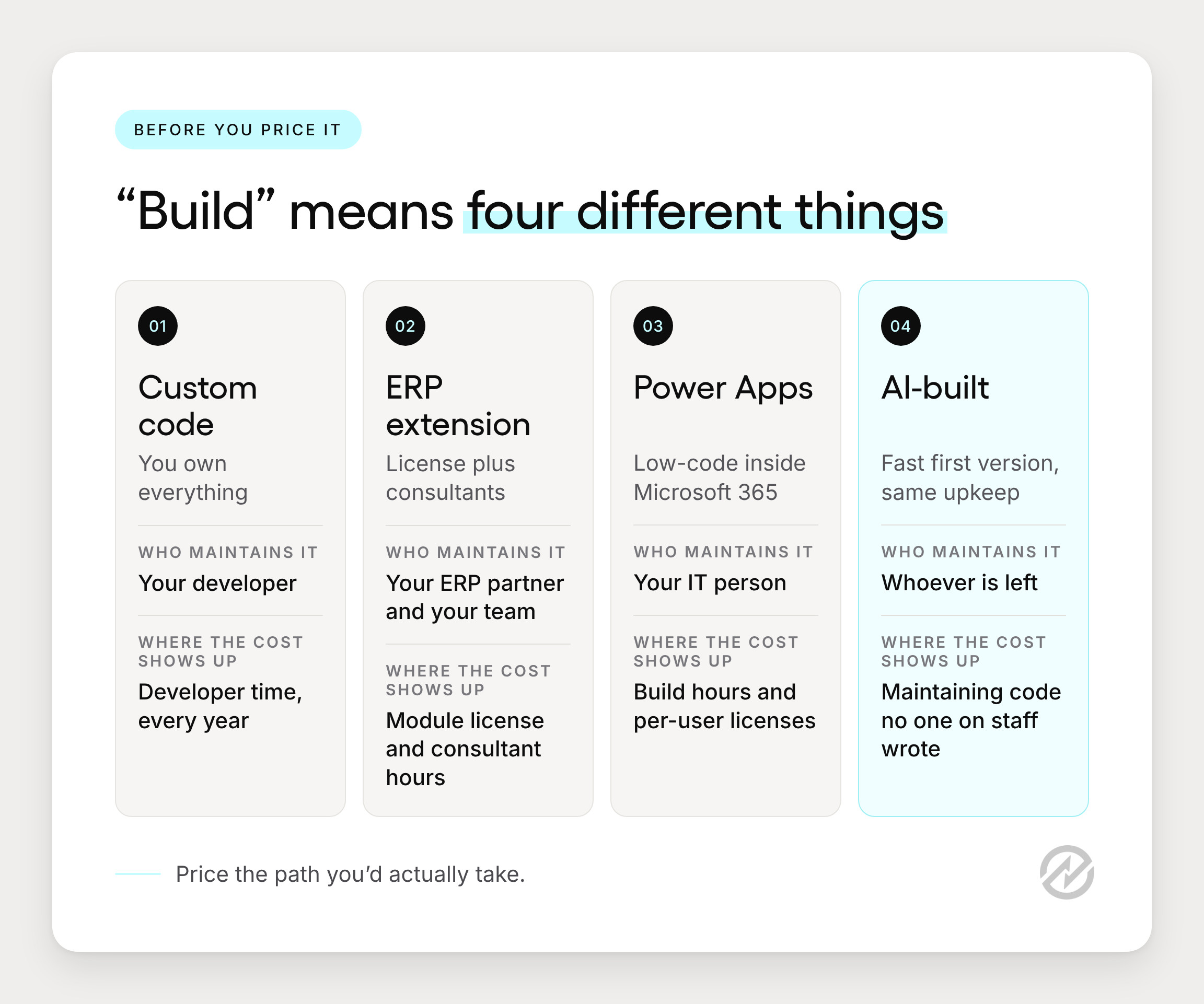
For a 50 to 500 person organization, building usually means one of three things: writing custom code, extending your ERP or accounting system, or assembling a low-code tool from SharePoint lists, Power Apps, and Power Automate. Each has a different cost profile, so price the one you'd actually take.
To keep this concrete, picture a 180-person nonprofit with three locations, QuickBooks Online, Microsoft 365, and one IT generalist. Approvals depend on the purchase amount and which program budget it hits. (This is an illustrative scenario, and we'll come back to it.) If that sounds familiar, our guide to procurement for non-profits covers the grant and program-budget side in more depth.
Custom code
In-house software development gives you full control and full ownership. Someone designs the database, writes the request and approval screens, builds the purchase order (PO) output, and connects it to accounting. It's the most flexible path and the one most dependent on a single person staying.
Extending your ERP
Many accounting and ERP systems offer a purchasing module. Turning it on usually means a module license plus consultant hours to configure it. That's a purchase with a build attached, so compare it like one. Our post on extending your ERP vs a dedicated tool goes deeper on that choice.
SharePoint and Power Apps
This is the option the IT generalist at our nonprofit sketches first: a SharePoint list for requests, a Power Apps form on top, and a Power Automate flow for approvals. It feels free inside Microsoft 365. The licensing changes once the app needs premium connectors or Dataverse, which we'll price below. If your team is still on Excel, it's worth reading when spreadsheets stop working before you scope anything.
What this means for your estimate: pick the build path you'd actually take. That's the one to price.
How much does it cost to build procurement software?
Price a build as developer hours multiplied by a loaded hourly rate, plus hosting and platform licenses, over three years. At US median developer pay, one loaded hour costs about $93. Most published custom software development cost ranges skip that math, so they're hard to apply to your situation.
How to price an hour of developer time
The US Bureau of Labor Statistics puts the median annual wage for software developers at $135,980 (May 2025). Salary isn't the whole cost of an employee, though. In BLS's Employer Costs for Employee Compensation data, wages make up 70.0% of private-industry compensation costs, with benefits covering the other 30.0% (June 2026).
Divide the wage by 2,080 working hours, then by 0.70, and you get roughly $93 an hour:
Loaded hourly cost = ($135,980 ÷ 2,080) ÷ 0.70 ≈ $93
Your number will differ. Contractors and agencies usually cost more, and senior developers in major metros earn well above the median. Use your own figure if you have one, and keep the method.
The four cost buckets
A homemade purchasing tool spends money in four places, and only the first shows up in most estimates:
- Initial build: screens, database, approval logic, PO output, and the first accounting connection.
- Maintenance and change requests: new approval thresholds, new departments, a new location, a policy change from finance, and updates when the accounting system's API changes.
- Security and access reviews: who can see which budgets, who can approve what, and removing access when people leave.
- Staff time outside IT: the finance and purchasing people who test changes, train new requesters, and answer "why didn't my request go through?"
Picture the nonprofit's finance director asking for a new approval tier mid-year, say a second sign-off on anything over $10,000 charged to a grant. In configurable software, that's a settings change. In a homemade tool, it becomes a ticket in a one-person IT queue, competing with password resets and a laptop rollout. Our guide to procurement approval workflows shows how those tiers are usually structured.
The cost nobody estimates: key-person risk
The rarest skill in a build isn't coding. It's staying. When the person who built the tool takes another job, the organization inherits code nobody else wrote, plus every undocumented decision inside it. That cost doesn't appear on day one, but it's real, and it lands at the worst possible time: right when something breaks.
What this means for your estimate: most of the cost of a homemade tool arrives after launch.
Can AI build your procurement tool?
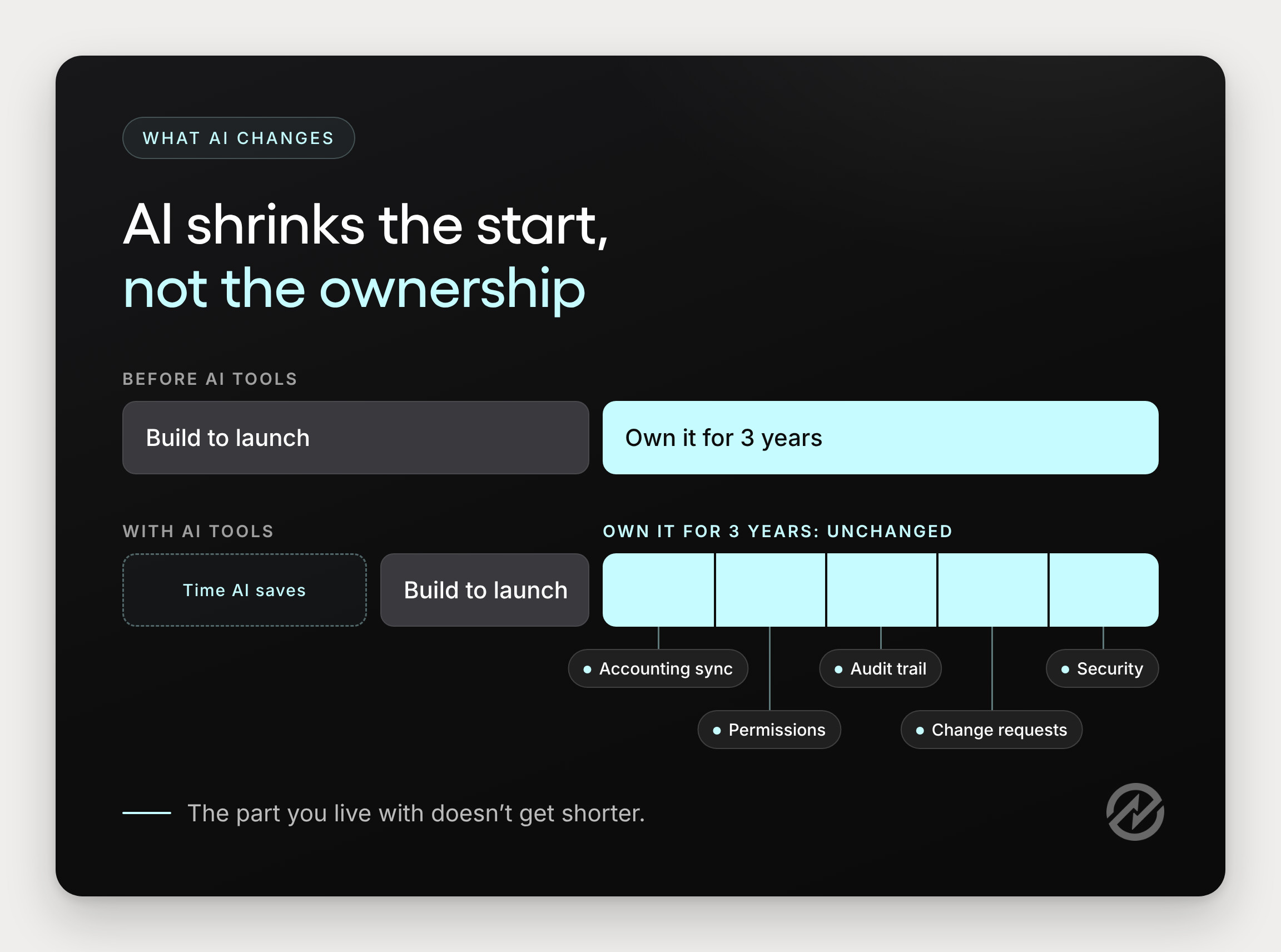
Yes, AI coding tools can generate a working request and approval app quickly. They don't remove the ongoing work: testing changes, keeping the accounting integration current, securing data, and maintaining an audit trail. AI shrinks the first 80% of a build. The last 20%, the part you live with for years, stays roughly the same size.
This isn't a fringe practice anymore. Gartner forecasts that 75% of enterprise software engineers will use AI code assistants by 2028, up from less than 10% in early 2023. Outside IT, "vibe coding" (describing an app in plain language and letting an AI tool write the code) has put prototypes in the hands of operations and finance staff too.
Here's how that plays out. An operations manager at our nonprofit describes what she wants, and by the end of the afternoon she has a working request-and-approve app. It's impressive. Three months later, a vendor's name changes in QuickBooks, the app doesn't recognize it, and someone discovers two records for the same supplier. No one on staff fully understands the sync code, because the AI tool wrote most of it.
Four things an AI tool doesn't take off your plate:
- Change testing. Every new threshold or department means testing that existing approvals still route correctly.
- Integration upkeep. Accounting systems update their APIs, and the connection has to keep up.
- Access control. Someone has to decide who can see budgets and approve spend, then keep that current as people join and leave.
- Audit trail. Auditors want to see who approved what, when, and at what amount, in records that can't be edited after the fact.
AI still has a useful place in purchasing. It just works best on specific tasks inside a system someone else maintains. Tradogram's TradoScan, for example, reads invoice data into records so your team isn't retyping it. For a deeper look at where AI is heading in this space, see our post on agentic procurement.
What this means for your estimate: AI changes what a build costs to start, not what it costs to own.
Off-the-shelf vs custom software: a side-by-side comparison
Custom software is built and owned by you, so you also own every fix and update. Off-the-shelf software is licensed from a vendor who maintains it, and you configure it to your rules. In SaaS vs custom software decisions, the real difference is who carries the ongoing work.
| Custom code | ERP extension | Power Apps | AI-built tool | Configurable software | |
|---|---|---|---|---|---|
| Upfront cost | Highest: full developer build | Module license plus consultant hours | Moderate: build hours, licenses if premium | Low: fast first version | Subscription plus setup time |
| Ongoing cost | Developer time every year | License plus consultant time for changes | Developer time plus per-user licenses | Developer time to maintain AI-written code | Subscription plus light admin time |
| Time to first use | Months | Weeks to months | Weeks | Days | Weeks to a few months |
| Who maintains it | Your developer | Your ERP partner and your team | Your IT person | Whoever is left | The vendor |
| Accounting sync | You build and maintain it | Native if same system | Premium connectors or custom | You build and maintain it | Vendor-maintained integrations |
| Audit trail | You build it | Usually included | You build it | You build it | Included |
| Multi-entity fit | You build it | Depends on ERP edition | Hard to scale cleanly | You build it | Built in on higher plans |
Notice where the "you build it" cells cluster: accounting sync, audit trail, and multi-entity support. Those are the requirements that look small in a scoping meeting and large in year two. For a fuller checklist of what a connected system should cover, see what an integrated procurement system includes.
What this means for your estimate: the table shows where each path spends its money. The next two sections cover the two places builds tend to stall.
Why is procurement software integration where builds get expensive?
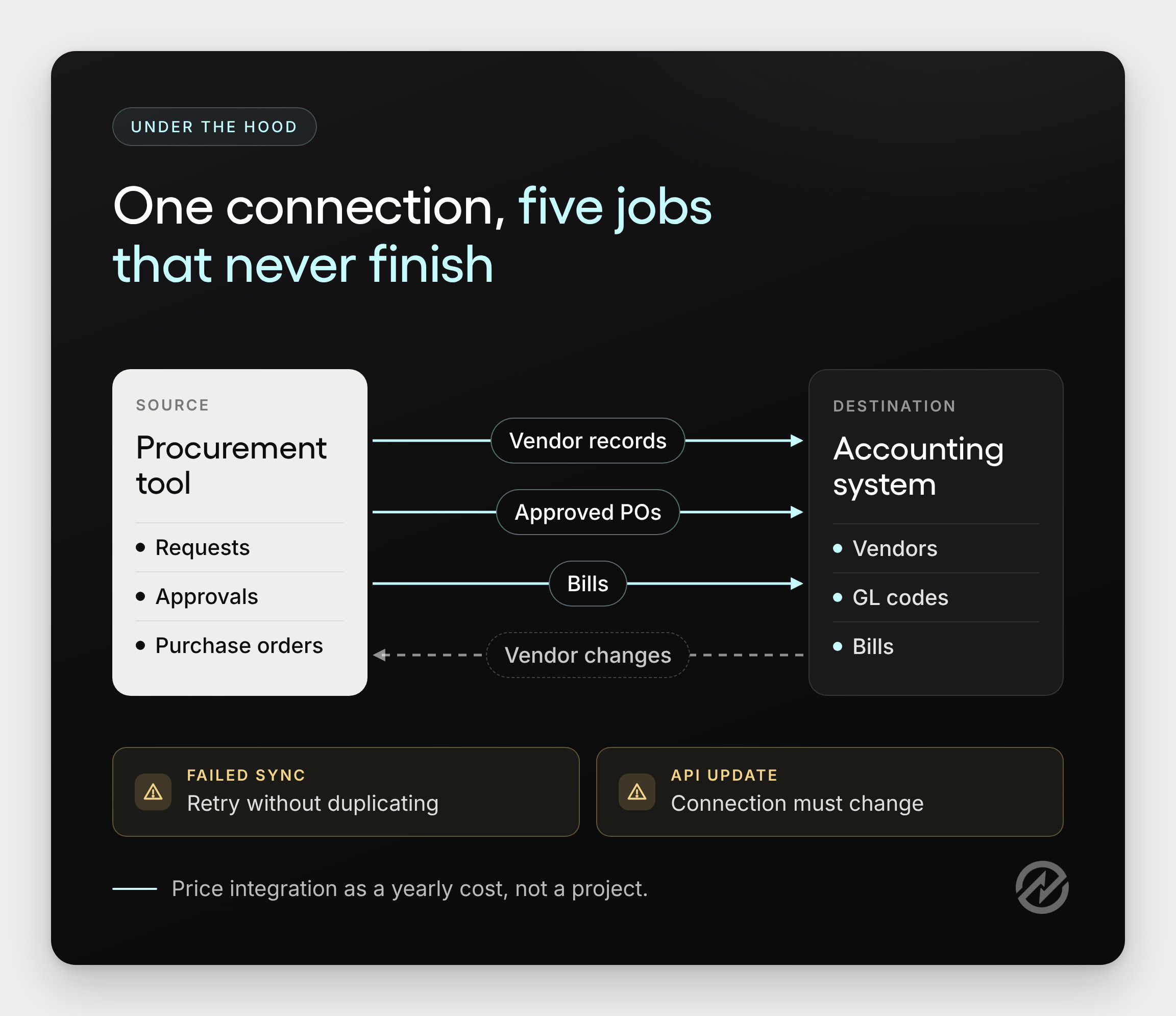
A purchasing tool is only useful if its vendors, POs, and bills match what's in your accounting system. Keeping them matched is ongoing work, not a one-time connection. That's why integration is usually the line item that turns a cheap build into an expensive one.
What has to stay in sync
At minimum, a homemade tool connected to QuickBooks Online, Xero, NetSuite, Sage, or Microsoft Dynamics 365 Business Central has to handle:
- Vendor records: creating new vendors, matching existing ones, and catching name or address changes made on either side.
- Purchase orders: sending approved POs to accounting with the right GL codes, classes, or locations.
- Bills: linking supplier invoices back to the PO they belong to.
- Failed syncs: noticing when a record didn't go through, explaining why, and retrying without creating a duplicate.
- API changes: updating the connection when the accounting vendor changes how its system accepts data.
What happens when it drifts
Back at the nonprofit, a supplier is renamed in QuickBooks after a merger. The homemade tool doesn't recognize the new name, so the next PO creates a second vendor. Now there are two records, two payment histories, and an accounts payable clerk trying to work out which one is real. None of this is dramatic. It's just slow, and it repeats. We've written more about how fragmented procurement systems create this kind of drift.
This is where buying changes the math. Since 2014, Tradogram has been helping organizations digitize their procurement processes, and integrations are a large part of what we maintain. POs and bills sync to Xero and NetSuite, approved POs are sent to QuickBooks Online, and vendor records stay synchronized. When an accounting system changes its API, keeping the connection working is our job. You can see the full list of procurement integrations, or read how procurement software connects to your ERP for the mechanics.
Julian D'Oyley, Director of Finance at Reed Global, describes the before and after: "Before Tradogram, we were reconciling purchase orders and invoices manually across spreadsheets. Now everything is structured, approved, and synced with our accounting system."
What this means for your estimate: price integration as a yearly cost, not a project.
Will off-the-shelf software force us to change how we work?
Usually not. Most "custom" purchasing requirements turn out to be approval thresholds, routing rules, document formats, and access permissions. In configurable procurement software, those are settings. "Our process is unique" usually means "our approval thresholds are unique," and that's a configuration problem, not a coding one.
A question we often hear in evaluations is some version of "Can it handle the way we do approvals?" It's a fair question, and the honest answer depends on the rule. So let's test it against the nonprofit's actual requirements:
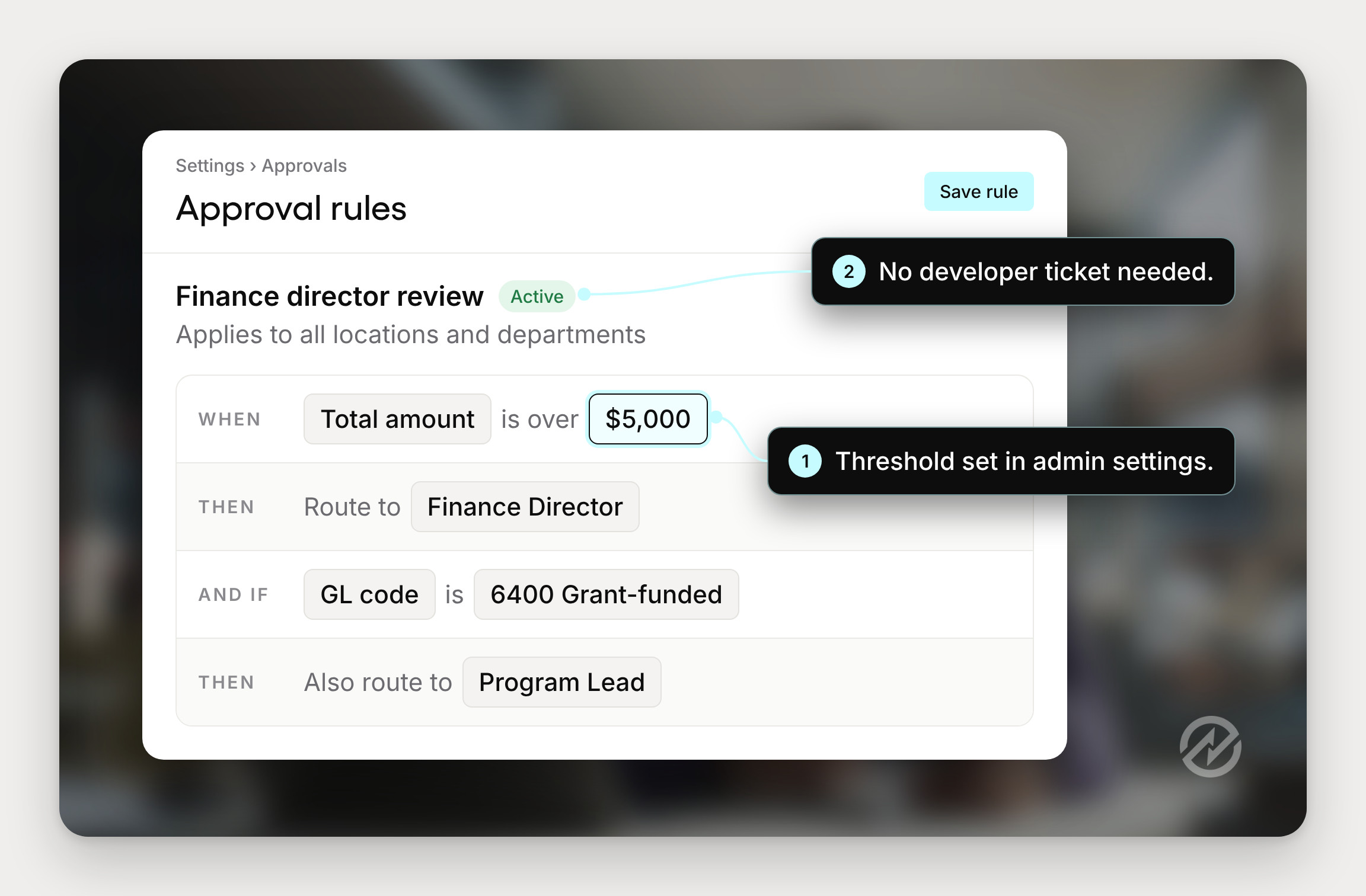
- "Anything over $5,000 needs the finance director, and grant-funded purchases need the program lead too." That's approval routing by amount and GL code or department.
- "Each location orders its own supplies, but finance needs to see everything." That's location-based routing plus role-based permissions.
- "Our POs need our logo, the grant number, and the delivery site." That's a PO template with required fields.
Approval routing
In Tradogram, approvals can be configured by amount, department, supplier, GL code, location, or any business rule. The rules live in admin settings, so when finance adds a tier mid-year, the change takes minutes and doesn't need a developer. See how purchase approval software handles routing in practice. Custom Approvals is included on the Premium plan or available as an add-on.
PO templates
Reusable PO templates carry your logo, required fields, and document structure, so every department issues the same document. That ends the quiet version drift that happens when each office keeps its own Word template. Our purchase order management software page shows the template options, and our post on moving from a purchase order template to software covers the same build-or-buy question at the PO level.
Permissions across multiple entities
Multi-Entity & Locations lets one system cover several entities or sites, each with its own access rules. That replaces the per-site copies a homemade app tends to spawn. It's available on the Premium plan or as an add-on.
Joel Gerber, SVP Technology at Adheris Health, put it from the IT side: "Tradogram was very easy to customize and use. Setup and configuration was simple and easy to maintain." For more on where configuration ends and rigidity begins, read how flexible procurement software should be.
What this means for your estimate: if your requirement is a rule, it's probably a setting.
What is the total cost of ownership of procurement software over three years?
Total cost of ownership (TCO) is everything you'll spend to get a tool running and keep it running, including your own staff time. The most common mistake in build vs buy software decisions is comparing a build's hours-to-launch against a vendor's three-year license. Compare three years to three years.
A worked example
Here's the nonprofit's decision, priced out. The figures are illustrative, and every assumption is listed under the table so you can swap in your own.
| Cost line | Custom code | Power Apps build | Configurable software |
|---|---|---|---|
| Developer time, year 1 | 800 hours: $74,400 | 400 hours: $37,200 | None |
| Developer time, years 2 and 3 | 800 hours: $74,400 | 400 hours: $37,200 | None |
| Platform licenses, 3 years | Hosting not included | 60 users × $20 × 36 months: $43,200 | Subscription (see below) |
| Finance and purchasing staff time, 3 years | 280 hours: $28,560 | 280 hours: $28,560 | 140 hours: $14,280 |
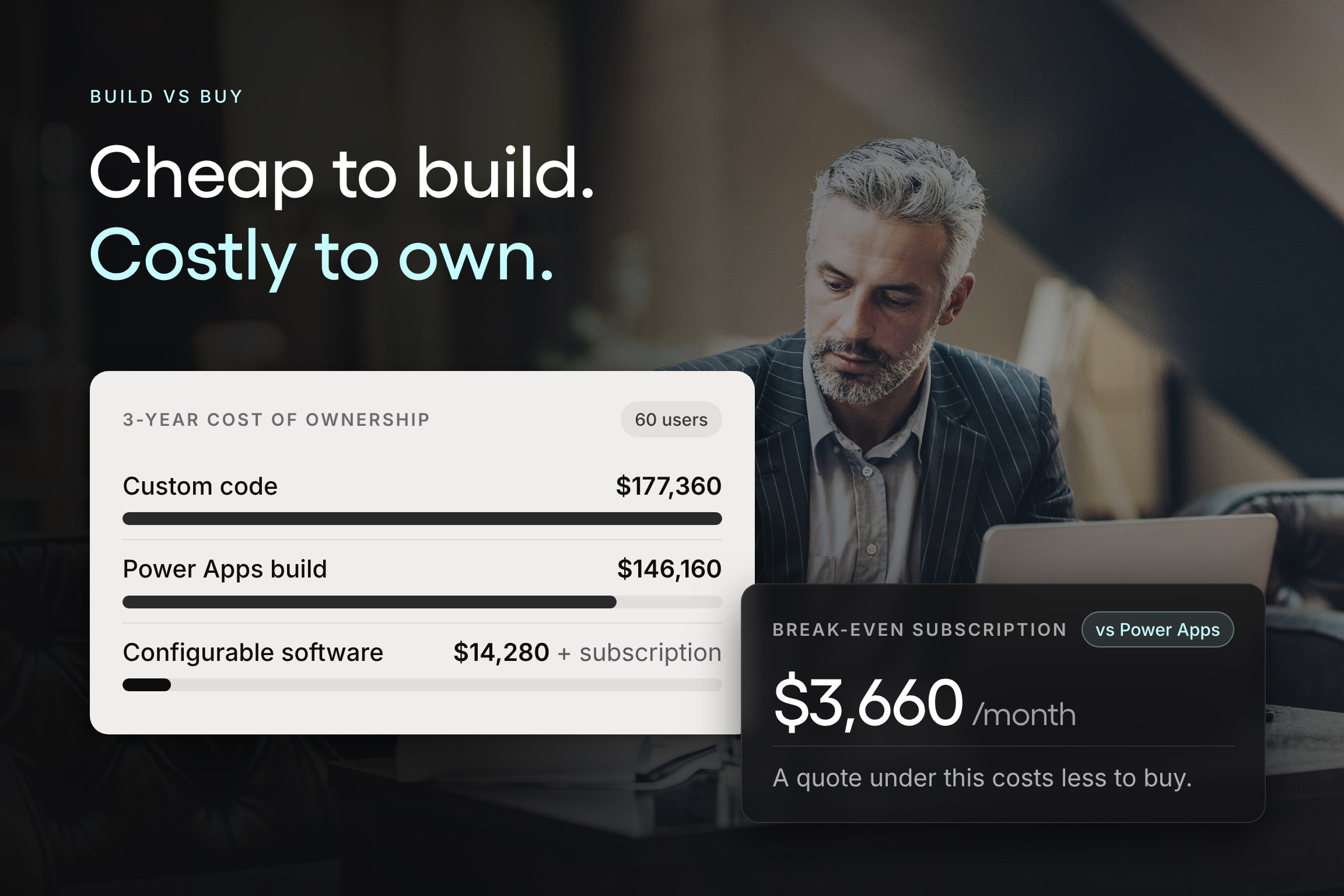
| Three-year total | $177,360 plus hosting | $146,160 | $14,280 plus subscription |
Assumptions:
- Developer time is priced at $93 per loaded hour (BLS median developer wage of $135,980, divided by 2,080 hours and by 0.70). Hour estimates are illustrative.
- Power Apps licensing uses Microsoft's listed Power Apps Premium price of $20 per user per month, paid yearly. Microsoft's pricing page says apps that use premium connectors or Dataverse need a Premium license, and occasional requesters count as users. Microsoft notes its listed prices vary by region.
- Staff time is priced at about $102 per loaded hour, based on the BLS median wage for purchasing managers of $148,080 (May 2025) and the same 70% wage share. Configurable software assumes 60 hours of setup and testing in year 1 and 40 hours a year after that. The build paths double that, because your own staff test every change and fix before it reaches requesters.
- Hosting, security tooling, and consultant fees are excluded, so the build totals are conservative.
Now flip the question around. For buying to cost more than the Power Apps build over three years, the subscription would have to run above $131,880, or roughly $3,660 a month. To beat the custom build, it would need to exceed about $4,530 a month. That's the number to hold any vendor quote against, including ours. Tradogram's Essentials plan starts at $99 a month with an additional fee per user, and Premium and Scale are priced by quote.
Implementation time
Buying isn't instant either. Plan for weeks to a few months, depending on how many users, entities, and integrations you're bringing online. Our guide on what implementation involves walks through the steps and the decisions to make before go-live.
How to estimate procurement software ROI
The TCO comparison tells you which path costs less. Return on investment asks a second question: what does the tool give back in time saved and spend controlled? Use the TCO figure as your cost and add the benefits you can measure, such as hours spent chasing approvals or rekeying POs. Our walkthrough shows how to calculate procurement ROI step by step.
What this means for your estimate: take the three-year totals above, replace our assumptions with yours, and put a quote next to them. If you'd rather see the numbers on your own team size, you can compare Tradogram plans.
When does building procurement software make sense?
Building makes sense when you have a developer who will own the tool for years, your purchasing process is a real competitive advantage, and no product supports a requirement you can't change. Those cases exist. They're just narrower than the first scoping meeting suggests.
Build if you can check all five:
- You have a developer who will own it for at least three years, with a named backup who knows the code.
- The process is a competitive advantage, not just a familiar habit. Customers or funders would notice if it changed.
- You've confirmed no product supports a requirement you can't change, by testing it in at least two demos, not by assuming.
- You'll budget maintenance every year, in developer hours, before the first line of code is written.
- Auditors won't rely on it, or you'll build the approval history and access controls they need.
If the nonprofit ran this test honestly, it would stall on the first box. One IT generalist with a full plate can't also be the three-year owner of a business system. That's no criticism of the person who offered to build it. It's a staffing fact.

What this means for your estimate: if you can't check all five, price the buy path seriously. A good starting list is our roundup of procurement software for small business and mid-size teams.
See what your build would replace before you scope it
The person who offered to build your purchasing tool is trying to help, and they may well be able to do it. The useful next step is putting both options side by side with real numbers: the build at your loaded hourly rate over three years, and a configured system with a quote attached.
Before you scope the build, see what it would replace. Book a 30-minute demo and we'll walk through your approval rules, PO templates, and accounting sync, so you can compare three-year costs side by side. If you'd rather click around first, take the interactive product tour.
Sources
All opened November 12, 2026.
- US Bureau of Labor Statistics, Occupational Outlook Handbook: Software Developers (May 2025 wage data)
- US Bureau of Labor Statistics, Employer Costs for Employee Compensation, June 2026
- US Bureau of Labor Statistics, Occupational Outlook Handbook: Purchasing Managers, Buyers, and Purchasing Agents (May 2025 wage data; in the Source Library)
- Microsoft Power Apps pricing
- Gartner, "75% of Enterprise Software Engineers Will Use AI Code Assistants by 2028," April 11, 2024
- Tradogram pricing