


A demo call usually reaches the same moment about 20 minutes in.
The buyer has described how their organization purchases things, which departments get to raise requests, who signs off at what amount, and which of those rules exist in a policy document versus in one person's head. Then they ask the question they came to ask: can your software do that?
The answer is almost always yes, and that is exactly why it isn't useful. Nearly every procurement platform on a shortlist can route a request, produce a purchase order, and store supplier data. A question we hear constantly, phrased a dozen different ways, boils down to this: if they all do the same things, how am I supposed to tell them apart?
The differences are real. They just are not on the feature list, because feature lists describe what a system contains, not what it can be shaped into. This guide covers what each category of procurement and purchasing solution does, where the differences that matter show up, how much configurability a growing organization really needs, and the questions that separate two platforms whose marketing pages could be swapped without anyone noticing.
Procurement solutions, purchasing solutions, and why the labels slip
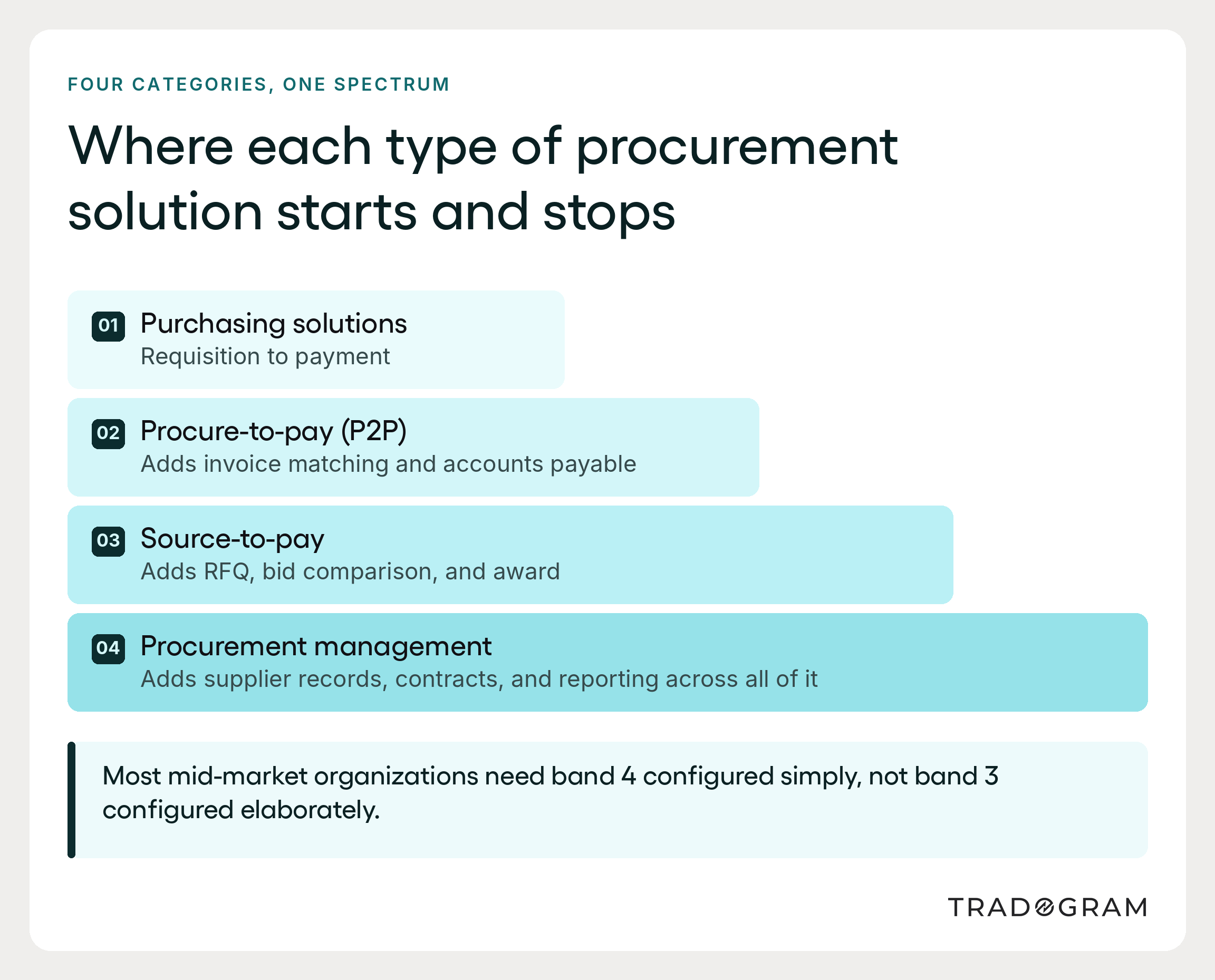
Procurement and purchasing solutions are software systems that manage how an organization requests, approves, orders, receives, and pays for goods and services. The category covers everything from a single-purpose approval tool to a full source-to-pay suite, and that range is a large part of why the market is confusing to shop in. Most options today are cloud-based procurement software, sold by subscription, which removes the server and upgrade costs that once made purchasing software an enterprise-only decision.
The most useful first distinction is scope, and the words themselves suggest it.
Purchasing solutions focus on the tactical steps of buying. A purchase request is raised, approved, converted into a purchase order, sent to a supplier, received against, and matched to an invoice. Purchasing typically starts with a requisition and ends with payment processing. The work is transactional, and the software's job is to make it accurate and fast.
Procurement solutions include all of that and add the decisions that come before it. Which suppliers should we be buying from? On what terms? Under which contract, expiring when? Procurement encompasses strategic sourcing and contract management alongside the ordering mechanics, and it treats supplier selection as a recurring business decision, not a one-time setup task.
Neither is better. They answer different questions, and many unhappy software purchases trace back to buying a purchasing tool when the underlying problem was sourcing, or buying a full procurement suite when the real need was a way to stop people from ordering without telling finance. Procurement teams that map their own purchasing processes first tend to make this call correctly.
The 6 categories you will meet on a shortlist
Vendors use these labels inconsistently, so bring your own definitions before you start comparing.
Procurement management software covers the full set of procurement activities: requests, approvals, purchase orders, receiving, supplier records, and reporting in one connected system. This is the broadest category and the most common fit for growing mid-market organizations.
Procure-to-pay software, often shortened to P2P, handles the chain from purchase order through to final payment. The emphasis is on transactions and the accounts payable end, including three-way invoice matching against the order and the receiving record. A procure-to-pay (P2P) tool covers the entire purchasing process from order to payment without necessarily touching supplier selection.
Source-to-pay software extends procure-to-pay backward to include strategic sourcing: running requests for quotation, comparing supplier bids, and awarding business before any purchase order exists.
Contract lifecycle management (CLM) software automates contract creation, storage, renewal tracking, and obligation management. Some procurement platforms include contract management as a module; dedicated CLM tools go considerably deeper.
Spend analysis software identifies cost-saving opportunities by pulling purchasing data together and showing where the money goes, broken out by category, supplier, and department. This is also where spend visibility and procurement analytics tend to live.
Vendor management and supplier relationship management tools focus on the supplier side: onboarding, documents, compliance records, and supplier performance over time. The argument for keeping these in the same system as purchasing is that supplier relationships are shaped by how reliably you order and pay, not only by how you negotiate.
Standalone procurement software handles one of these jobs well and connects to others. Dedicated procurement software and full procurement suites try to hold the entire procurement lifecycle in one place. The trade-off is familiar: depth in one workflow against breadth and a single shared record.
3 differences that belong on your evaluation criteria
This is where the demo-call question gets a real answer. Three differences between procurement systems change what an organization can do. Most of the rest resolve into configuration.
1. How many dimensions an approval rule can read
Every platform has approval workflows. The question is what a rule is allowed to look at.
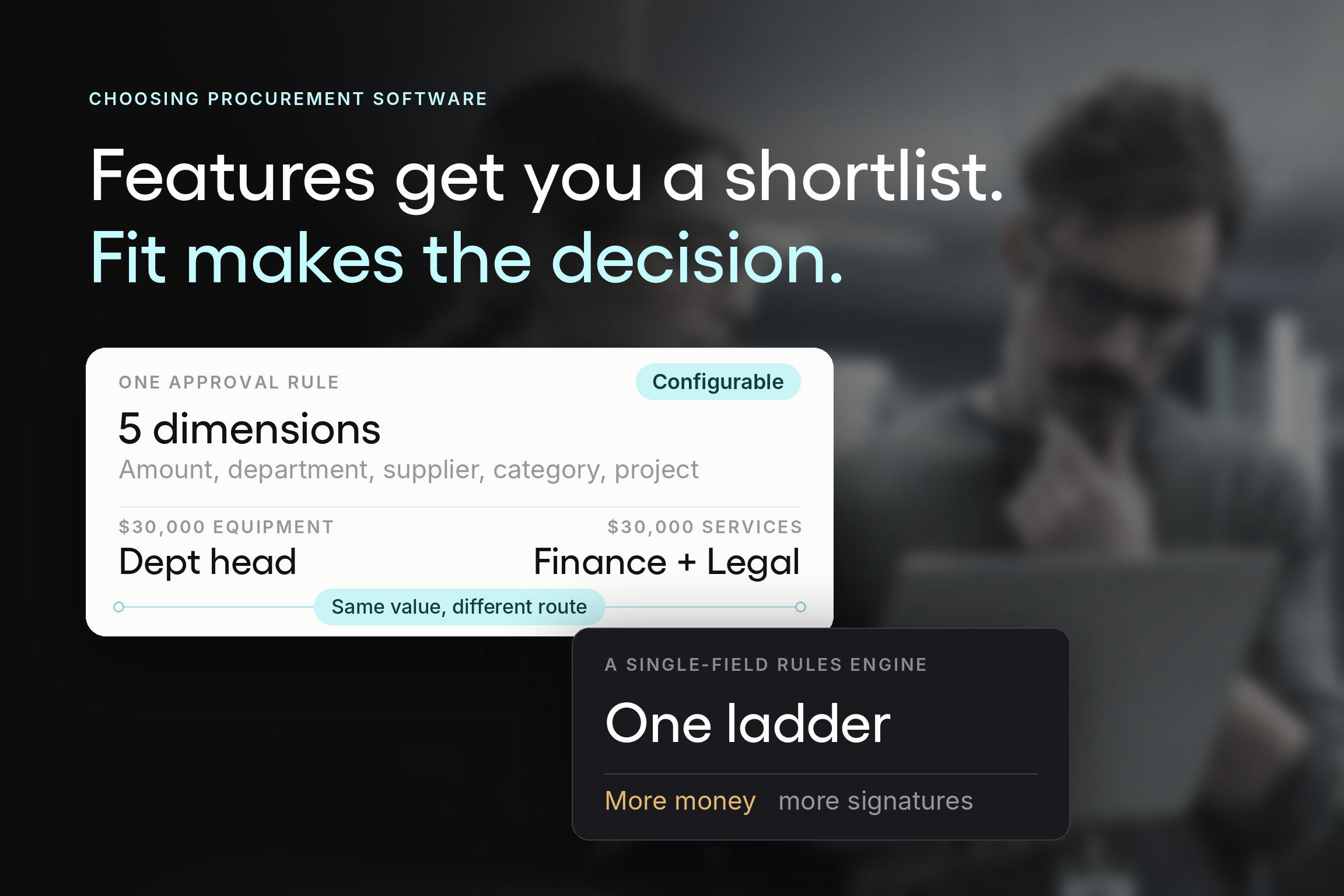
A system with a single approver field, or one fixed chain per department, can only express a ladder: more money, more signatures. Few real purchasing policies are ladders. A $30,000 capital equipment purchase and a $30,000 professional services engagement warrant different reviewers. A recurring order from a contracted supplier at agreed pricing doesn't need the scrutiny a first-time purchase from an unvetted vendor does, even at the same value.
If the rules engine cannot combine amount with department, supplier status, category, project, location, and general ledger code, you will simplify your policy to fit the software. That happens during configuration, in silence, and it never gets written down.
2. Whether procurement data reaches the systems finance already works in
This question determines whether you end up maintaining two sets of records.
Procurement integrations with accounting platforms such as QuickBooks, Xero, NetSuite, and Sage determine whether you connect procurement data to finance automatically or through an export file somebody remembers to run. Enterprise resource planning software changes the calculation again: ERP systems often include a procurement module that already holds some of this, and the real question becomes which system owns which record. Finance teams feel the answer every month at close.
Ask specifically: what data moves, in which direction, on what trigger, and what happens when the two systems disagree. Vendors answer "we integrate with QuickBooks" very readily. The useful detail sits one question deeper.
3. What gets recorded at the moment of the decision
Compliance and audit trails are where procurement software either earns its place or becomes an expensive filing cabinet.
A complete audit trail records who approved what, against which budget, with which supporting documents attached, and when the decision was made. Reconstructing that afterward from email is possible and awful, which anyone who has prepared for an audit that way already knows. The difference between a system that assembles the record as a byproduct of buying and one that stores documents you later have to assemble isn't visible in a feature comparison, but it is very visible in October, when the auditor arrives.
The sorting rule: if a difference changes the structure of what gets recorded or controlled, it belongs on your evaluation criteria. If it changes what a field is called, it does not.
Configurability beats feature count, and here is why
Ask a vendor whether their software is customizable, and you will get a yes. Ask what specifically can be changed, by whom, and without professional services, and the answers start to diverge.
This matters because procurement software has an adoption problem that most business software does not. The largest group of users is not the procurement team. It is everyone else in the organization who occasionally needs to buy something, and that group has no professional interest in purchasing controls whatsoever. A system those users find harder than emailing a manager gets bypassed, and a process people bypass governs nothing.
Practical customization means the software matches how your team already buys instead of forcing a new process on everyone at once. That is the difference between a rollout that holds and one that unravels. Purchasing workflows that mirror an existing process get adopted. Ones that replace it wholesale get abandoned.
The 6 places flexibility earns its keep
When you evaluate custom or customizable procurement software, test flexibility in these areas:
- Approval workflows. Multi-level, parallel, and conditional routing across the dimensions your policy really uses, editable by an administrator, not through a support ticket.
- Request forms. Different purchase types need different questions. A contractor engagement and a supply reorder should not use the same form, and required fields are what stop requests from bouncing back for missing information.
- Spend coding. The dimension you code against varies by organization: department, project, job, campus, site, production run, or grant. If the system only codes to a department, the reporting you need gets rebuilt by hand.
- Supplier records and fields. Certifications, insurance, banking details, and performance notes vary by industry. The record has to hold what your category managers track day-to-day.
- User roles and permissions. Who can raise, approve, edit, and view, scoped by department, location, or entity.
- Reporting and exports. Required report formats are a configuration you set once, not a reason to reject a platform.
When configurability turns into a liability
It’s worth being straightforward about the other side of this equation, because the customization argument gets oversold.
Configuration no one can explain becomes a black box, and people bypass black boxes. Approval logic complex enough to require its own documentation is a sign the policy underneath it needs simplifying, not that the software needs more options. The most effective procurement rules are usually the ones a department head can hold in their head.
Modular procurement systems help here: start with the capabilities the organization needs now and scale features as the requirements grow, instead of configuring everything on day one because it is available. Most organizations are better served covering the procurement cycle simply than covering the entire procurement cycle elaborately. Our guide to procurement software flexibility goes further on where that line sits.
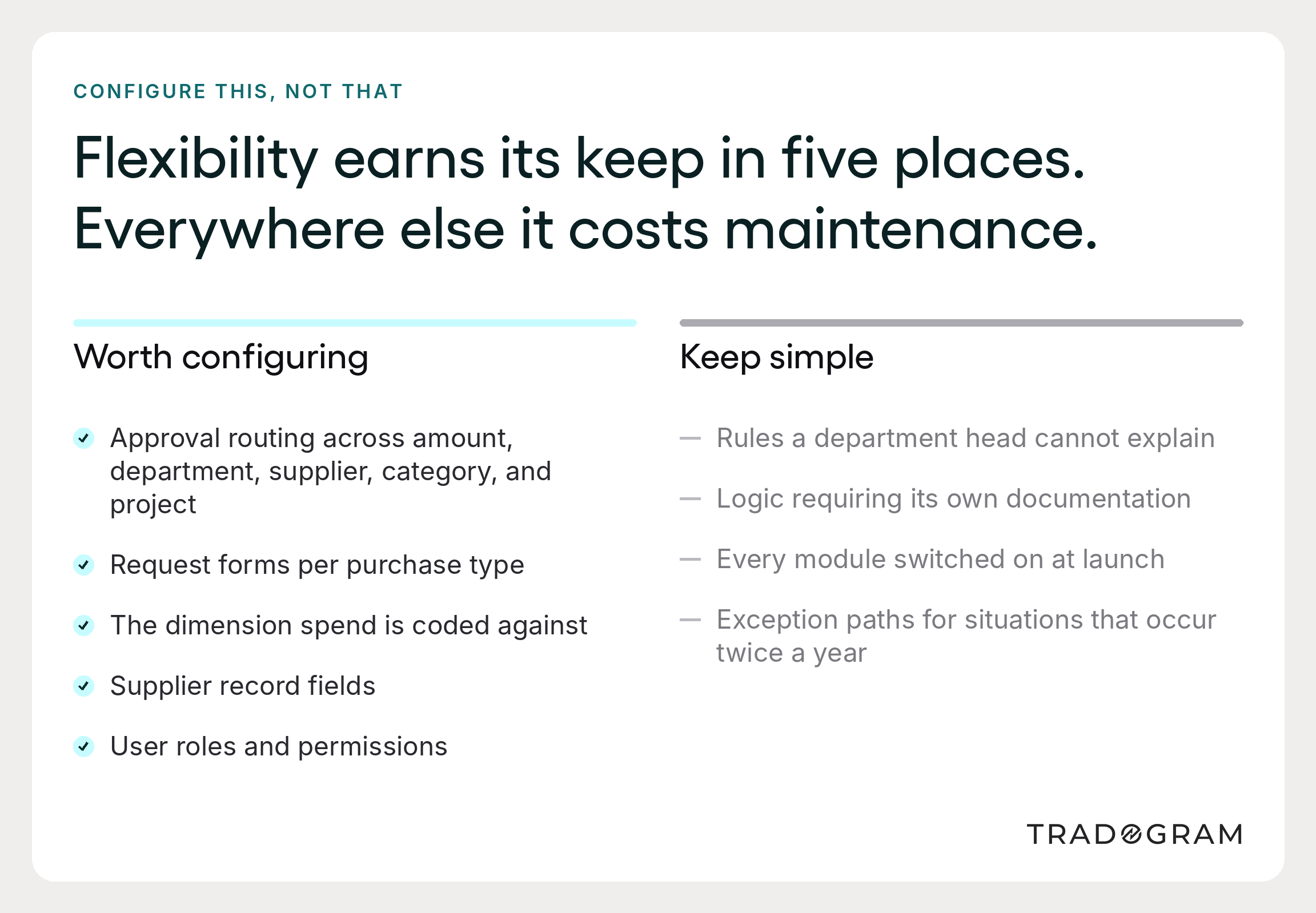
Image alt text: Matrix graphic showing which areas of procurement software should be configurable and which are better kept simple.
The capabilities to test, and what each one changes
Feature lists are weak comparison tools, but some key features have to be present. Below is what each one changes in the workflow, which is a more useful frame than whether a box is ticked.
A useful sanity check on any of these: a procurement suite that handles one stage with no link to the others tends to recreate the original problem in software form. The value comes from the stages sharing one record across the entire procurement lifecycle.
AI-powered procurement: what is shipping, and what is a roadmap
Every procurement platform currently describes itself as AI-powered, which makes the term close to useless as a differentiator. Separate what is shipping today from what sits on a roadmap.
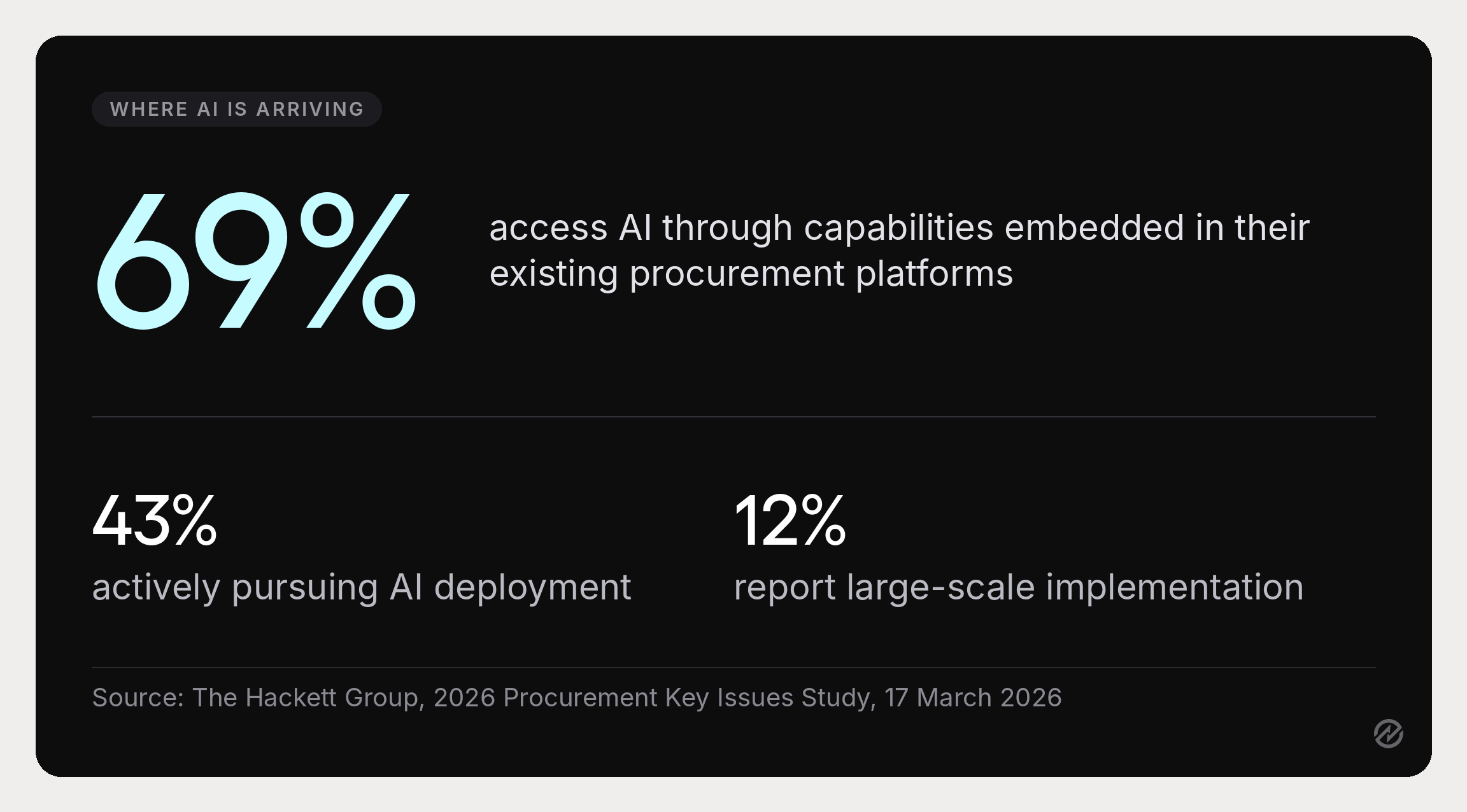
The most grounded read on where the market sits comes from The Hackett Group's 2026 Procurement Key Issues Study, which found that 43% of organizations are actively pursuing AI deployment, nearly double the previous year, but only 12% report large-scale implementation. The most useful number in that study for a buyer is different: 69% access AI through capabilities embedded in their existing procurement platforms instead of separate tools.
That reframes the buying question. For most organizations, AI-powered automation arrives inside the procurement platform they were going to choose anyway. The sensible question is whether a vendor is adding it to the workflows your team uses every day.
Where AI-powered procurement delivers practical value today, it tends to be in the unglamorous places: automatically categorizing spend data, extracting line items from supplier invoices, flagging anomalies in purchasing patterns, and surfacing contract dates no one diarized. These are real time savings on administrative work, and they are increasingly available in mainstream procurement tools.
Worth holding onto alongside that: Gartner reported in May 2026 that only 36% of CPOs are very confident in their ability to redesign roles and processes around AI, noting that "without intentional redesign of roles and processes, those gains remain confined to the individual level." Which is a tidy summary of the whole category: the technology is rarely the constraint.
Running the evaluation without a requirements matrix
Most evaluation advice starts with building a requirements matrix. That is the right instinct and the wrong starting point, because a requirements list assembled before you have looked closely at your current process tends to describe the software you have heard about instead of the problem you have.
Start with the pain points instead.
Write down where purchases go wrong today. Use specific recent examples. The order placed before anyone approved it. The renewal that auto-charged. The department that came in $40,000 over because committed spend was invisible. Three or four real incidents will tell you more about your requirements than a feature matrix will.
Sort them into the two piles from earlier. Which of those failures needed something different recorded or controlled, and which simply needed a process somebody followed? The first pile is your evaluation criteria. The second pile is a policy conversation, and buying software won't help.
Decide on the realistic scope. If every incident on the list happened after a supplier was chosen, you need purchasing and procure-to-pay capability, not a source-to-pay suite. If the recurring theme is that supplier decisions never get re-tested, the sourcing layer matters more than the ordering layer.
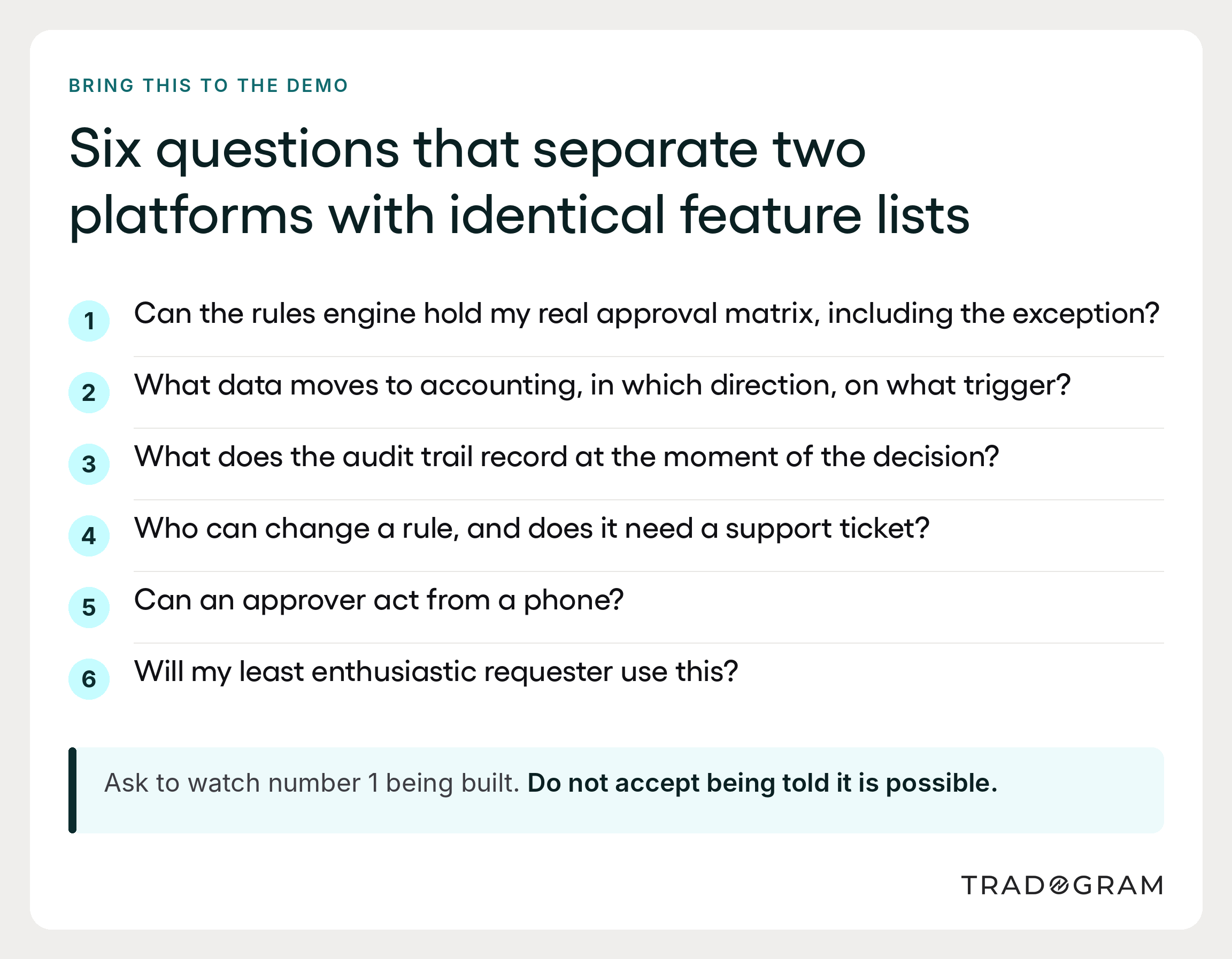
Test the configurability with your own rules. Bring your real approval matrix to the demo, including the awkward exception everyone knows about, and ask to watch someone build it. Not hear that it is possible. Watch it happen. Few steps in the evaluation tell you more.
Ask who will maintain it. Thresholds drift and departments reorganize, so a system where every rule change requires a support ticket goes stale quickly.
Weight requester experience heavily. The people who will use it most have the least interest in it. Their experience drives adoption, and adoption determines whether any of the controls matter.
There is no single best procurement software, and it helps to say so plainly. The right procurement solution is the one whose rules engine holds your policy, whose integrations reach your finance system, and whose request screen your least enthusiastic user will tolerate. The right procurement software, in other words, is defined by your constraints.
What the first 90 days really involve
One question deserves a direct answer, because vendors vary enormously here: what does the first 90 days involve, and who does the work?
To implement procurement software well is not primarily a technical project. Most of the effort goes into decisions the organization has been deferring: what the approval thresholds should be, who owns which budget, which supplier list is authoritative. Procurement technology makes those decisions visible. It does not make them for you, and a vendor who suggests otherwise is describing a product that does not exist. Operational efficiency follows the decisions, not the software installation.
A phased rollout, starting with one department, tends to work better than switching the whole organization at once. It also produces the internal evidence that makes the second department easier.
What this looks like in Tradogram
Tradogram is a procurement platform purpose-built for organizations that have outgrown spreadsheets and email approvals but don't want an enterprise implementation to get out of it. The procurement functions it covers span the full buying cycle.
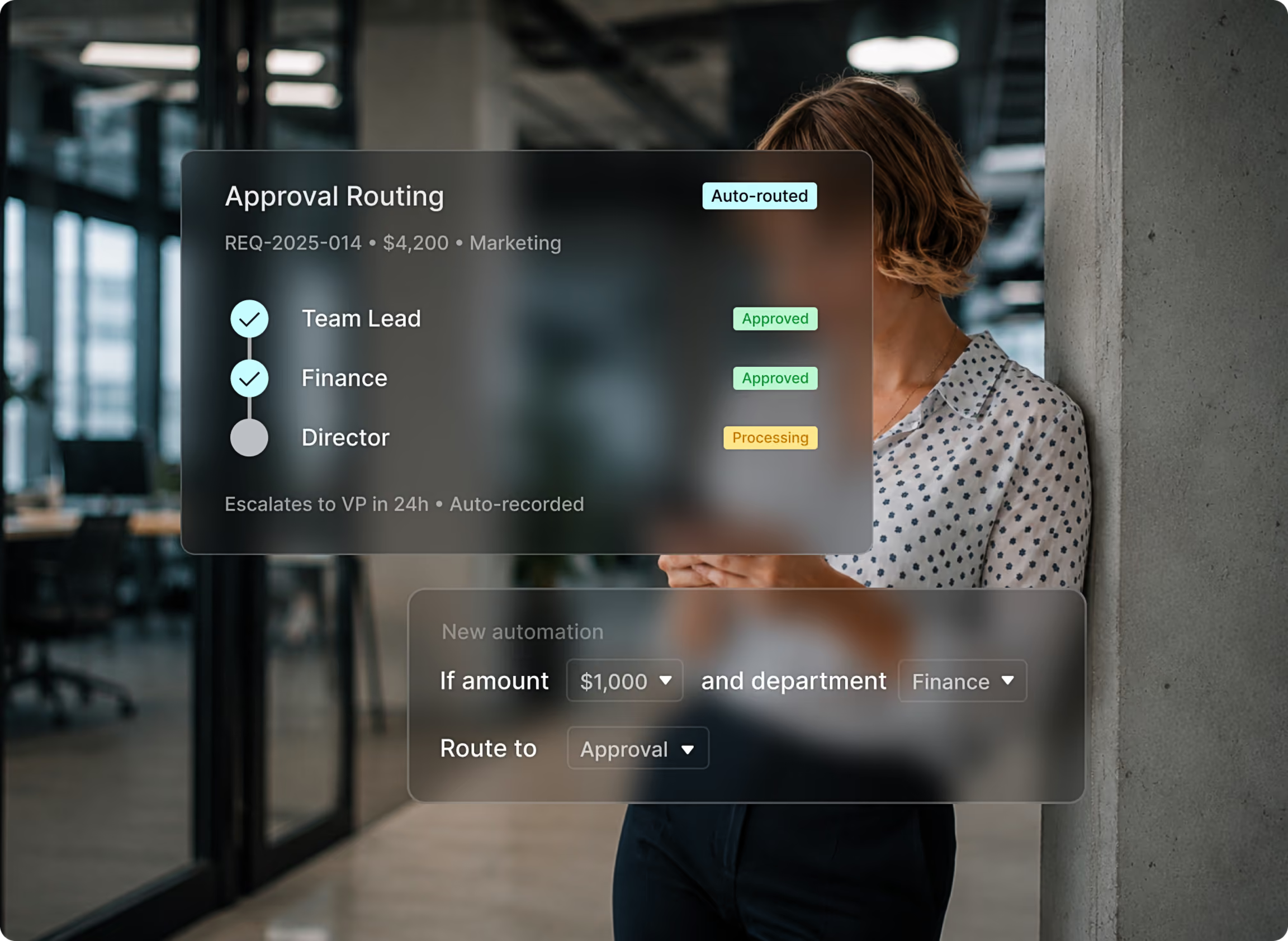
The specific fit is configurability at mid-market scale. Approval workflows route by amount, department, supplier, project, location, category, or general ledger code, and an administrator edits those rules, not through a professional services engagement. Purchase requests, approvals, purchase orders, receiving, supplier records, contracts, and invoice matching share one record, so an approval made in March still governs what gets paid in June. Procurement integrations connect that data to QuickBooks, Xero, NetSuite, and Sage, so finance works from the same data.
Control and Power Systems eliminated 100% of its paper trails and gained real-time visibility into project spending after moving off manual processes. A university procurement team cut purchase order processing from two to three business days to under two hours, after previously walking between departments to collect approval signatures.
Your next afternoon
You do not need to run a formal evaluation to make progress on this.
Write down the last five purchases that caused a problem, and next to each one, note what would have had to be visible or enforced to prevent it. That list is the beginning of a real requirements document, and it costs an afternoon. It will also tell you whether your real exposure is cost, risk management, supply chain continuity, or simply no one knowing what has been committed.
Then check what your current tools can already do. A surprising number of organizations have budget controls or approval routing sitting unconfigured in software they already pay for.
If the gap is real, shortlist three vendors and bring your own approval matrix to every demo. The differences that matter will show up in the first 15 minutes of watching someone try to build it.
Bring your matrix to us, and we will build a rule from it live on the call. That is the offer, and it is a better test of any vendor than a feature grid. Book a demo when you have the list in hand.