


Most teams say they need procurement automation when what they really need is to automate one specific thing. Approvals that stop getting lost. Purchase orders that don't have to be retyped. Invoices that match an order before anyone pays them.
Those are separate jobs, and no single platform leads on all of them equally. A tool with excellent approval routing may have thin invoice matching. A tool built around supplier discovery may have no budget check at the request stage. Buying on a general impression of "automation" is how organizations end up six months in, having solved a problem they didn't have while the original one is still costing them.
So this guide is organized around the work rather than the vendors. It covers the seven procurement processes automation tools actually handle, which platforms are strongest at each, what to look for before you shortlist anything, and how to roll automation out in phases so your team adopts it.
If you want full vendor profiles with verified pricing and limitations, our comparison of the 12 best purchasing and procurement software platforms covers that in detail. This article answers the question that usually comes first: what should you automate, and what tool actually does it?
What procurement automation tools actually automate
Procurement automation is the use of software to move a purchase through its stages without manual re-entry or manual chasing. Instead of an employee emailing a request, a manager replying "approved," and someone else retyping those details into a purchase order, the system applies rules you've set and carries the information forward. Each stage hands its data to the next, so the record builds itself.
That covers seven distinct processes. Most procurement automation software handles some of them well and treats the rest as checkboxes.
Purchase requests and the approval process. A standard form captures what's being bought, why, and against which budget, then routes the request by rules such as amount, department, location, or project. Approval workflows replace the follow-up email.
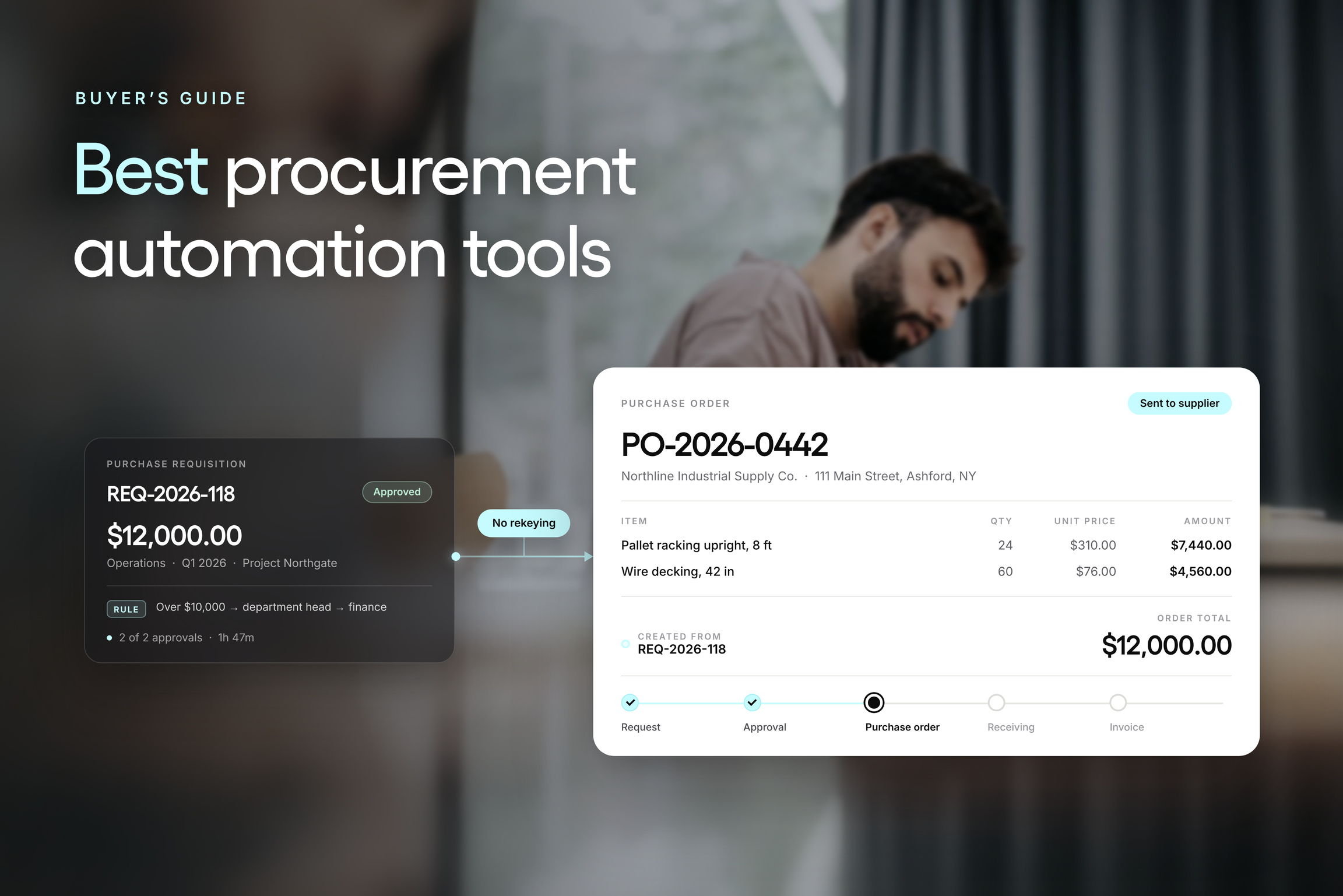
Purchase order creation and dispatch. An approved request converts to a purchase order without rekeying, and the order goes to the supplier from the same system.
Invoice matching and accounts payable. Invoice details are compared against the purchase order and the receiving record before payment proceeds, which surfaces price, quantity, and delivery discrepancies while they can still be corrected.
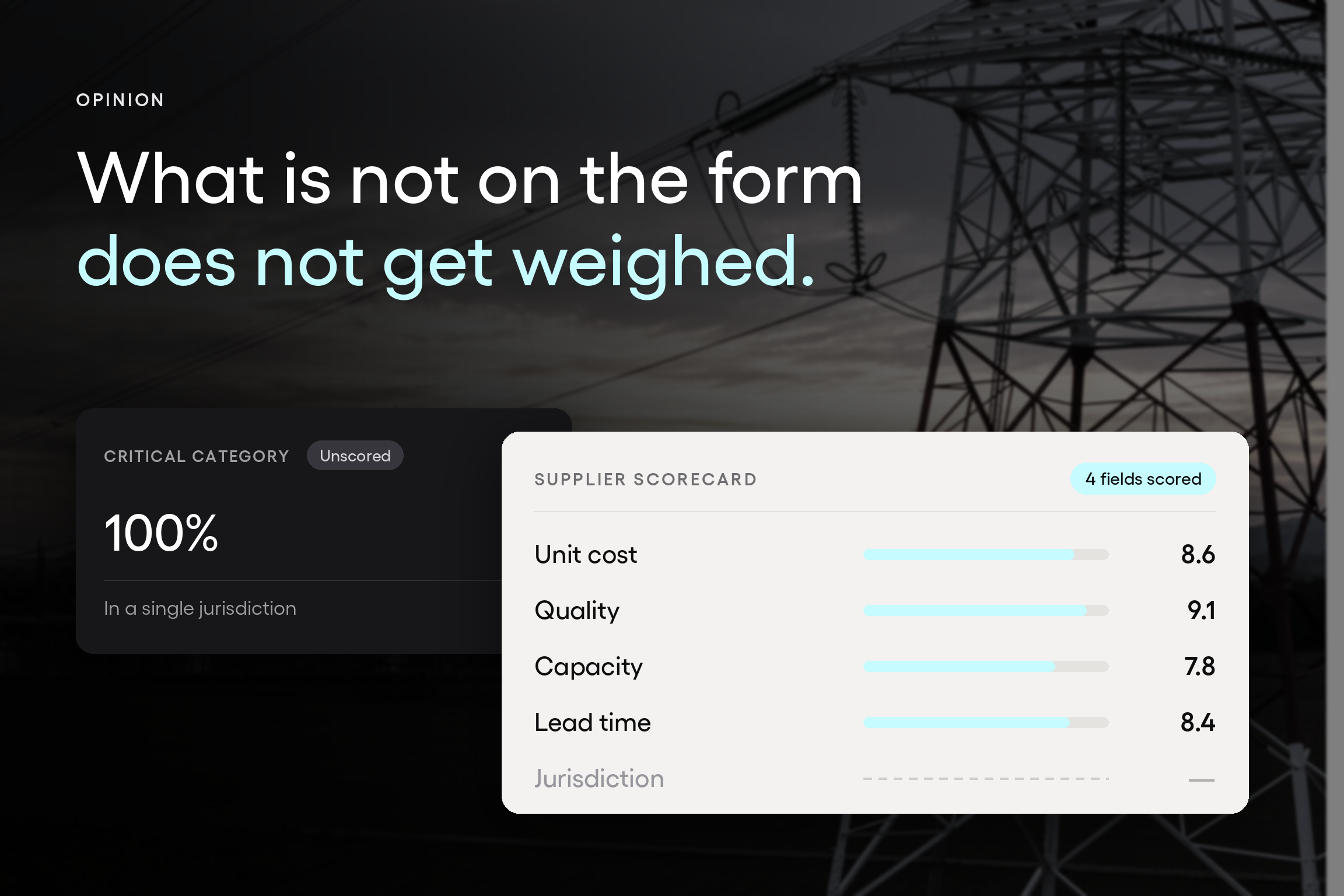
Supplier onboarding and performance tracking. Supplier records, documents, tax forms, and pricing live in one place, with scorecards that turn supplier relationships into something you can evaluate rather than estimate.
Contract lifecycle management and renewals. Agreements are stored with their terms and dates, and renewal alerts arrive before the auto-renew clause does.
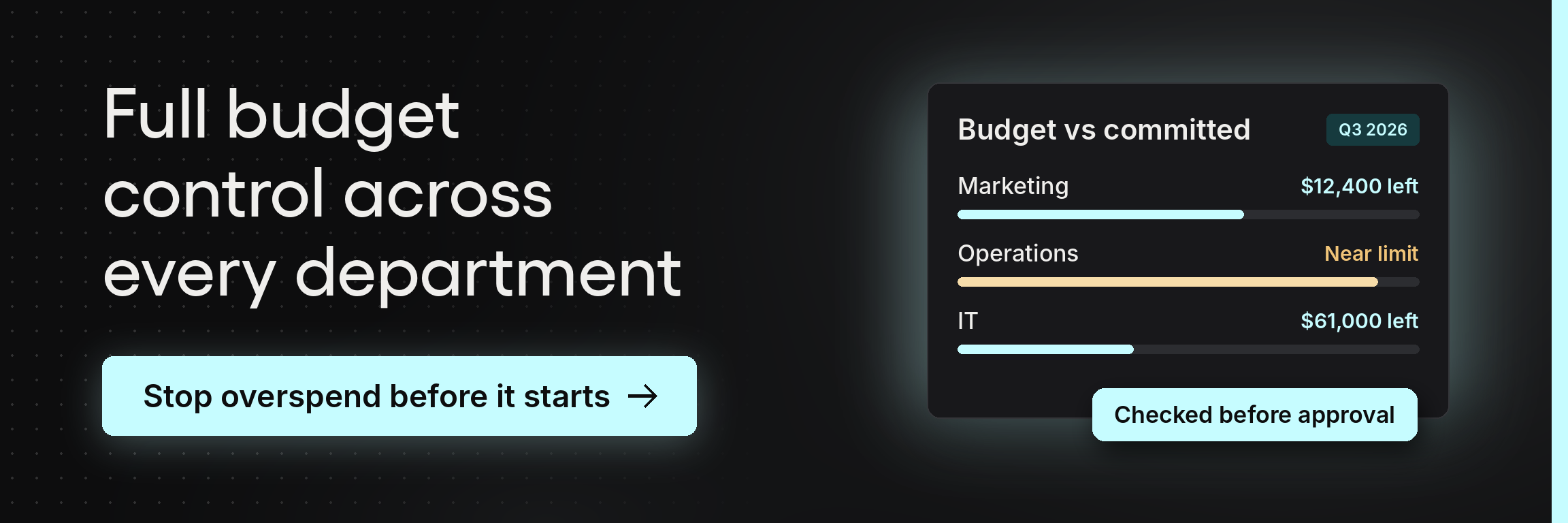
Budget and spend control. Requests and approved orders are checked against the relevant budget before anyone commits, so procurement and finance see committed and actual spend as it happens rather than at month-end.
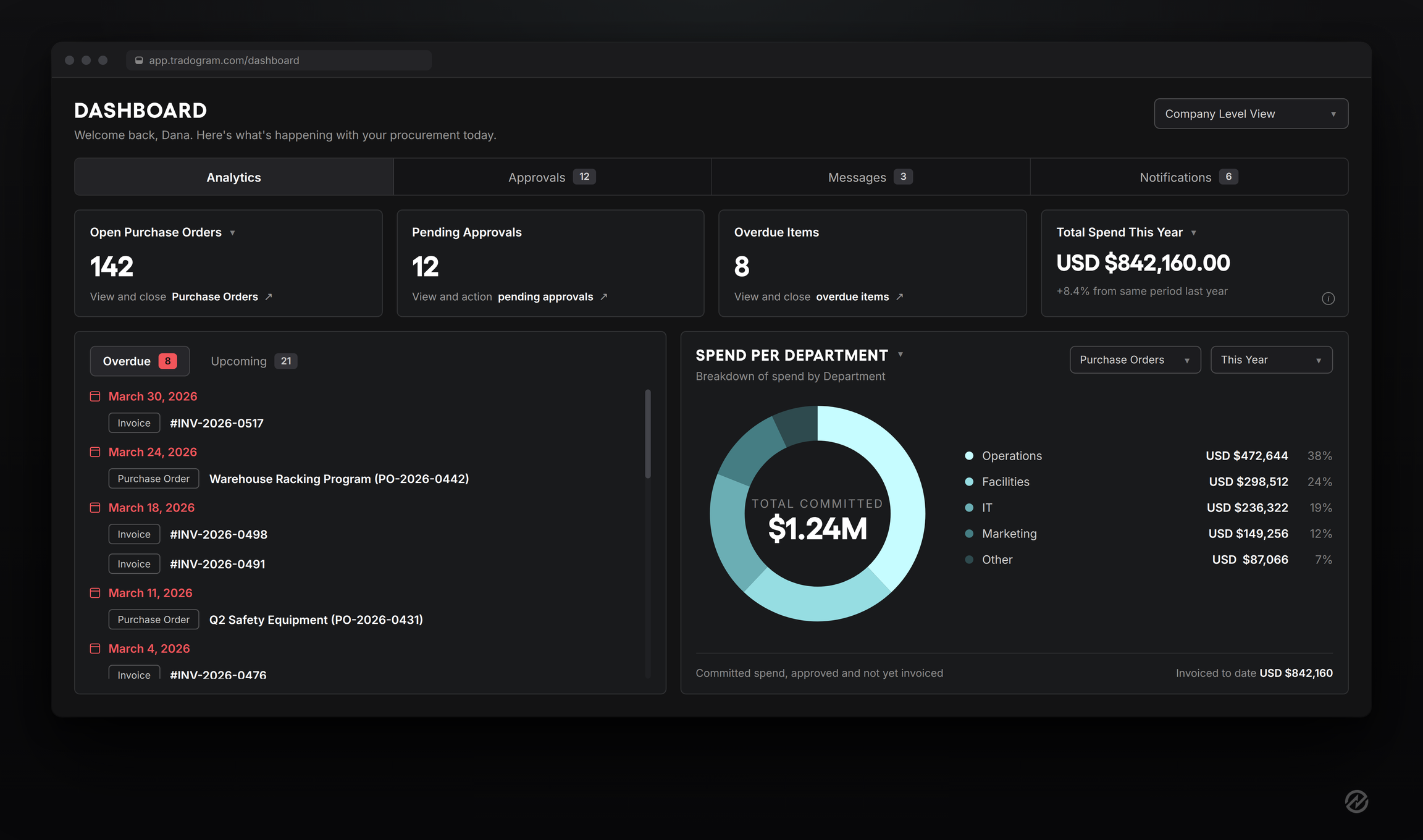
Spend analysis and advanced analytics. Reporting shows committed spend alongside actual spend, broken down by department, project, supplier, or category.
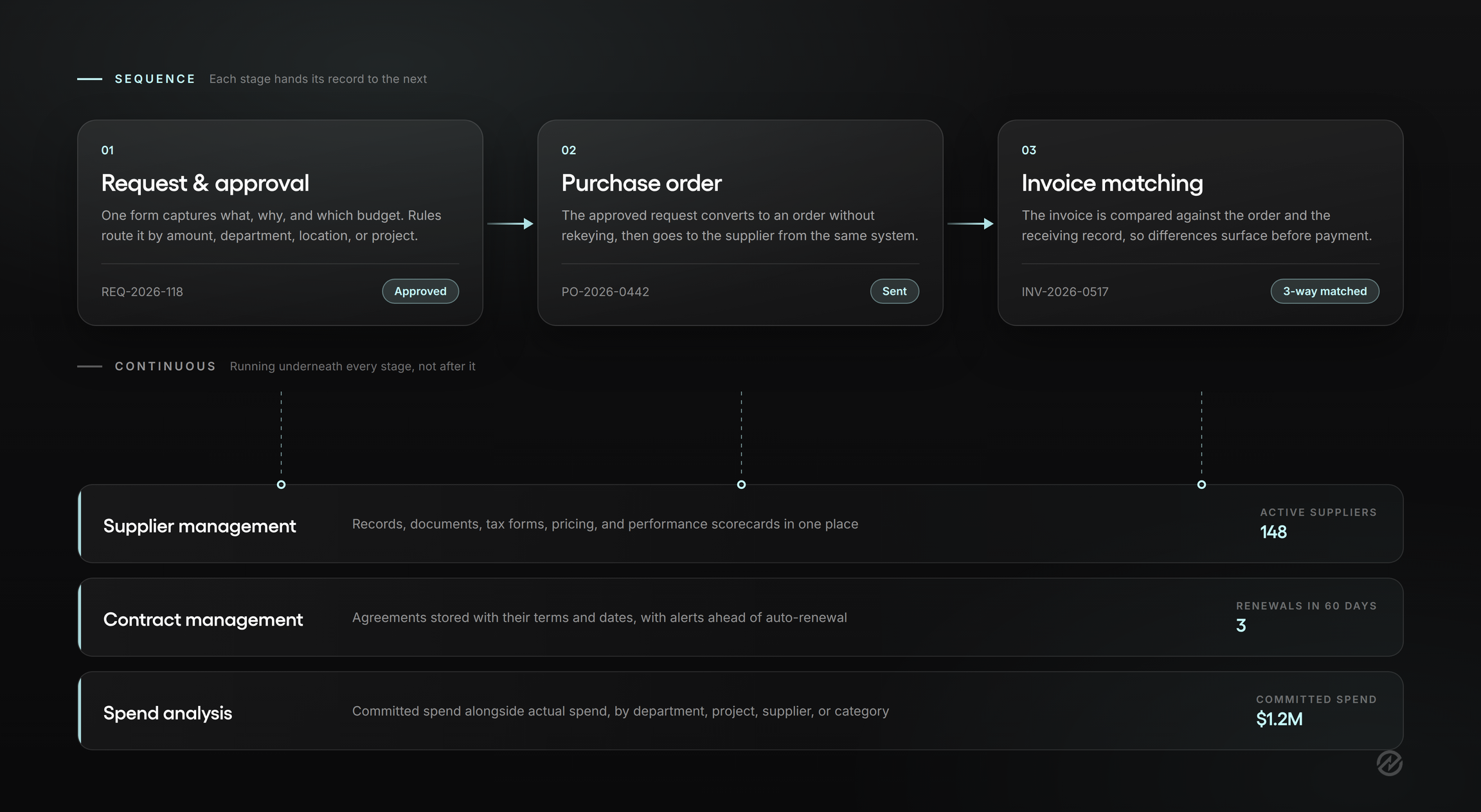
Automating any one of these helps. Connecting them is where the real change happens, because the value of a receiving record is mostly that accounts payable can check an invoice against it. For the broader case, see our guide to the benefits of procurement automation.
Where robotic process automation fits, and where it doesn't
Vendors use "automation" to describe three different technologies, and the difference matters when you're comparing procurement tools.
Robotic process automation (RPA) uses a software robot to mimic human keystrokes and clicks across systems that won't talk to each other. It's a bridge. It's genuinely useful when you're stuck with an old system that has no application programming interface (API), and it's fragile, because a changed screen layout can break the robot. RPA moves data between broken processes, but it doesn't fix them.
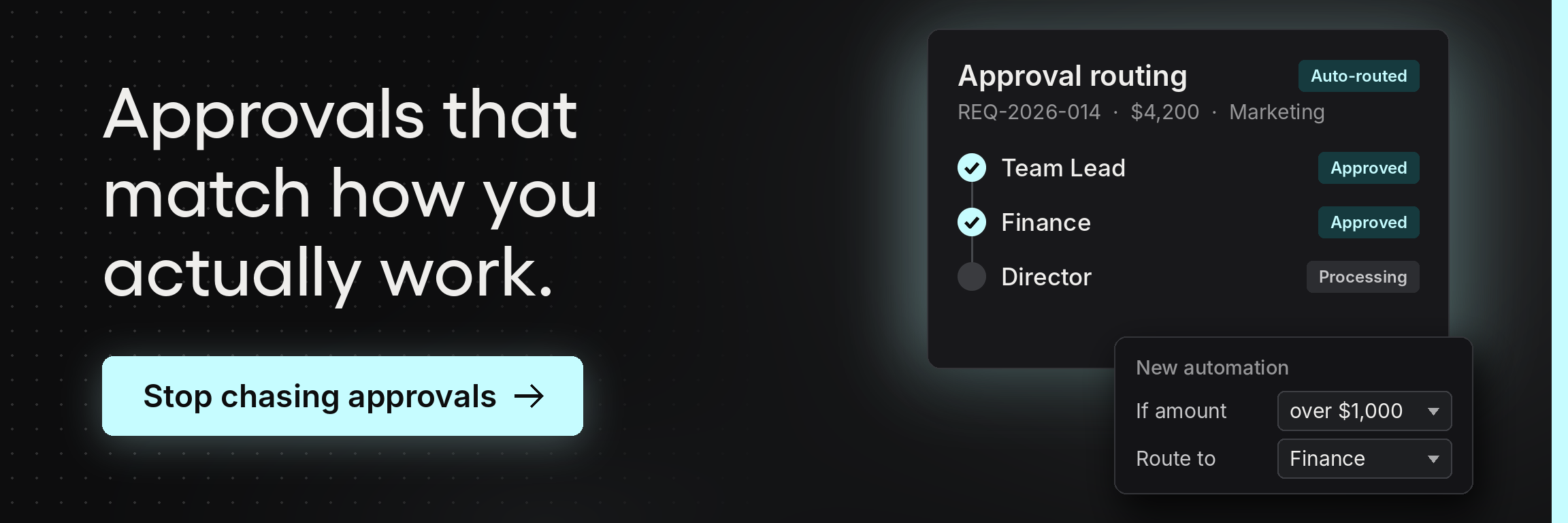
Workflow automation applies rules inside one system. A $900 supply order clears with one approval while a $40,000 contract renewal routes to the department head and finance before anyone signs. This is what most mid-market organizations are actually shopping for, and it's the layer that changes behavior rather than just moving records.
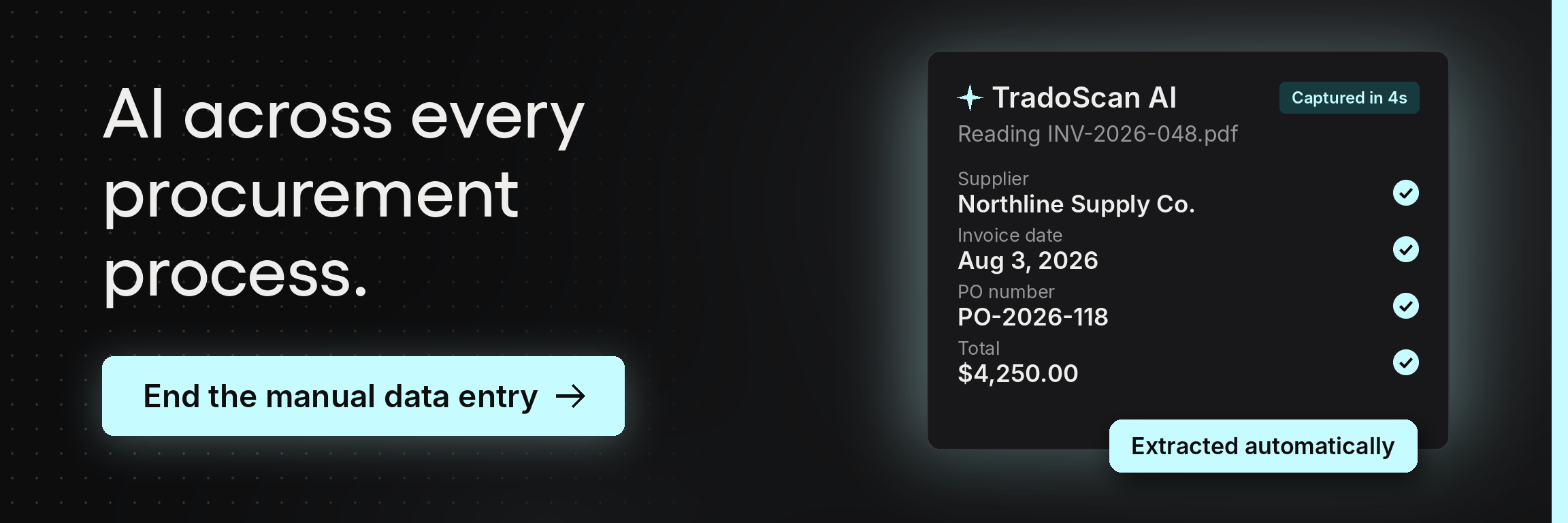
AI agents interpret information that isn't already structured and make judgment calls. Reading a supplier invoice and pulling the line items. Categorizing spend. Flagging that a delivered quantity doesn't match the order.
Adoption is real, though narrower than the marketing suggests. PwC's 2026 Digital Trends in Operations Survey, which polled 767 US operations and supply chain executives at companies with $100 million or more in revenue, found that 65% of consumer market companies were already deploying AI agents in both demand planning and sourcing and procurement. That's one sector at the larger end of the market, not a general benchmark, but the direction is clear.
The practical question for a buyer is simple. When a vendor says automation, ask which of the three they mean, and ask whether AI usage is included in the subscription or metered separately.
Procurement automation tools compared by what they automate
A disclosure before this section: Tradogram is our platform, and it appears below in the categories where it genuinely competes. It's left out of the ones where it doesn't. Every other platform links out so you can check the claims yourself.
One note on how to read this. Almost every tool here will tell you it does all seven jobs. Most technically do. The question is which one the product was built around, because that's the one that works without configuration effort, and it's usually visible in how the vendor describes itself before you reach the feature list.
Which procurement automation tools lead at each job
Platforms are listed by strength of fit for the job, not overall ranking. Full profiles with pricing are in our comparison of 12 purchasing and procurement software platforms.
Approval workflow automation
The job: route a purchase request to the right approver based on rules, and record the decision.
What separates real automation from a routing form is how it handles exceptions. Most organizations approve differently by amount, department, location, project, category, or some combination, and a single linear approval chain pushes every exception straight back into email. The other thing worth testing is whether the approver sees the budget position at the moment of approval, or has to go look it up.
Strongest here:
Tradogram builds automated approval rules on amount, department, location, project, category, or combinations, and checks the request against the relevant budget before approval.
Precoro includes automated custom approval routing, rule-based workflows, and approval service level agreements from its entry tier, with approvals covering requests, orders, invoices, expenses, and suppliers.
ProcurementExpress.com is narrower, but rates 9.7 for ease of use on G2, and reviewers consistently describe requesters watching the remaining budget update as they submit, which is the behavior that actually changes spending.
Bellwether allows approvers to accept or reject individual line items rather than the entire order, which matters more than it might sound when one questionable item is bundled with five routine ones.
Worth knowing: approval depth is where entry tiers most often disappoint. Custom approval routing is an add-on at Tradogram's Essentials level, and ProcurementExpress.com bills a 10-user minimum whether or not you have ten approvers. Ask specifically whether rules can combine criteria, since a system that routes on amount alone pushes every departmental exception back into email.
Purchase order creation and dispatch
The job: convert an approved request into a purchase order without retyping it, and get it to the supplier.
This is the most commonly automated procurement task and the one where the difference between tools is smallest. The distinctions that matter are whether the purchase order inherits the request data automatically, whether the system dispatches to suppliers directly, and whether it supports PunchOut catalogs, which let a buyer shop a supplier's catalog from inside your system and return with a populated cart.
Strongest here:
ProcureDesk covers self-hosted and PunchOut catalogs with automated order dispatch.
Bellwether handles blanket purchase orders and connects to more than 50 PunchOut catalogs, which suits organizations issuing 50 to 1,000 orders a month.
Tradogram purchase order management converts approved requisitions to orders without rekeying and carries the record through receiving.
Invoice matching and accounts payable automation
The job: compare the invoice against the purchase order and the receiving record before payment.
This is three-way matching, and it's the automation with the clearest financial return, because it catches price, quantity, and delivery differences while you can still do something about them. The prerequisite is a receiving record. A platform that skips receiving can only do two-way matching, which compares the invoice to the order and takes the supplier's word on what arrived.
Strongest here:
ProcureDesk approaches procurement from the accounts payable side, with optical character recognition (OCR), two-way and three-way matching, invoice approval workflows, and credit memos.
Tradogram runs TradoScan AI OCR across expenses, requisitions, purchase orders, and invoices, then matches against both the order and the receipt.
Order.co adds automated general ledger coding and line-level reconciliation.
Worth knowing: invoice matching is frequently gated above the entry plan. At ProcureDesk, matching, OCR, and the vendor portal all sit above the Purchasing Automation tier. If three-way matching is why you're shopping, price that tier, not the headline number.
Supplier onboarding and performance tracking
The job: keep supplier records, documents, and performance history in one place so renewal and sourcing decisions rest on evidence.
Nearly every platform stores supplier contacts. Far fewer track supplier performance on price, quality, and delivery over time, and that gap is what separates vendor management from a contact list. Ask specifically whether scorecards exist and who has to populate them.
Strongest here:
Tradogram supplier management keeps supplier records, documents, pricing, and scorecards together, with a vendor portal suppliers use to submit invoices.
SAP Ariba is in a category of its own if your problem is supplier discovery, because the SAP Business Network connects millions of buyers and suppliers.
Coupa covers supplier risk alongside procurement.
Worth knowing: most mid-market organizations buy repeatedly from 20 to 50 known suppliers. If that's you, the problem usually isn't discovery; it's that supplier information is scattered. Buying network capability to solve a records problem is expensive in both money and adoption.
Contract lifecycle management and renewals
The job: store agreements with their terms and dates, and surface renewals before the auto-renew clause fires.
Contract lifecycle management (CLM) is the automation most organizations discover they need after an unwanted renewal. The useful capabilities are narrow: a searchable repository, tracked key dates, and alerts far enough ahead that renegotiation is still possible. PwC's Digital Procurement Survey found half of companies planned to invest in upgrading or implementing a CLM tool by 2027, putting it among the higher-priority use cases on procurement roadmaps.
Strongest here:
Tradogram covers the contract management essentials, a repository with terms and renewal alerts, without the authoring layer. Coupa and SAP Ariba both carry full CLM including authoring and negotiation as part of their suites, which is the right fit when contracts are negotiated rather than renewed.
Budget and spend control
The job: check a request against the budget before anyone commits, not after the invoice posts.
This is the capability that separates procurement software from record keeping, and it's the one most often assumed rather than verified. A platform can route approvals beautifully and still leave the approver guessing about whether the budget can absorb the purchase. The question to ask is when the budget updates: at request, at approval, at order, or at invoice. Only the first two give a budget owner a decision to make.
Strongest here:
Tradogram checks requests and approved orders against the relevant budget in real time, so the commitment is visible when it's created rather than weeks later.
Procurify does the same at request time and pairs it with spending cards carrying preset limits, which brings small purchases into the same system without a requisition.
ProcurementExpress.com shows remaining budget to the requester as they submit, which changes behavior earlier in the process than any approval rule can.
Spend analysis and advanced analytics
The job: show what has been committed, not only what has been invoiced.
The distinction is the whole point. Your accounting system reports accurately on money already billed. Spend analysis in a procurement system should show committed spend, meaning purchases approved but not yet invoiced, because that's the number a budget owner needs before approving the next request. Ask whether dashboards update when a request is approved or when the bill posts.
Strongest here:
Tradogram reports committed alongside actual spend, broken down by department, project, location, and supplier.
Coupa's benchmarking, drawn from aggregated customer spend data across its base, is genuinely unmatched and supports category and negotiation decisions no internal dataset can.
Worth knowing: every platform has dashboards, so the demo question is not whether reports exist. Have the vendor build a report based on something similar to your dimensions, your departments, your locations, and the way you code projects, instead of clicking through a prepared dashboard. You're watching how many steps it takes and whether your structure maps cleanly, and demo data is fine for that.
What to look for in procurement automation software
The short answer: look for control that happens before money is committed, and a record that survives the handoff between stages. Almost everything else is a preference.
That sounds simple, but it rules out a lot. Plenty of procurement software will document a purchase beautifully after someone has already agreed to pay for it. Here's what actually separates the tools, roughly in the order it matters.
Approval rules that survive your exceptions. Rules should run on amount, department, location, project, category, or a combination. If the system only supports a single linear chain, every exception goes back into email, and you've automated the easy half of the problem.
A budget check at the request stage. The approver should see the budget position while deciding, not after. This is the capability most worth testing in a demo, because it's the one that separates procurement operations from bookkeeping.
A receiving step. Without a record of what actually arrived, invoice processing can only compare the bill to the order. Receiving is what makes three-way matching possible, and it's often the quiet omission in otherwise capable platforms.
Supplier records that hold more than contacts. Look for documents, tax forms, pricing history, and performance metrics on price, quality, and delivery in the same record. Supplier data scattered across drives and inboxes is what turns supplier relationship management into guesswork at renewal time.
Contract dates with alerts you'll actually receive. A repository is table stakes. Notification far enough ahead to renegotiate is the part that pays for itself.
Integration with your accounting or ERP system. Ask whether the connector to your enterprise resource planning (ERP) or accounting platform is bidirectional, whether it's included or an add-on, and whether it handles your chart of accounts structure. Purchasing data that doesn't reach finance cleanly creates reconciliation work that cancels out the time saved everywhere else. ERP integrations are where implementations most often stall.
Support for how your organization is actually structured. Multiple departments, locations, projects, or legal entities each need their own rules under one system. Retrofitting this later is painful.
The capabilities specific to your bottleneck. If stock drives your purchasing, inventory management matters more than sourcing. If you're leaving money on the table because bids never get compared, strategic sourcing matters more than receiving. If auditors or funders impose regulatory requirements, prioritize the audit trail, since a complete record of who approved what and when does more to improve compliance than any policy document.
A requester experience that needs little training. Requesters and approvers use these systems occasionally, not daily. If submitting a request requires another walkthrough, procurement teams will spend their time chasing people instead of doing procurement, and employees will quietly route around the system. Every capability above depends on this one.
How to choose the right procurement automation software
The criteria in the previous section tell you what to look at. This section is about the order you apply them in, because the sequence changes the answer more than the list does.
If you've been putting this decision off, that's fair. Most procurement automation platforms make it genuinely hard to compare what you'd actually pay, and the differences that matter rarely show up on a feature grid.
1. Name where your process breaks before you look at a single product. If purchases are approved but invisible to finance until the invoice arrives, you have a visibility problem, and you need budget control at the request stage. If invoices arrive that nobody can match to an order, you have an accounts payable problem, and you need three-way matching. If you suspect you're overpaying because nobody compares bids, you have a sourcing problem. These are three different products. Buying the wrong one solves a problem you didn't have, and it's the most common and most expensive mistake in this category.
2. Size by transaction complexity, not headcount. Volume tells you less than it seems to. A restaurant group issuing 400 nearly identical food orders a month against one budget has a simpler purchasing problem than an engineering firm issuing 30 orders across four projects, three budget owners, and two legal entities. The second organization needs more from a procurement automation system despite buying a fraction as often.
Before your first sales call, count the things that actually create complexity: how many people can approve, how many budget owners you answer to, how many departments buy independently, how many locations or legal entities need their own rules, and how many exceptions your current process handles by someone making a judgment call. That last number is the most revealing one. Exceptions are where informal processes quietly live, and they're what a platform either configures for or pushes back into email.
3. Price the workflow, not the entry plan. Nearly every platform gates something essential behind a higher tier, and it's usually the thing you came for. Requisitions and custom approval routing are add-ons at Tradogram's Essentials level. Real-time budget tracking sits in Precoro's Automation plan rather than Core. Invoice matching sits above ProcureDesk's entry tier. Ask what your actual configuration costs, then compare those numbers rather than the advertised ones.
4. Check the seat model against your approver count. Occasional approvers usually outnumber procurement staff several times over. Per-user pricing that looks reasonable for a five-person team gets expensive when 30 budget owners need access, and it creates quiet pressure to leave people out of the system, which reintroduces the manual work you were trying to eliminate. Ask what an approver costs compared with a daily user.
5. Test the integration before you're committed to it. Ask which fields sync, in which direction, and what happens when they conflict. Ask whether the connector is included or quoted separately. If you can, ask to see the integration configured rather than described, because this is where implementation timelines slip.
6. Watch someone outside finance submit a request during the demo. Not the vendor. Not your procurement lead. Someone who would use it four times a year. If they need coaching to finish, you've learned something no feature list will tell you, and you've learned it before signing.
7. Compare cost against the administrative hours the current process consumes. Add up the time spent chasing approvals, rekeying data, and reconciling invoices at month-end. That's the number the subscription competes against, and it's usually larger than procurement leaders expect. Cost savings from better prices are real but slower to arrive. The administrative recovery shows up in the first quarter.
8. Treat AI claims as a question rather than a feature. Most procurement automation software now leads with AI. The useful questions are what it does and what it costs. Document capture and invoice coding are mature and reduce manual entry immediately. Autonomous negotiation agents are newer and less proven. Ask whether AI usage is included in the subscription or metered, since credit-based models turn an apparently fixed cost into a variable one.
One more thing worth doing before any of this. Write down what your approval rules actually are today, including the exceptions people work around. Most organizations discover during this exercise that the rules aren't written anywhere, that two departments follow different ones, or that the official policy stopped matching practice some time ago. That's uncomfortable, and it's the single most useful hour you'll spend, because every e-procurement solution you evaluate will ask you to configure exactly this. Teams who arrive with it run better demos, get more accurate quotes, and implement faster.
How to automate the procurement process in four phases
Trying to automate the entire procurement process at once is the most common reason implementations stall. The better approach is sequential, because each phase produces the data the next one depends on, and because your team can absorb one change at a time.
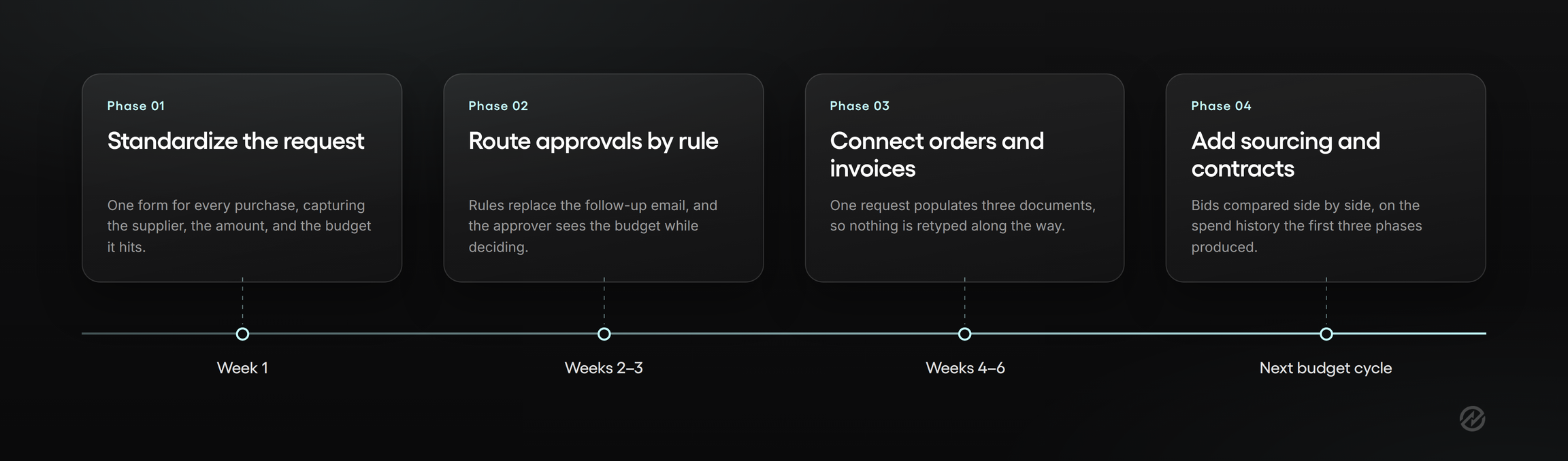
Phase 1: Standardize the request
Before any routing rules, give everyone one form. It captures what's being bought, why, the supplier, the amount, and the budget it hits.
This phase alone resolves most of what people complain about. Incomplete requests are what force approvers to chase details, and that back and forth is a large share of the manual effort in a typical purchasing process. Standardizing the form also produces the first clean procurement data you've had, which matters more in phase four than it seems now.
Phase 2: Route approvals by rule
Now add the logic. Requests route by amount, department, location, project, or category, and the approver sees the budget position while deciding.
Most of the repetitive tasks in procurement live here. Deciding who should see a request, forwarding it, following up, and confirming the decision are all manual tasks that a rule handles without anyone thinking about it. Automating repetitive tasks at this stage is also what makes the audit trail assemble itself instead of being reconstructed from inboxes later.
Phase 3: Connect orders, receiving, and invoices
With approvals working, extend forward. Approved requests convert to purchase orders without manual data entry, receiving records confirm what arrived, and invoices are matched against both before payment.
This is where the procure-to-pay process becomes continuous rather than a series of disconnected steps. It's also where the data entry savings compound, because a single request now populates three downstream documents instead of being retyped into each.
Phase 4: Add sourcing and contracts
Only once the transactional procurement cycle runs cleanly should you add sourcing and contract management. Requests for quotation and proposals get collected and compared side by side, and contract dates trigger renewal alerts.
The reason this comes last is evidence. Strategic sourcing decisions and supplier negotiations are only as good as the spend history behind them, and that history is a byproduct of phases one through three. A year of clean records is what makes supplier collaboration a conversation about performance rather than an exchange of assertions, and it's the practical basis for optimizing supplier negotiations at renewal.
What this looks like on a calendar
Most organizations run phase one in weeks, phase two within the first month or two, and phase three once approvals are habitual. Phase four often waits a full budget cycle, and that's fine.
The temptation during any implementation process is to configure every rule you can imagine on day one. Resist it. Automated processes that mirror a policy nobody follows will be worked around within a quarter. Build the procurement workflows your organization actually uses, then tighten them once people trust the system, which is what genuinely ends up enabling procurement teams to move from administering the process to improving it.
What procurement automation will not fix
Every vendor on this page, us included, will tell you what automation solves. Less gets said about what it leaves behind, and knowing that in advance is what separates a successful rollout from a disappointed one.
It enforces a policy. It doesn't write one. Approval rules have to encode a decision someone already made about who can commit the organization to what. If that decision has never been made explicitly, automation will simply make the ambiguity visible faster. That's genuinely useful, but it arrives as work rather than relief.
It won't repair supplier records that were never accurate. Automated systems inherit whatever you import. The same supplier entered three ways stays three suppliers, and spend analysis built on that data will confidently tell you something untrue. Cleaning supplier records before migration is unglamorous, and it determines whether your reporting is worth reading.
It doesn't settle who owns a budget. When two managers both believe a cost center is theirs, a routing rule forces the question rather than answering it. Expect these conversations during configuration, not after.
It reduces manual errors without eliminating judgment. Matching catches a price difference between an invoice and an order. Deciding whether to accept it, query it, or renegotiate is still a person's call, and it should be. Automation moves procurement teams from finding problems to resolving them, which is a better use of their time but not less of it.
It will surface uncomfortable spending before it saves you money. The first full quarter of procurement data usually reveals maverick spend, duplicate suppliers, and renewals nobody reviewed. That's the system working. It rarely feels like it at the time, and leadership should hear that framing from you before the first report lands, not after.
None of this is an argument against automating. These are the business processes automation makes visible, and every one of them was already costing you something while it stayed invisible.
How Tradogram automates purchasing, from request to invoice match
Everything above applies whichever platform you choose. Here's specifically how Tradogram handles the sequence, using one purchase as the example.
An office manager needs a $12,000 equipment order. She submits a requisition through a standard form that captures the supplier, the amount, the project, and the budget line. Because the amount crosses a threshold, the request routes to the department head and then to finance, and each approver sees the remaining budget while deciding rather than looking it up afterward.
Once approved, the requisition converts to a purchase order without anyone retyping it, and the order goes to the supplier from the same system. When the equipment arrives, whoever receives it records what actually showed up. The supplier's invoice arrives, TradoScan AI reads the line items, and the invoice is matched against both the purchase order and the receiving record before accounts payable processes payment. If the invoice shows $12,400, that difference surfaces as a question rather than as a payment.
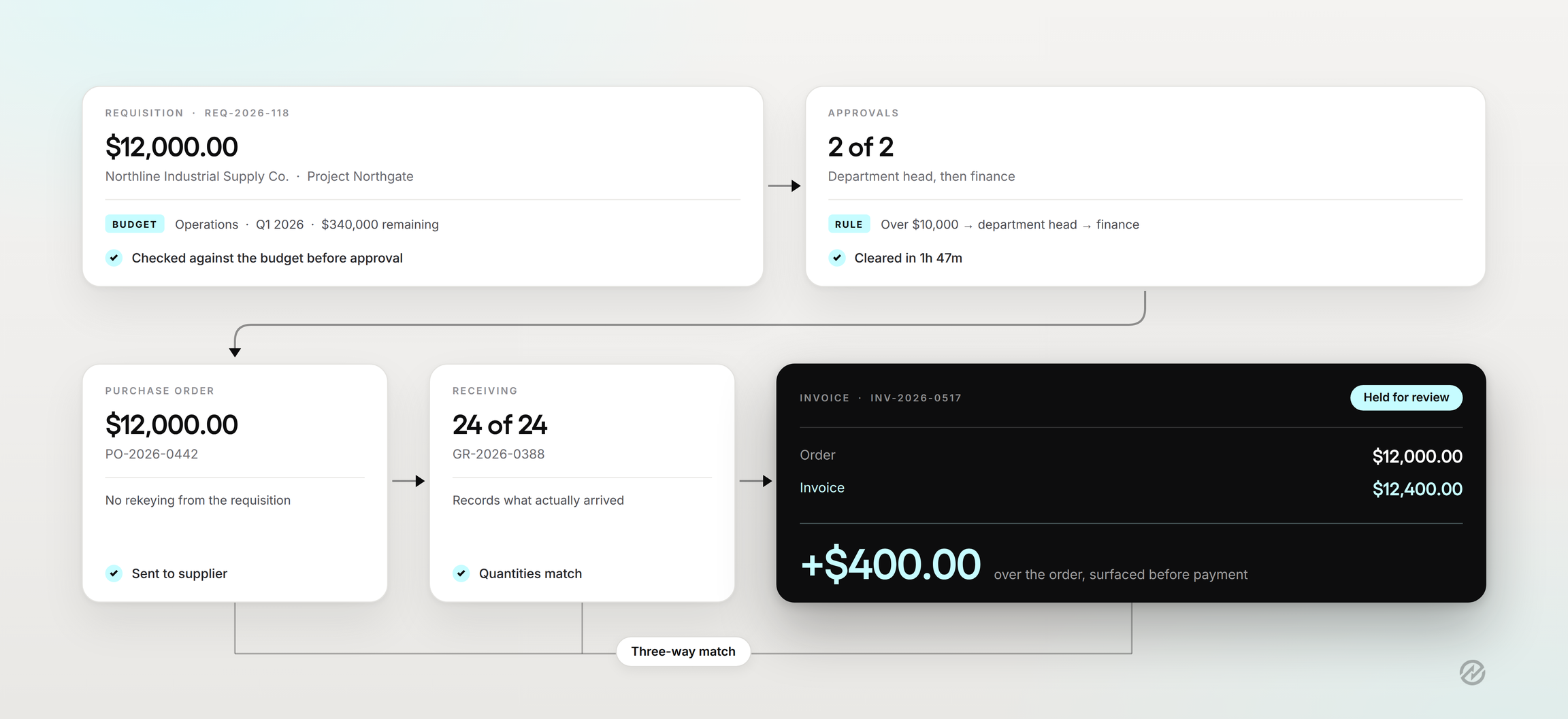
The point isn't any single step. It's that the record assembles itself. Nobody reconstructs the audit trail later, because each stage handed its data to the next.
That connected sequence is what most procurement departments are actually buying. Julian D'Oyley, Director of Finance at Reed Global, described the before state plainly: "Before Tradogram, we were reconciling purchase orders and invoices manually across spreadsheets. Now everything is structured, approved, and synced with our accounting system." Reed Global runs multiple branches with different approval rules inside one system and reported completing a full approval cycle in under two hours.
Results depend on where you're starting from. Ashesi University moved from paper approvals and reduced purchase order processing from two or three business days to under two hours, with a reported 15% cost reduction. A team already running a disciplined process shouldn't expect the same delta.
Where Tradogram fits is the middle: organizations too complex for spreadsheets and email approvals, not ready for an enterprise implementation. Usually that means multiple departments or locations, more approvers than one person can track, and a finance team that needs to see commitments before invoices arrive. If your problem is genuinely a purchase order template and you issue five a month, your accounting software is probably enough, and we'd rather say so.
Book a Tradogram demo to see how approval rules and budget checks handle a purchase your current process would miss. That's a better test than any feature list.
Where to start your procurement automation transformation
Procurement automation tools aren't interchangeable, and the one that fits depends less on feature counts than on which part of your purchasing process keeps breaking. Approvals lost in email, invoices nobody can match, supplier records scattered across drives: these point to different products.
So start with the diagnosis rather than the shortlist. Write down what your approval rules actually are today, count the exceptions your team handles by judgment, and name the one thing that would change most if it were automated. That hour of work will make every demo you sit through more useful and every quote you receive more accurate.
Then automate in phases. Standardize the request, route approvals by rule, connect orders to receiving and invoices, and add sourcing and contracts once you have the spend history to make those decisions well.