


How can the group or role that a user belongs to be changed?
In Tradogram, a user’s "Group" determines their default role and access level within the system. Administrators can easily move users between groups to update their permissions automatically or manually fine-tune specific access rights.
Accessing User Profiles
Only users with Administrative permissions can modify roles.
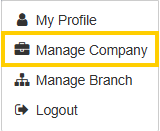
- Navigate to Manage Company in the top right corner
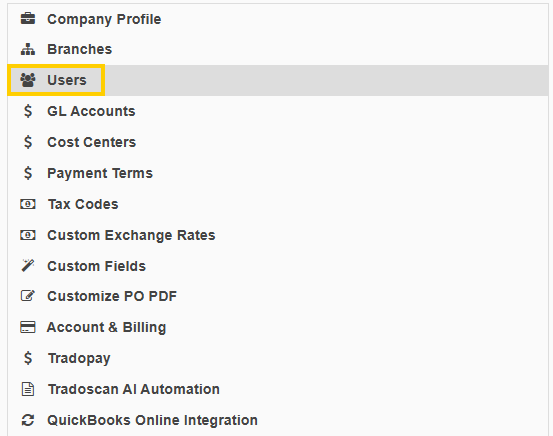
- Select the Users button located under the Company Profile section.
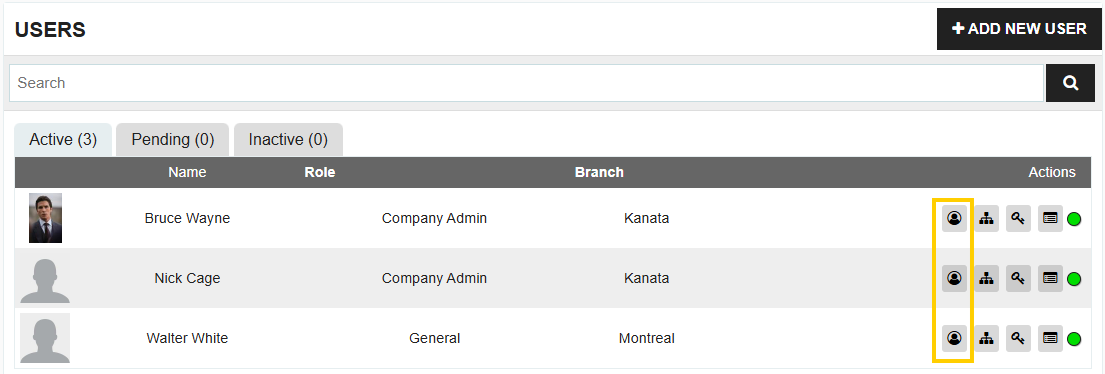
- Find the user you wish to update and click the Edit under the Actions column.
Selecting a New Group (Role)
Once you are inside the user’s profile, locate the Group dropdown menu. Tradogram offers several pre-set groups that automatically assign permissions based on typical job functions:
- Company Admin - The Company Admin is the highest level of access, providing complete control over the entire Tradogram account. This role is responsible for top-level configurations, including global settings, billing, integrations, and the management of all branches and users across the organization.
- Branch Admin - A Branch Admin has high-level control over a specific location or division. They can manage users, departments, and settings within their assigned branch, ensuring that the local procurement workflow is optimized while maintaining the standards set by the company.
- Accounts Payable - Specifically tailored for the finance team, the Accounts Payable role focuses on the end of the procurement cycle. These users manage incoming invoices, reconcile them against purchase orders and deliveries (3-way matching), and mark records as paid to maintain accurate financial books.
- Auditor - The Auditor role provides "read-only" visibility into the system’s data. This is intended for internal or external reviewers who need to examine transaction histories, compliance records, and spend reports without the ability to create, edit, or delete any live data.
- Approver - An Approver is a management-focused role centered on oversight and cost control. Users assigned this role are responsible for reviewing requisitions, purchase orders, or expenses submitted by others, ensuring that all spending aligns with company budgets and policies before a transaction proceeds.
- Requisitioner - The Requisitioner role is perfect for staff members who need to request items but do not necessarily handle the final purchasing or financial negotiation. They can browse catalogs and submit requests (requisitions) for approval, allowing the procurement team to take over once the need is verified.
- Purchaser & Sales - This "hybrid" role is ideal for users who manage the full cycle of trading—both buying and selling. The Purchaser & Sales role provides a consolidated set of tools to handle procurement needs while simultaneously managing sales orders and customer relationships.
- Purchaser - A Purchaser is a procurement-focused role responsible for the transactional side of buying. These users have the authority to create and manage purchase orders, communicate with suppliers, and ensure that the goods and services requested by the team are ordered accurately and on time.
- Receiver - The Receiver role is a specialized access level focused on the logistical stage of the procurement cycle, primarily responsible for "booking in" goods as they arrive at a facility. This role ensures that physical deliveries accurately match the quantities and specifications listed on the original Purchase Order.
- Sales - The Sales role is designed for team members focused on the "sell-side" of operations. Users in this role typically manage customer interactions, generate sales quotes, and track outgoing orders to ensure revenue-generating activities are documented and fulfilled.
- General - The General role is a versatile, baseline access level. It is typically used for employees who need to view specific information or perform basic tasks—such as "Booking In" a delivery—without having access to more sensitive financial or administrative settings.
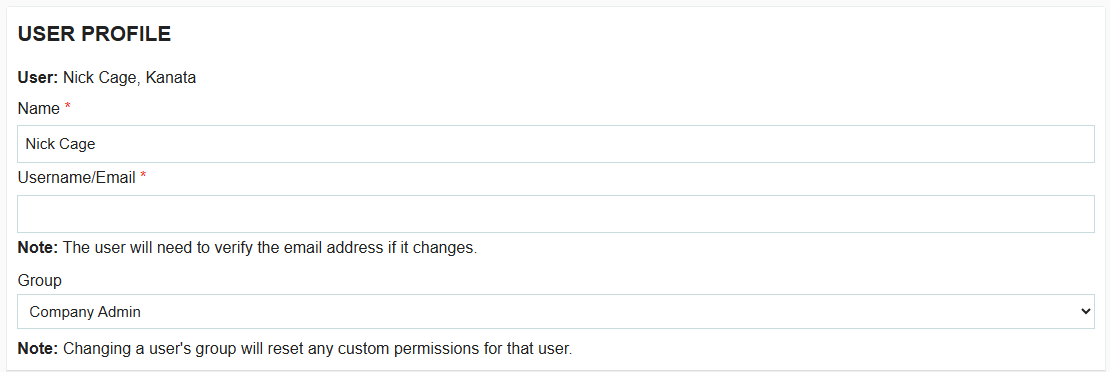
Note: Selecting a new group will automatically reset that user's permissions to the system defaults for that role.
Customizing Specific Permissions
If a pre-set group doesn't perfectly match the user's needs, you can customize their access:
- After selecting a Group, click on Edit Permissions.
- Toggle specific permissions "On" or "Off" to create a custom access profile for that individual.
- Click Save to apply the changes.
Pro Tip: Bulk Changes
If you need to change the permissions for everyone in a specific group, Tradogram gives you the option to clone different users' permissions.

.webp)
.png)


