


What is the maximum number of users that can be added under one company?
Tradogram is designed for teams of all sizes. There is no technical limit to the total number of users you can add to your company account. The only limit you will have is based on how many user licenses you have. Whether you have a small procurement team or a global organization with hundreds of requisitioners, the platform scales to meet your needs.
Plan-Based User Allowances
While you can add unlimited users, each of our plans includes a specific number of "Base Seats." Any users added beyond the included amount will incur an additional per-seat fee.
Managing Your Team Growth
- Adding Individual Seats: If you are on a Pro or Premium plan and only need one or two extra users, you can add them at any time from your User Management settings. The additional cost will be automatically reflected in your billing cycle.
- Scaling to Enterprise: For organizations that require more than 20 seats or have complex multi-branch needs, we offer custom packages designed for high-volume usage.
How to Add New Users
If you have Company Admin permissions, you can invite new team members in a few clicks:
- Navigate to Manage Company.
- Select the Users button.
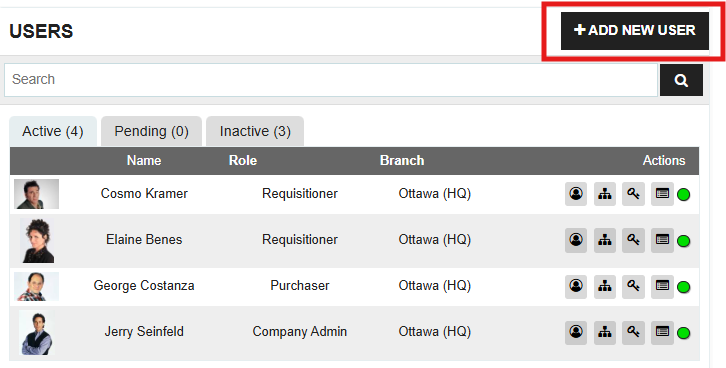
- Click “+ADD NEW USER” and enter their email address and assigned role.
Need a Larger Plan? If you are planning a significant expansion or need to discuss bulk seat pricing, please reach out to your Customer Success Manager or contact us at support@tradogram.com to explore our high-volume options.
.webp)
.png)


