


Why are there two PDF options for purchase orders?
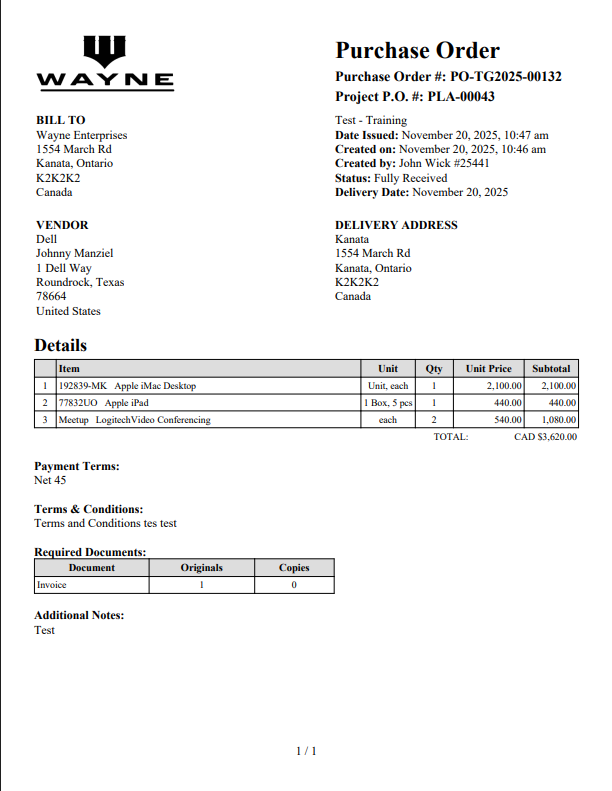
When a Purchase Order (PO) is created in Tradogram, you have the option to generate two different PDF versions: the Simple Version and the Detailed Version. This gives you flexibility in deciding how much information to share with suppliers or retain internally.
Key Differences
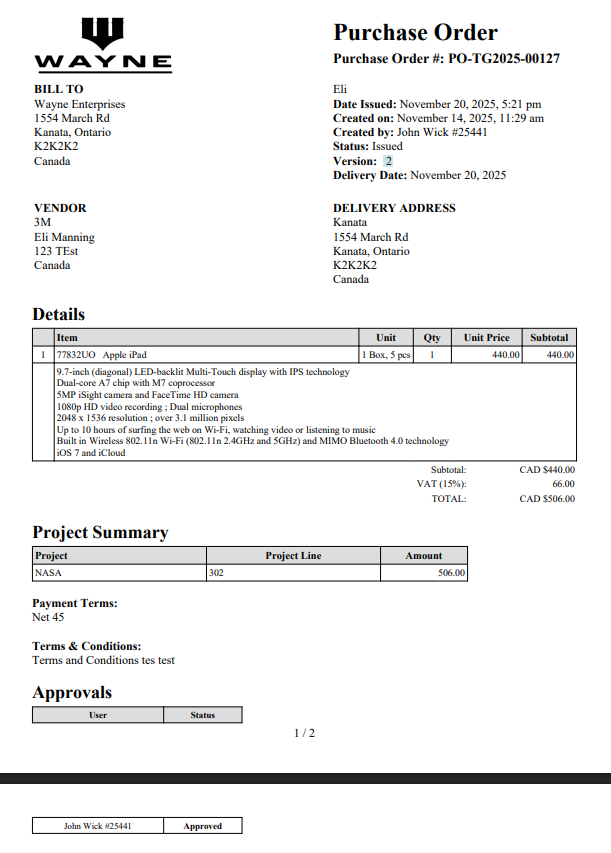
The main distinguishing features of the Detailed Version are:
- Line Item Description: Includes the full description for each item.
- Project Summary: Provides an overview of the linked project's details and budget status.
- Approval Table: Shows the complete history of approvals for the PO.
Controlling PDF Visibility
You can control which PDF version is used as the default for suppliers and what details are included, all within the Branch Profile settings:
- Default for Suppliers: Use the setting "Send the Detailed Purchase Order PDF to Suppliers" to choose which version is sent by default.
- Hiding Details: Use the setting "Hide Project Summary from Detailed Purchase Order PDF" if you want to use the Detailed version but withhold the project financial information.
PDF Examples
Simple Version
Detailed Version
Thank you! Your submission has been received!
Oops! Something went wrong while submitting the form.
.webp)
.png)


