


What is the difference between “quantity delivered” and “quantity received”?
In Tradogram, these two fields allow you to accurately document shipments where the physical items arriving at your facility do not match the paperwork provided by the vendor. This distinction is critical for maintaining accurate inventory and ensuring you only pay for usable goods.
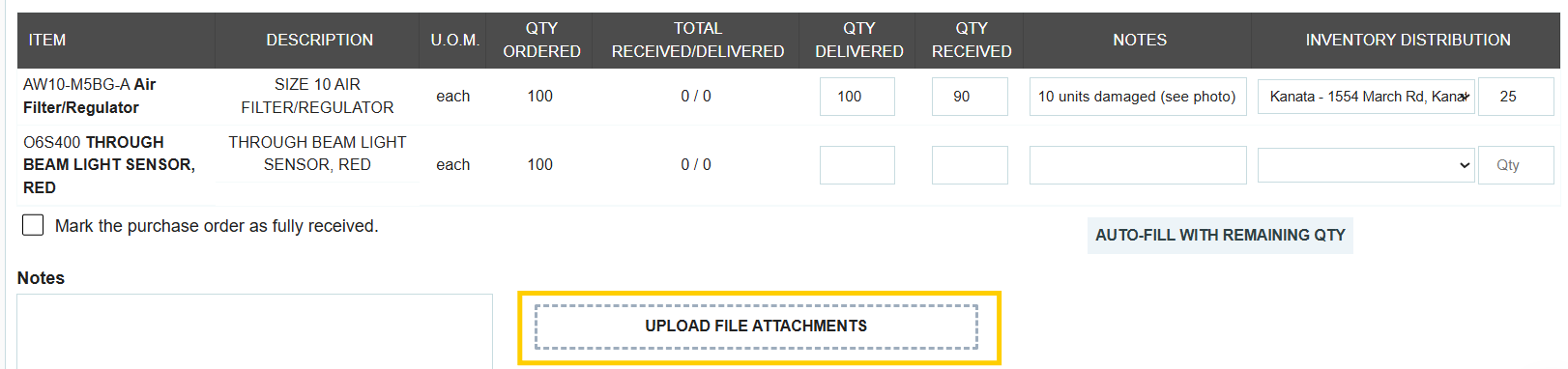
Quantity Delivered
This field represents the amount the supplier claims to have sent. When filling this out, you should enter the number exactly as it appears on the supplier's packing slip or delivery note.

Quantity Received
This field represents the amount you actually accept into your facility. This is the official "booked in" quantity that you are confirming receipt of and intend to pay for.

When to Use Different Values
You should enter different numbers for these fields whenever there is a discrepancy. This is common in the following scenarios:
- Damaged Goods: If a supplier sends 100 items but 5 arrive broken, you would enter 100 as Delivered and 95 as Received.
- Short Shipments: If the packing slip says 50 units are in the box, but your physical count shows only 48, you record the discrepancy here.
- Quality Rejections: If items arrive that do not meet your technical specifications and must be returned, they are recorded as delivered but not received.

The Impact on Your Workflow
- Financial Accuracy: The Quantity Received is the value used to "book in" the items. This ensures your accounts payable team only pays for what was actually accepted, preventing overpayment.
- Audit Trail: By filling out both fields, the system can automatically highlight discrepancies in red on your Delivery Summary page, making it easy to identify unreliable suppliers.
- Inventory: If you have the Inventory module enabled, your stock levels will only be increased by the Quantity Received, ensuring your on-hand counts remain precise.
Success Tip: Always use the Line Item Notes to explain why there is a difference (e.g., "5 units damaged during transit") and attach photos of damaged items for your records.

.webp)
.png)


