


What happens if the purchase order numbering system is not set for a branch?
In Tradogram, PO numbers are typically generated automatically based on a predefined sequence. However, if a branch has not configured an automatic numbering system, the "PO Number" field will remain blank upon creation.
While a missing number does not prevent you from working on the document, it can make tracking and communication with suppliers difficult.
Manually Assigning a PO Number
If your branch is not set up for automatic numbering, or if you need to override the system for a specific transaction, you can manually assign a number:
- Open the PO: Locate and open the purchase order that is missing a number.
- Enter Edit Mode: Click the Edit (pencil) icon at the top of the page.
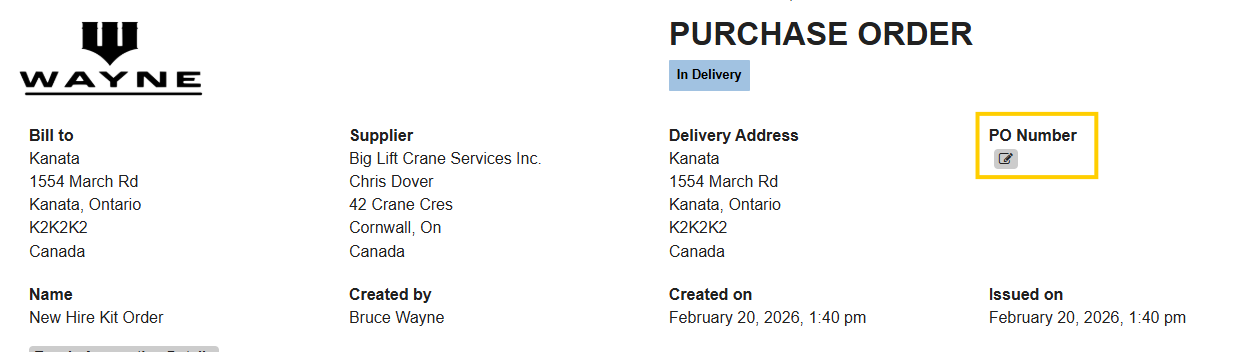
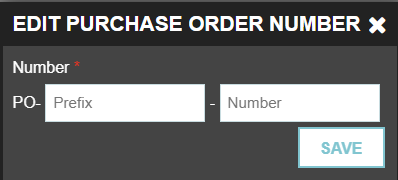
- Configure the Identity: You will see two specific fields used to identify the document:
- Prefix: This is a required field. You can include letters, numbers, or symbols (e.g., TG2026- or DEPT-).
- Number: This field is restricted to numbers only. Enter the specific sequence number you wish to assign (e.g., 1001).
Learn how you can set your branch Purchase Order numbering sequence here!
Thank you! Your submission has been received!
Oops! Something went wrong while submitting the form.
.webp)
.png)


