


What Happens When a Supplier’s Offer from a Request is Accepted?
Accepting a supplier's offer is the final step in the negotiation process. In Tradogram, this action converts the negotiated terms and pricing into an official document, while providing options to manage other participating vendors.
Automatic Document Conversion
The type of document generated depends on how you originally configured the sourcing event:
- Request for Purchase Order: The accepted bid will automatically generate a Purchase Order.

- Request for Contract: The accepted bid will automatically generate a Contract.

Important Note: The newly created document (PO or Contract) is not automatically sent to the supplier. You must finalize the transaction and manually click "Send" to issue the documentation to the vendor.

Managing Other Suppliers
When you choose to accept a bid, a pop-up window will appear with two critical options for managing the remaining participants:
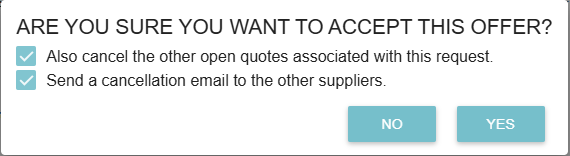
- "Also Cancel the other open quotes associated with this request":
- Checked: This officially closes the sourcing event for all other vendors.
- Unchecked: This keeps the request active, allowing you to award other items to different suppliers (split-awarding).
- "Send a Cancellation Email to the other suppliers":
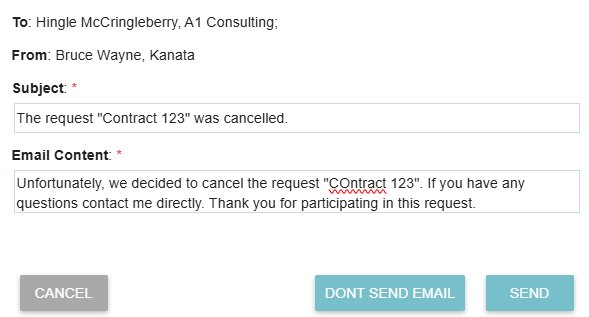
- Checking this box allows you to send a professional "not selected" notification to the other vendors. You can customize the subject and body of this email to maintain good supplier relationships.
Thank you! Your submission has been received!
Oops! Something went wrong while submitting the form.
.webp)
.png)


