


Why are certain requisition options grayed/greyed out and not selectable when creating a purchase order?
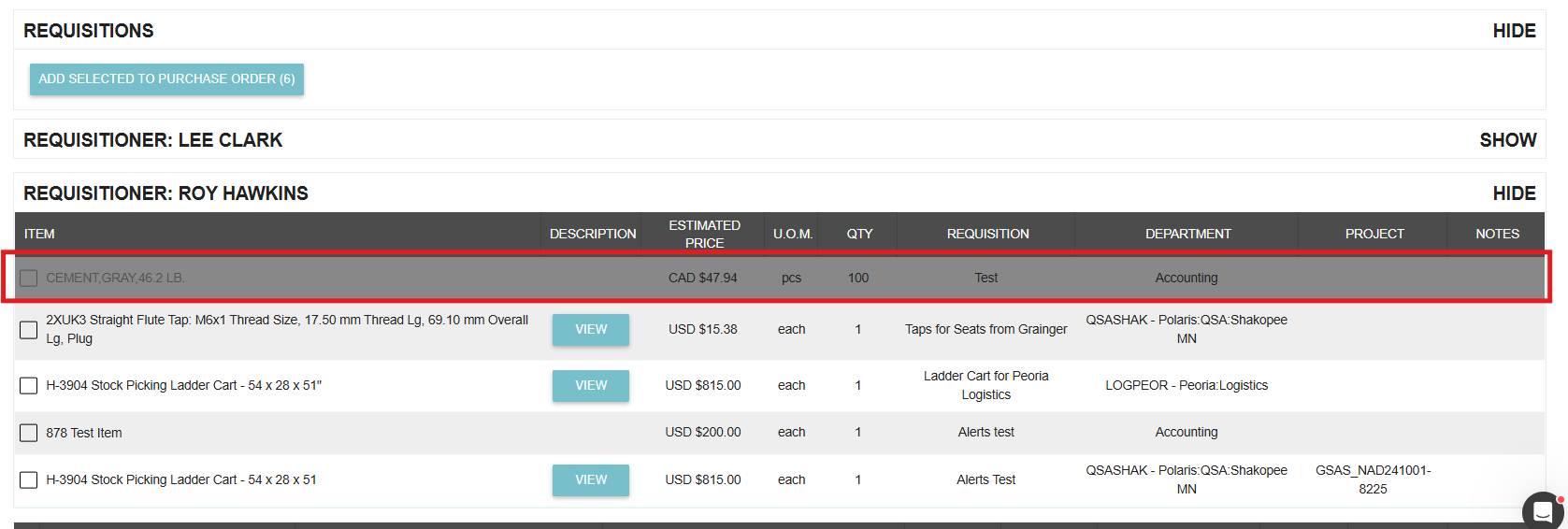
When creating a Purchase Order from your requisition list, you may notice that some items are "grayed out" and cannot be selected. This is a built-in safeguard designed to prevent duplicate ordering and ensure supplier consistency.
Common Reasons for Grayed Out Items
1. The Item is Already on an Active PO
The most common reason an item is unselectable is that it has already been added to another Purchase Order.
- Check your Drafts: If you or a teammate started a PO but haven't sent it yet, the requisition items are "reserved" on that draft.
- Active Orders: If the item is on a pending or issued PO, it cannot be selected again until that PO is cancelled or the item is removed from it.
2. Supplier Incompatibility
Tradogram groups Purchase Orders by supplier. You can only create a single PO for items that can be sourced from the same supplier.
- If you have already selected an item associated with "Supplier A," any items in your list that are strictly associated with "Supplier B" will be grayed out to prevent a multi-vendor conflict on a single document.
How to Resolve This
Review Existing Transactions
Search your Purchase Order list (including the Drafts tab) for the item in question. Once the item is removed from a draft or the duplicate PO is cancelled, the requisition will become selectable again.
Adjust Supplier Association Settings
If you need the flexibility to order any item from any supplier regardless of their "default" association, you can change your branch settings:
- Navigate to Manage Branch from the top-right dropdown menu.
- Select the Branch Profile tab.
- Locate and select the option: "Don't associate items with suppliers."
- Click Save at the bottom of the page.

Success Tip: Keeping your "Drafts" folder clean is the best way to avoid grayed-out items. If a project was abandoned, make sure to delete the draft PO to release those requisitioned items back into the available pool.
.webp)
.png)


